00198227-03_UM_MaterialSetupAssistant_2.3-R17-1_DE_EN.pdf - 第224页
Workflow with Flexible Family Setup Performing Presetups with Material Reuse 224 ASM Material Setup Assistant 2.3 (R17-1) ASM Material Setup Ass i st a n t 2 . 3
Workflow with Flexible Family Setup
Performing Presetups with Material Reuse
ASM Material Setup Assistant 2.3 (R17-1) ASM Material Setup Assistant 2.3 (R17-1) 223
5.10.1.1
5.10.1.1 Presetup Process with Material Reuse
Presetup Process with Material Reuse
► If flashing has been enabled for a location in a setup, pull these feeders from the AFP hardware.
► In ASM Setup Center, open the Target track view via the menu bar Extras => Target track view. This
dialog shows the track on the table to be set up onto which the just pulled feeder needs to be placed.
► Place the feeder on the changeover table. Verification is not needed.
► Move the changeover table into the docking station.
► Set up the additional picked material and verify the material, until the changeover table is completely
set up.
► Repeat this same procedure for the other changeover tables in the setup.
If all tables are torn down completely, the setup job is automatically completed. No manual intervention
is necessary. After that, the tables can be brought to the relevant production line.
5.10.1.2
5.10.1.2 Material Reuse in the Pre-Setup Area
Material Reuse in the Pre-Setup Area
Depending on the configuration in ASM Material Manager, specify if components are to be kept in the
pre-setup area or not. See also "2.3.2 Selecting Material Reuse" [ ➙ 163].
▪ Use the Permanent or Calculated option.
– The LED on the feeder lights green permanently => DO NOT tear down
▪ Without permanent material reuse (Never option)
– The LED on the feeder flashes red => tear down
Workflow with Flexible Family Setup
Performing Presetups with Material Reuse
224 ASM Material Setup Assistant 2.3 (R17-1) ASM Material Setup Assistant 2.3
Workflow with Fixed Setup and Constant Tables
Preconditions and Configurations
ASM Material Setup Assistant 2.3 (R17-1) ASM Material Setup Assistant 2.3 (R17-1) 225
6
6 Workflow with Fixed Setup and Constant Tables
Workflow with Fixed Setup and Constant Tables
In SIPLACE Material Setup Assistant, the functions for import, approval, download etc. are basically the
same as in the workflow for flexible family setups. The familiar functions are available in both cases. This
chapter describes the deviations and particularities when working with fixed setups and constant tables.
For common tasks and identical procedures, please refer to the standard workflow with flexible family
setups. Knowledge and content of chapter "5 Workflow with Flexible Family Setup" [ ➙ 189] are a pre
-
requisite.
6.1
6.1 Preconditions and Configurations
Preconditions and Configurations
6.1.1
6.1.1 Refill Material for Fixed Setups and Constant Tables
Refill Material for Fixed Setups and Constant Tables
Specify if refill material is to be requested for fixed setups and constant tables.
► Go to the ASM Studio and start the Factory Explorer module.
► Select Central Settings.
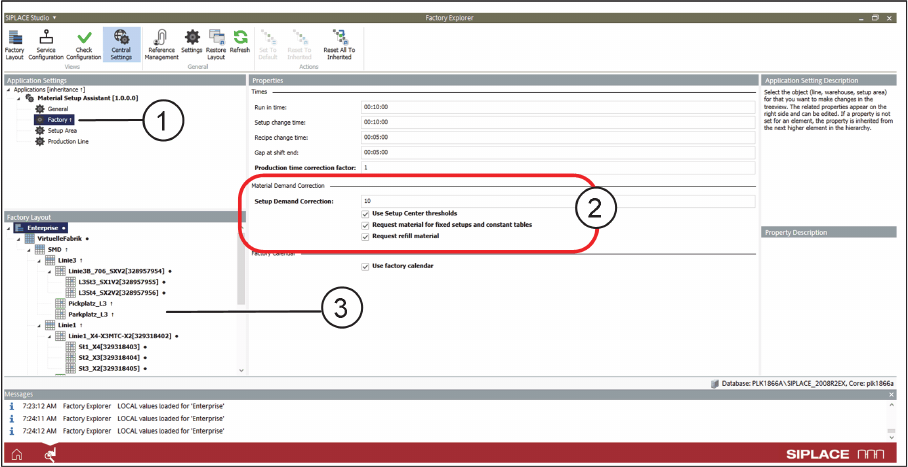
Factory Explorer – Central Settings: Factory
► Go to Application Settings => Material Setup Assistant and select Factory (1) from the tree structure.
SIPLACE MSA supports fixed setups and constant tables with or without request for refill material. The
settings can be made per line or globally.
► Go to the Factory Layout (3) of the line (e.g. Line 1) for the individual setting or go to Enterprise for
the global setting.
► If the material for constant tables and fixed setups is to be requested for this production line, go to
Setup Demand Correction (2) and activate the Material for fixed setups and constant tables option.
► Activate the Request refill material option if the refill material is to be requested for this production
line.
See also Constant Tables and Refill Material.