00198227-03_UM_MaterialSetupAssistant_2.3-R17-1_DE_EN.pdf - 第196页
Workflow with Flexible Family Setup Approving Production Schedules 196 ASM Material Setup Assistant 2.3 (R17-1) ASM Material Setup Ass i st a n t 2 . 3 Result Production Order Manager – approval comple ted In the Status …
Workflow with Flexible Family Setup
Approving Production Schedules
ASM Material Setup Assistant 2.3 (R17-1) ASM Material Setup Assistant 2.3 (R17-1) 195
5.4
5.4 Approving Production Schedules
Approving Production Schedules
Production schedules for which scheduling has been completed, must be approved. Non-approved pro
-
duction schedules can be edited. Approved productions schedules can be called back. See also View -
Edit.
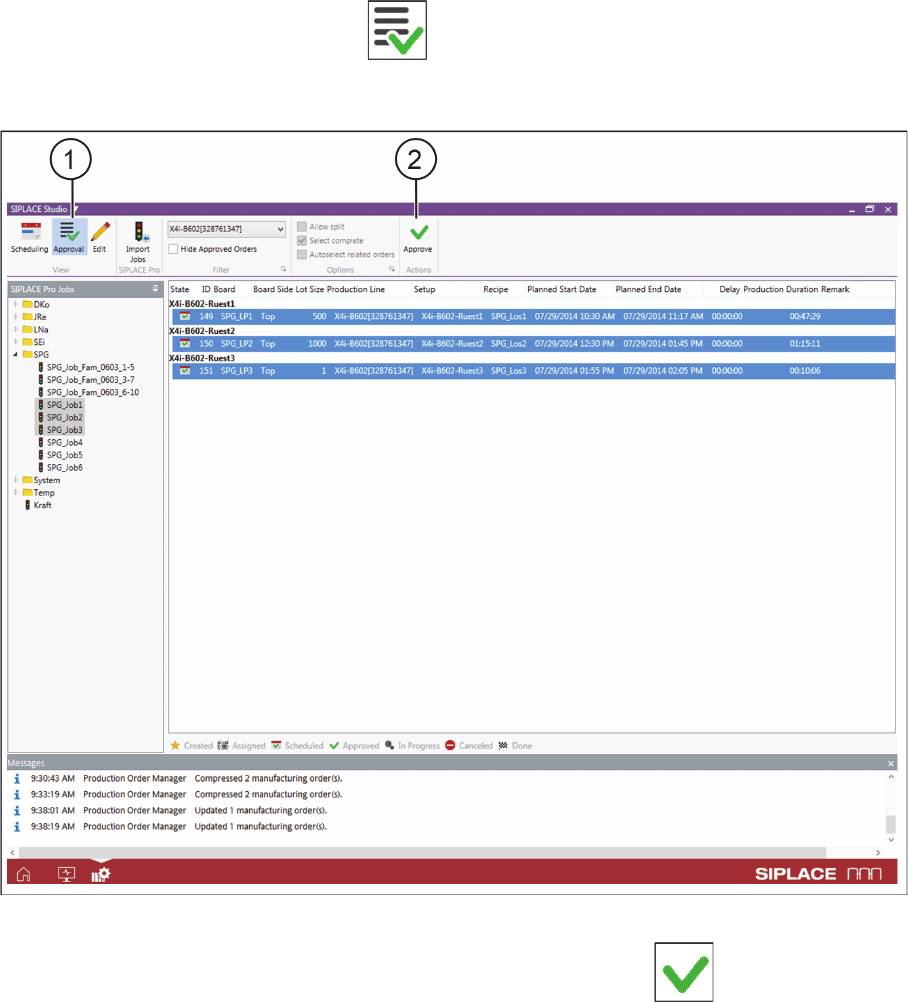
► Go to the View toolbar and select the Approval icon (1).
⇨ Switches over to the Approval view. In the Approval view you can approve the scheduled jobs for pro
-
duction.
Production Order Manager – start approval
► Select one or more production jobs and approve these with the action Approve (2).
⇨ If a production job is marked, all production jobs before this one, which have not yet been approved,
will also be marked and approved.
⇨ Notifications are issued in the notifications window. Observe these messages and perform any tasks
requested.
Workflow with Flexible Family Setup
Approving Production Schedules
196 ASM Material Setup Assistant 2.3 (R17-1) ASM Material Setup Assistant 2.3
Result
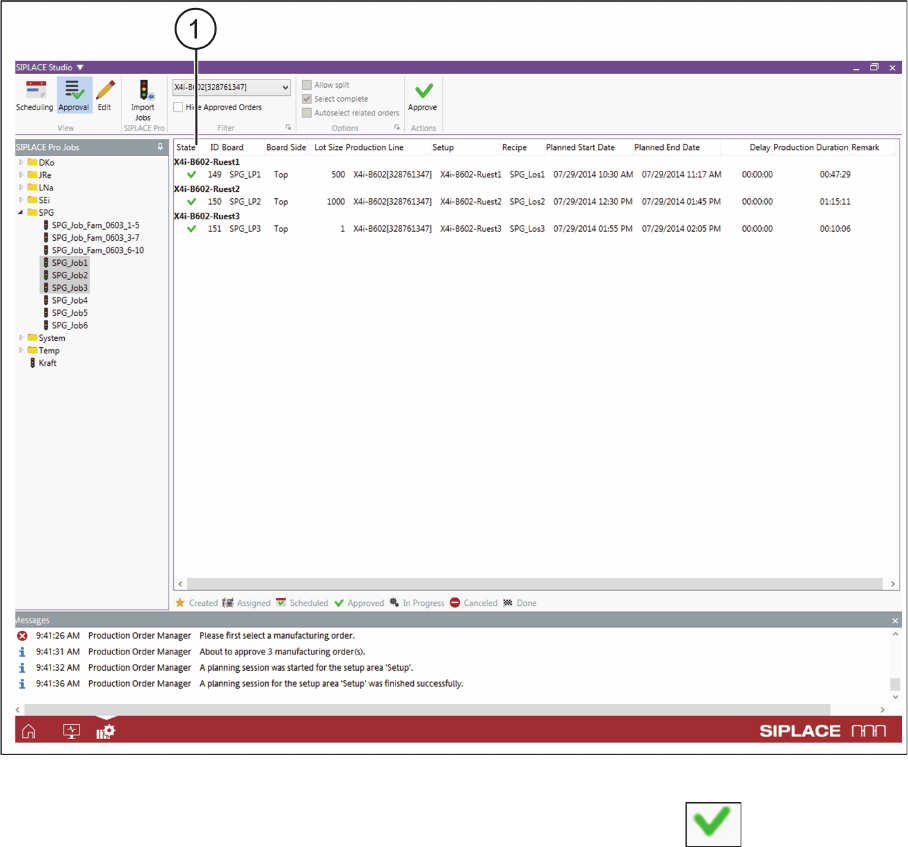
Production Order Manager – approval completed
In the Status column, the symbol for the approved production jobs changes to Approved (1). For
an overview of the available statuses, refer to Overview - Production Order Manager-
Notes on Approving Production Schedules
▪ Only those setups which have been approved will be taken into account for material reuse. It is there
-
fore important to make sure that there are always enough setups approved, so that material reuse
can take place.
▪ It may be advisable to hold back setup approvals. For example, if you already have a high level of
material reuse and additional approvals would lead to a scarcity of feeder capacity and/or space on
the AFP hardware (feeder rack or docking station).
▪ With EDM: In an EDM or EDMn scenario, the behavior of SIPLACE Material Setup Assistant chang
-
es for the approval of production schedules. After approval in the Order Manager, the EDM master
pushes the recipes of the production schedules to the EDM client. See also "7.1 Production Sched
-
ule Approval With EDM" [ ➙ 237].
► Observe the following chapter "5.5 System Status after Production Schedule Approval" [ ➙ 197].
Workflow with Flexible Family Setup
System Status after Production Schedule Approval
ASM Material Setup Assistant 2.3 (R17-1) ASM Material Setup Assistant 2.3 (R17-1) 197
5.5
5.5 System Status after Production Schedule Approval
System Status after Production Schedule Approval
After approval, the production schedules are automatically updated for all lines, the presetup area and
the warehouse concerned. Communication with the systems involved takes place once approval has
been given. Communication is started with the following systems:
▪ Order Manager - Monitoring
– The tasks are created for the approved production jobs and are then shown as a timeline in the
Gantt diagram.
▪ SIPLACE Line Control GUI
– The approved production jobs are entered in the form of recipes in the production schedule last
used at the lines.
▪ ASM Setup Center – Setup Preparation
–The Setup preparation view shows the planned setups for the setup preparation with ASM Setup
Center.
▪ ASM Material Manager - full version (not with ASM Material Manager for MSA)
– The material demand lists for material picking are created in the ASM Material Manager.