00198227-03_UM_MaterialSetupAssistant_2.3-R17-1_DE_EN.pdf - 第139页
Preconditions and Configurations Configuration Settings in ASM OIB ASM Material Setup Assistant 2.3 (R17-1) ASM Material Setup Ass istant 2.3 (R17-1) 139 2.1.2.2 2 . 1 . 2 . 2 A s s ig n in g S e t u p C e n t e r A d a …
Preconditions and Configurations
Configuration Settings in ASM OIB
138 ASM Material Setup Assistant 2.3 (R17-1) ASM Material Setup Assistant 2.3
2.1.2.1
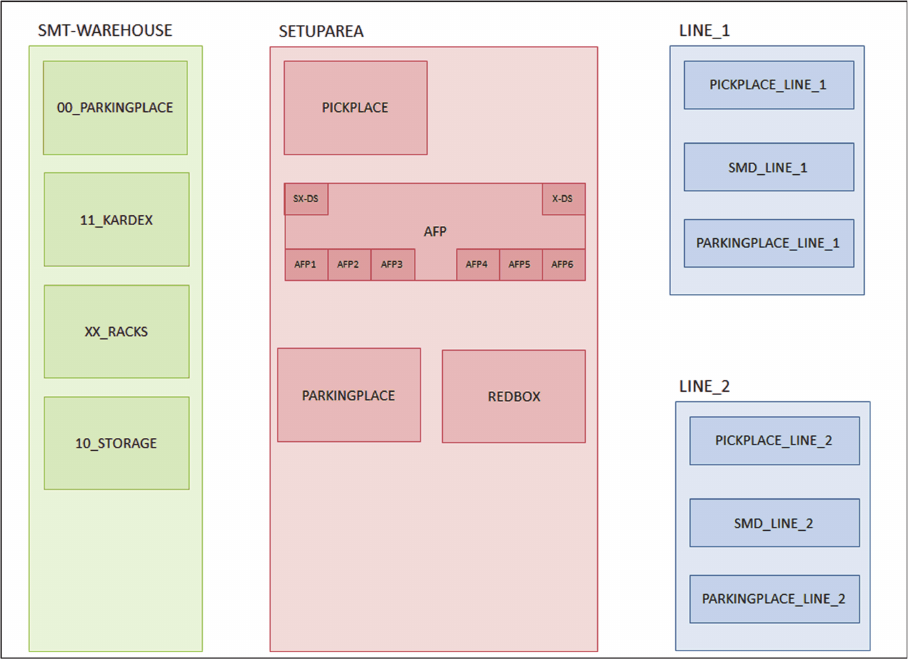
2.1.2.1 Example of a Factory Layout
Example of a Factory Layout
The overview shows an example of a typical factory layout for the SIPLACE Material Setup Assistant
workflow.
Example - factory layout
Preconditions and Configurations
Configuration Settings in ASM OIB
ASM Material Setup Assistant 2.3 (R17-1) ASM Material Setup Assistant 2.3 (R17-1) 139
2.1.2.2
2.1.2.2 Assigning Setup Center Adapter with AFP
Assigning Setup Center Adapter with AFP
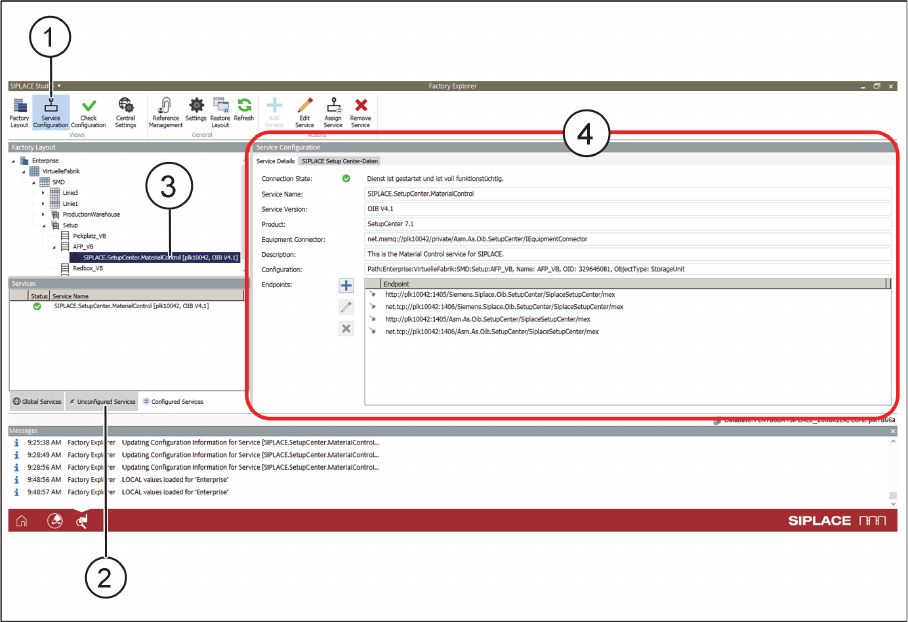
This setting specifies the OIB adapter with which the Active Feeder Pool (AFP) is to communicate. This
service controls the reuse of the hardware in the Active Feeder Pool.
► Select Service Configuration (1).
Service Configuration - Service Details - Tab
► In the Unconfigured Services tab (2), find the service Siplace.SetupCenter.MaterialControl.
► Using the mouse, drag this service on the entry (3) for the AFP in the Factory Layout.
⇨ The properties will be shown (4).
Preconditions and Configurations
Configuration Settings in ASM OIB
140 ASM Material Setup Assistant 2.3 (R17-1) ASM Material Setup Assistant 2.3
2.1.2.3
2.1.2.3 Connecting the SIPLACE Pro Line Control Adapter to MSA
Connecting the SIPLACE Pro Line Control Adapter to MSA
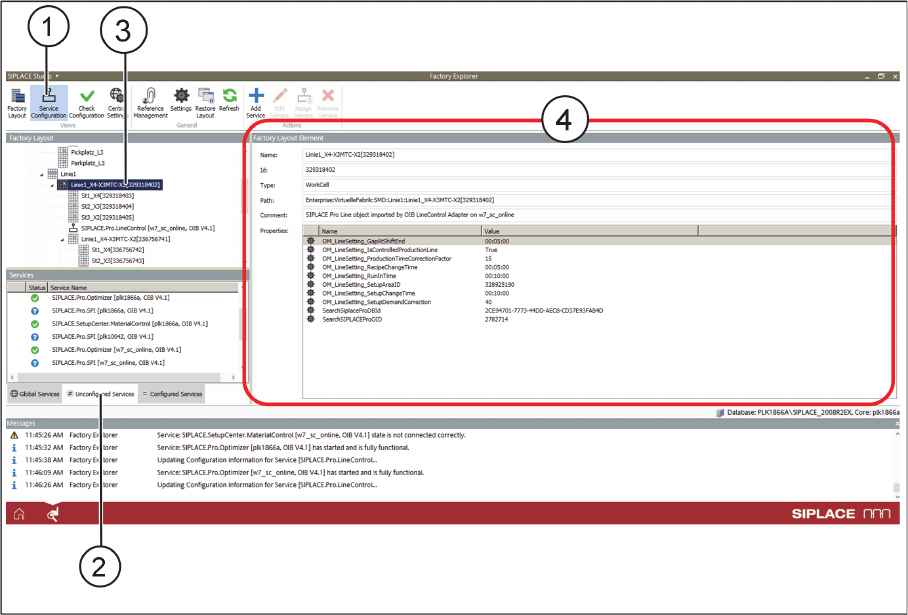
This setting establishes the connection between SIPLACE Material Setup Assistant and SIPLACE Pro.
Thus, the recipes will be entered in the Line Control GUI.
► Select Service Configuration (1).
Service Configuration - Factory Layout Element - Tab
► In the Unconfigured Services tab (2), find the service Siplace.Pro.LineControl.
► Using the mouse, drag this service on the entry (3) for the line in the factory layout.
⇨ The properties will be shown (4).