00198227-03_UM_MaterialSetupAssistant_2.3-R17-1_DE_EN.pdf - 第227页
Workflow with Fixed Setup and Constant Tables Creating Fixed Setups and Constant Tables in SIPLACE Pro ASM Material Setup Assistant 2.3 (R17-1) ASM Material Setup Ass istant 2.3 (R17-1) 227 Constant Tables You can create…
Workflow with Fixed Setup and Constant Tables
Creating Fixed Setups and Constant Tables in SIPLACE Pro
226 ASM Material Setup Assistant 2.3 (R17-1) ASM Material Setup Assistant 2.3
6.2
6.2 Creating Fixed Setups and Constant Tables in SIPLACE Pro
Creating Fixed Setups and Constant Tables in SIPLACE Pro
In order to define a setup as a fixed setup in SIPLACE Pro, you need to make the following settings in
the SIPLACE Pro Setup Editor.
Fixed Setup in the Setup Editor
Setup Editor - Tab: Setup
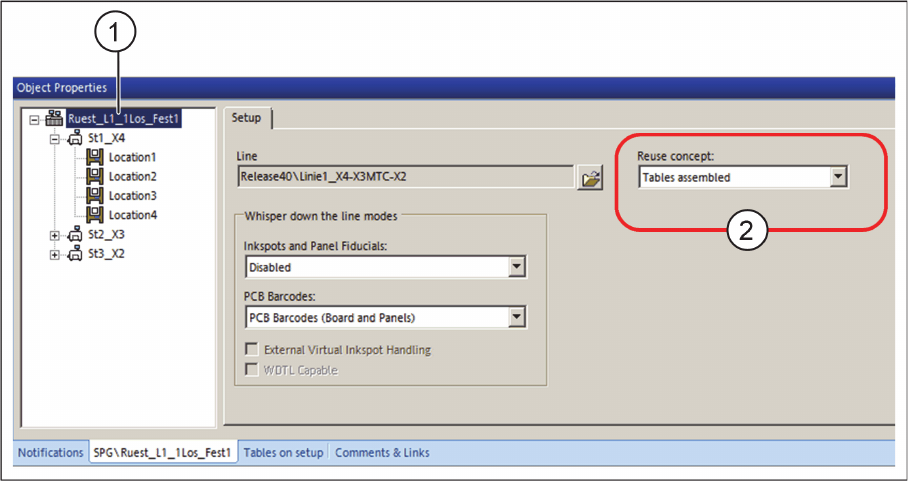
► Open the Setup Editor and mark the setup (1).
► In the Setup tab => Reuse concept (2), select the Tables assembled option.
Workflow with Fixed Setup and Constant Tables
Creating Fixed Setups and Constant Tables in SIPLACE Pro
ASM Material Setup Assistant 2.3 (R17-1) ASM Material Setup Assistant 2.3 (R17-1) 227
Constant Tables
You can create constant tables either manually in SIPLACE Pro or using an optimization tool like SiClus
-
ter Professional.
Setup Editor - Tables on setup - Constant Table already activated
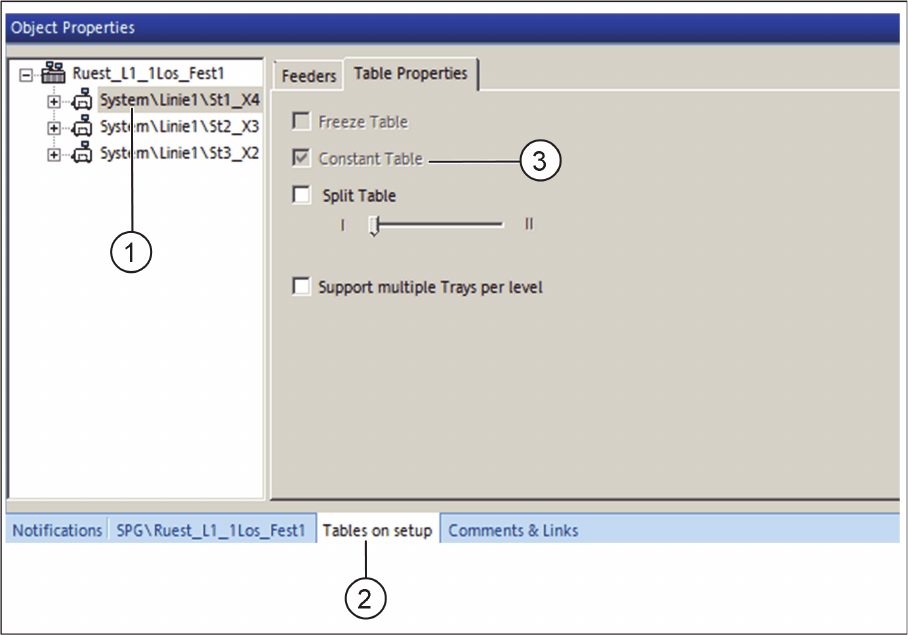
► Open the Setup Editor and select the table (1) from the tree structure.
► In the Tables on setup tab (2), select the Table Properties tab.
⇨ If the constant table was already created using the optimizing tool SiCluster Professional, the Con
-
stant table check box (3) is automatically activated.
► If the constant table is to be created manually, activate the Freeze Table check box. The Constant
Table check box is deactivated.
Workflow with Fixed Setup and Constant Tables
Creating a Material Requirement List in ASM Material Manager
228 ASM Material Setup Assistant 2.3 (R17-1) ASM Material Setup Assistant 2.3
6.3
6.3 Creating a Material Requirement List in ASM Material Manager
Creating a Material Requirement List in ASM Material Manager
For a fixed setup, a material requirement list needs to be created for each location in the ASM Material
Manager. For a setup with one or more constant tables, a material requirement list is generated for each
constant table. The flexible tables are not taken into account. Only the material for the basic setup (= one
reel per position) is requested and picked from the warehouse.
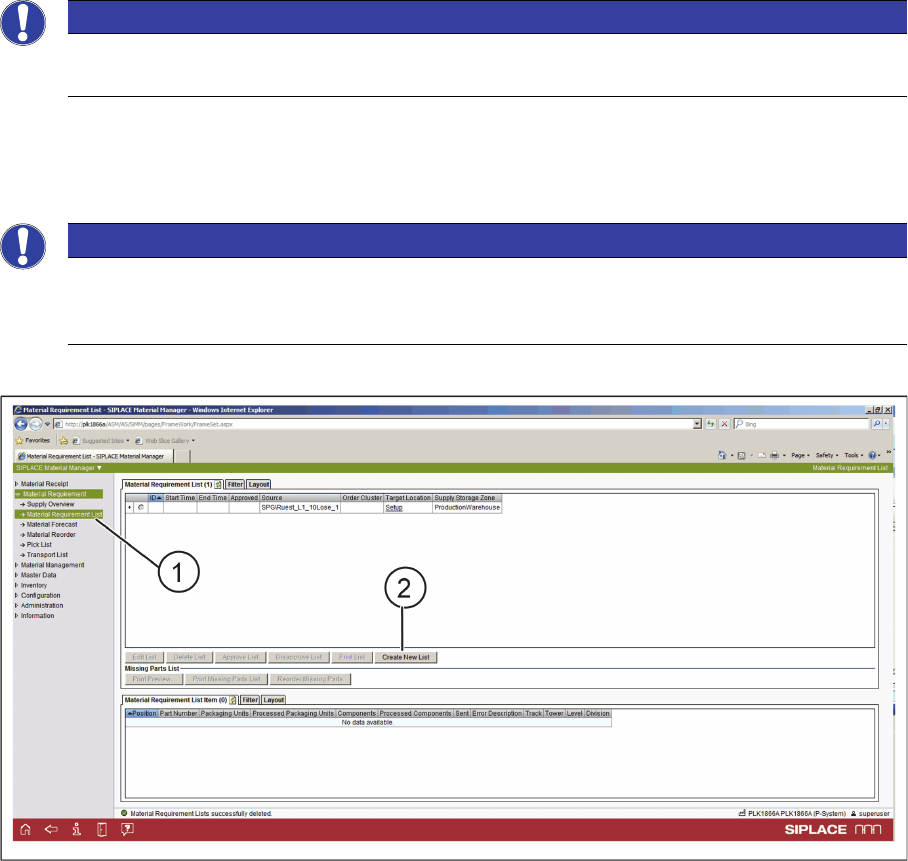
► Start the ASM Material Manager.
ASM Material Manager - Creating a Material Requirement List - Step 1
► Select Material Requirement => Material Requirement List (1) from the tree view.
► Select Create new list (2).
⇨ The selection of the line is displayed.
NOTICE
Only with ASM Material Manager - full version
Material demand lists can only be created with the ASM Material Manager - full version.
NOTICE
The fixed setup needs to be optimized
The fixed setup needs to be optimized or the constant table(s) need to be part of an optimized
setup.