00198227-03_UM_MaterialSetupAssistant_2.3-R17-1_DE_EN.pdf - 第138页
Preconditions and Configuratio ns Configuration Settings in ASM OIB 138 ASM Material Setup Assistant 2.3 (R17-1) ASM Material Setup Ass i st a n t 2 . 3 2.1.2.1 2 . 1 . 2 . 1 E x a m p le o f a F a c t o r y L a y o u t …
Preconditions and Configurations
Configuration Settings in ASM OIB
ASM Material Setup Assistant 2.3 (R17-1) ASM Material Setup Assistant 2.3 (R17-1) 137
2.1.2
2.1.2 Defining the Factory Layout
Defining the Factory Layout
In order for the workflow to be configured in SIPLACE Material Setup Assistant, you need to have a defi
-
nition of your factory layout in the Factory Explorer. The description and elements of a factory layout are
based on the ISA-95 standard.
Elements required for the Material Setup Assistant Workflow
To ensure that the material flow in the SIPLACE Material Setup Assistant works with reuse, you need to
define additional elements in the factory layout. You also need to have these elements in the ASM Ma
-
terial Manager.
▪ In the presetup area:
– AFP
The Active Feeder Pool (AFP) serves as a temporary warehouse for parking feeders in the pre
-
setup area for reuse later on. Feeder racks are used as AFP hardware. In addition, docking sta
-
tions with changeover table can be used as AFP hardware.
– REDBOX
The REDBOX is a container for storing torn-down materials, which should remain in the presetup
area as the feeder is needed.
▪ For the line:
– PickingPlace (PIP)
Working area in which the materials for production are delivered to the line.
– ParkingPlace (PAP)
Working area which serves as intermediate storage at the line.
WARNING
Factory layout in accordance with the ASM Material Manager
The factory layout for the SIPLACE Material Setup Assistant must correspond to the factory lay
-
out of the ASM Material Manager. The element names must be identical!
➢ Make sure that the factory layout and the element names are identical in both systems.
► For a description of the individual elements, refer to the user manual for the ASM Material
Manager.
German [item no. 00197586-xx]
English [item no. 00197587-xx]
NOTICE
Creating elements in the Factory Explorer
For details of how to create elements in the Factory Explorer, refer to the Online Help for the
Factory Explorer.
Preconditions and Configurations
Configuration Settings in ASM OIB
138 ASM Material Setup Assistant 2.3 (R17-1) ASM Material Setup Assistant 2.3
2.1.2.1
2.1.2.1 Example of a Factory Layout
Example of a Factory Layout
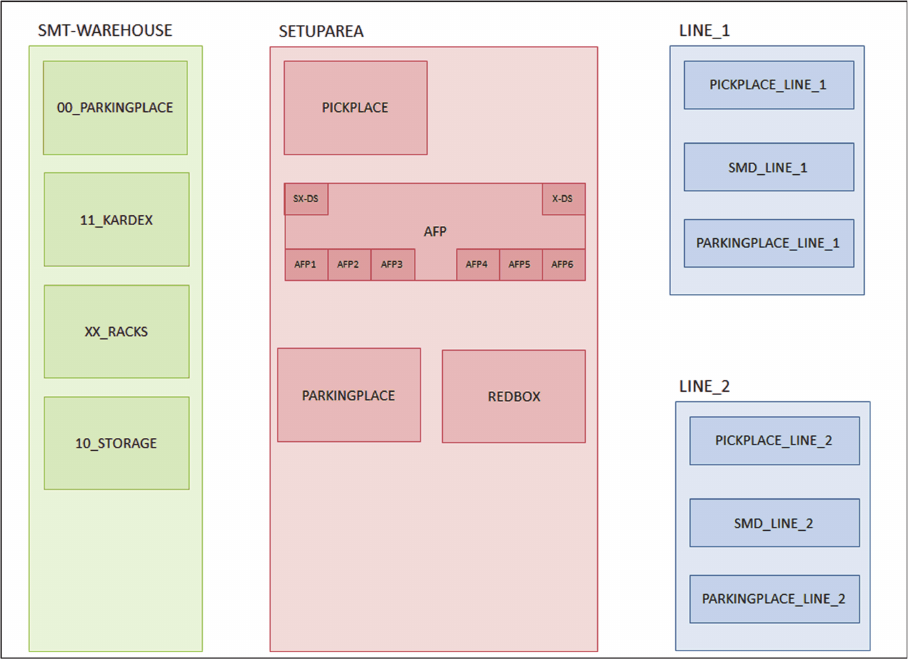
The overview shows an example of a typical factory layout for the SIPLACE Material Setup Assistant
workflow.
Example - factory layout
Preconditions and Configurations
Configuration Settings in ASM OIB
ASM Material Setup Assistant 2.3 (R17-1) ASM Material Setup Assistant 2.3 (R17-1) 139
2.1.2.2
2.1.2.2 Assigning Setup Center Adapter with AFP
Assigning Setup Center Adapter with AFP
This setting specifies the OIB adapter with which the Active Feeder Pool (AFP) is to communicate. This
service controls the reuse of the hardware in the Active Feeder Pool.
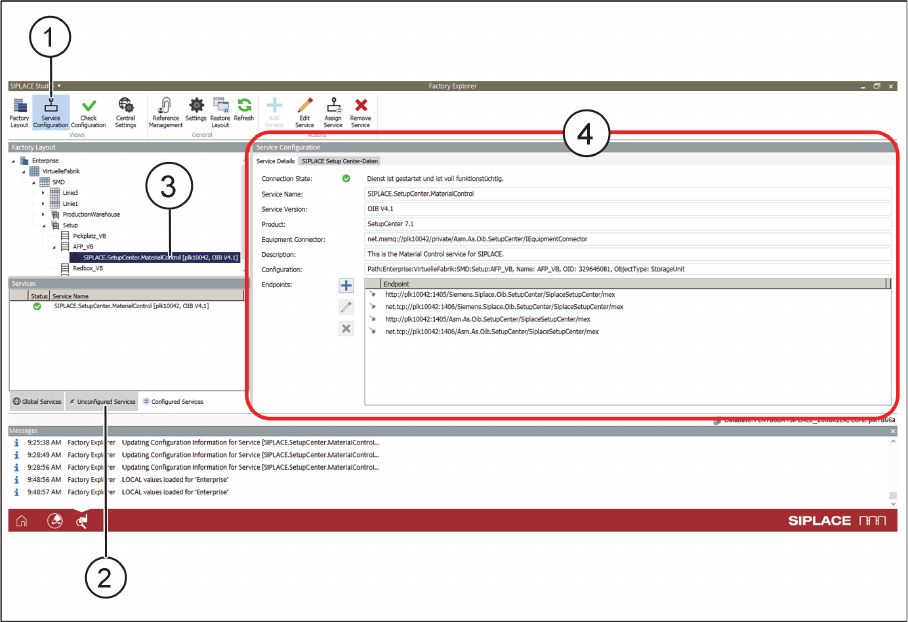
► Select Service Configuration (1).
Service Configuration - Service Details - Tab
► In the Unconfigured Services tab (2), find the service Siplace.SetupCenter.MaterialControl.
► Using the mouse, drag this service on the entry (3) for the AFP in the Factory Layout.
⇨ The properties will be shown (4).