00198227-03_UM_MaterialSetupAssistant_2.3-R17-1_DE_EN.pdf - 第198页
Workflow with Flexible Family Setup System Status after Production Schedule Approval 198 ASM Material Setup Assistant 2.3 (R17-1) ASM Material Setup Ass i st a n t 2 . 3 5.5.1 5 . 5 . 1 O r d e r M a n a g e r - M o n it…
Workflow with Flexible Family Setup
System Status after Production Schedule Approval
ASM Material Setup Assistant 2.3 (R17-1) ASM Material Setup Assistant 2.3 (R17-1) 197
5.5
5.5 System Status after Production Schedule Approval
System Status after Production Schedule Approval
After approval, the production schedules are automatically updated for all lines, the presetup area and
the warehouse concerned. Communication with the systems involved takes place once approval has
been given. Communication is started with the following systems:
▪ Order Manager - Monitoring
– The tasks are created for the approved production jobs and are then shown as a timeline in the
Gantt diagram.
▪ SIPLACE Line Control GUI
– The approved production jobs are entered in the form of recipes in the production schedule last
used at the lines.
▪ ASM Setup Center – Setup Preparation
–The Setup preparation view shows the planned setups for the setup preparation with ASM Setup
Center.
▪ ASM Material Manager - full version (not with ASM Material Manager for MSA)
– The material demand lists for material picking are created in the ASM Material Manager.
Workflow with Flexible Family Setup
System Status after Production Schedule Approval
198 ASM Material Setup Assistant 2.3 (R17-1) ASM Material Setup Assistant 2.3
5.5.1
5.5.1 Order Manager - Monitoring
Order Manager - Monitoring
► Start the Monitoring module in ASM Studio.
⇨ The Monitoring module will be opened.
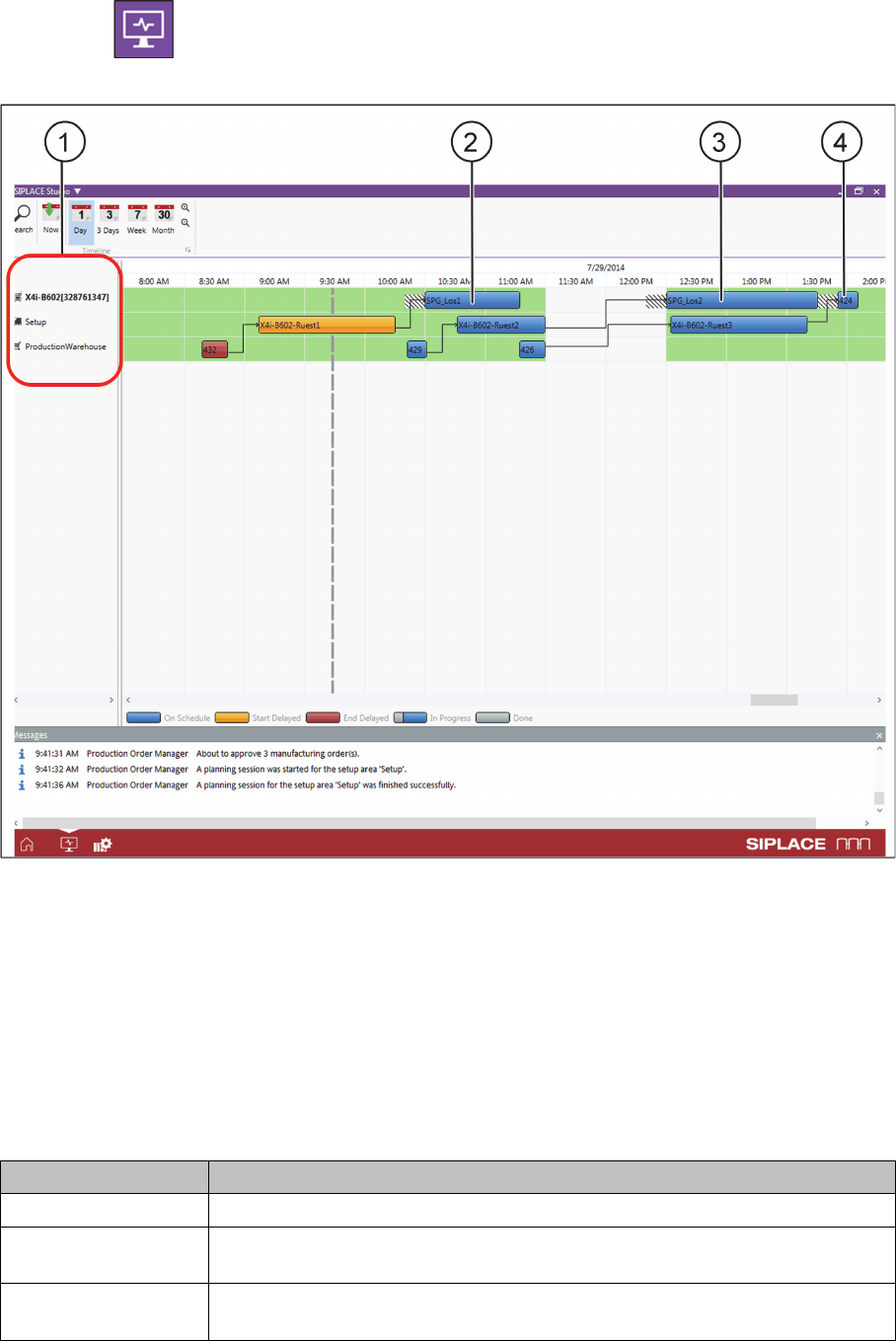
Order Manager - monitoring of production jobs after approval
In this example, the approved production jobs (2, 3 and 4) are linked to the time dependencies and
shown as a Gantt diagram.
At (1) you can see the three areas involved in the process, which are also shown in the Gantt diagram:
▪ Line: timeline as task for the production or placement of recipes at the line
▪ Presetup area: timeline as task for setup preparations
▪ Warehouse: timeline as task for material picking in the warehouse
The respective tasks or progress bars are color-coded in the Gantt diagram and show the relevant sta
-
tus. The following table shows the standard setting of these colors; you can adapt the colors to your
needs in Production Order Manager Configurations.
Color Description
Blue The task scheduling status is "on schedule".
Orange The task start has been delayed. The start time has already passed, the end
time is still in the future and could still be achieved.
Red The task end has been delayed. The end time has already passed and can no
longer be achieved.
Workflow with Flexible Family Setup
System Status after Production Schedule Approval
ASM Material Setup Assistant 2.3 (R17-1) ASM Material Setup Assistant 2.3 (R17-1) 199
5.5.2
5.5.2 SIPLACE Line Control GUI
SIPLACE Line Control GUI
► Open the SIPLACE Line Control GUI.
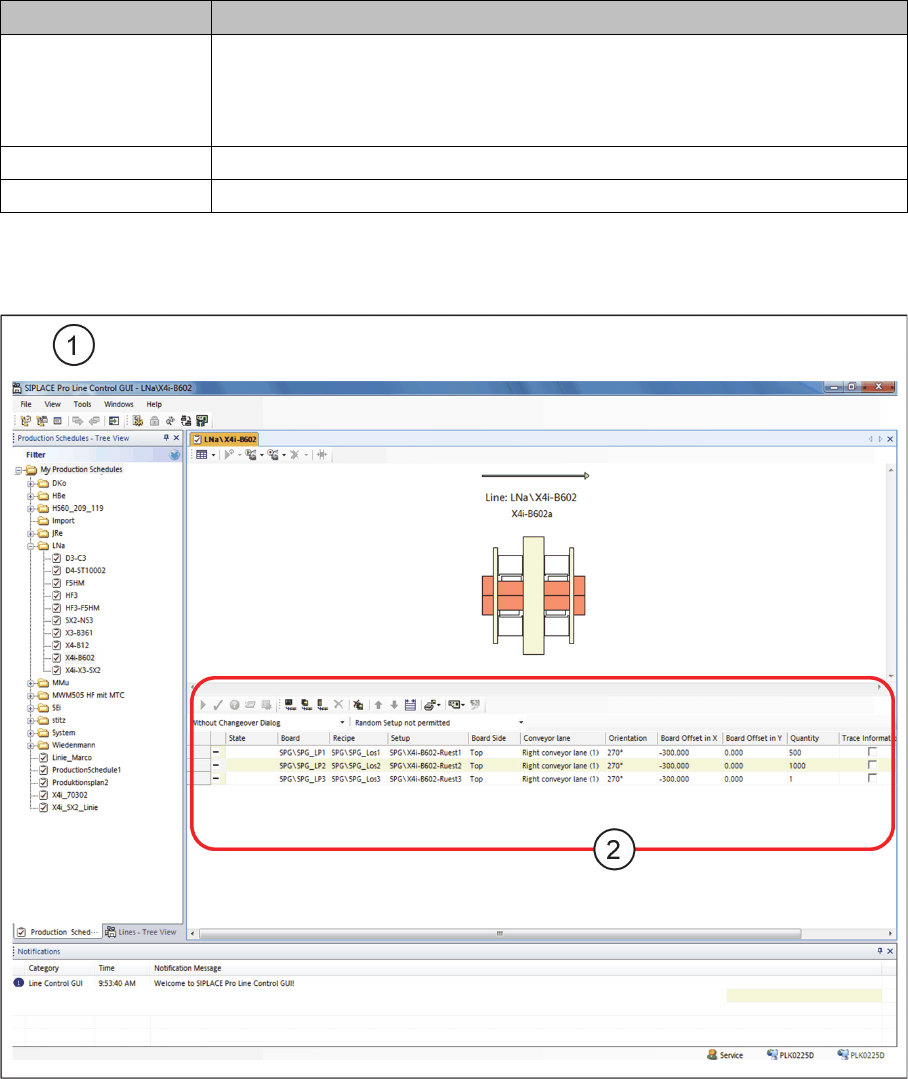
SIPLACE Line Control GUI – production jobs after approval
► Go to My Production Schedules and open the relevant production schedule (1).
► At (2) you can see the individual recipes for the production job, which are now ready for download
to the line.
Gray/blue
Gray/orange
Gray/red
The relevant task status is "in progress". The warehouse is already processing
the picking order etc.
Gray means completed and the second color represents the status (on sched
-
ule or with start/end delayed).
Blue/Yellow The setup contains constant/fixed tables.
Gray The task has been fully completed.
Color Description