00198227-03_UM_MaterialSetupAssistant_2.3-R17-1_DE_EN.pdf - 第205页
Workflow with Flexible Family Setup Executing and Monitoring Material Picking ASM Material Setup Assistant 2.3 (R17-1) ASM Material Setup Ass istant 2.3 (R17-1) 205 5.7 5 . 7 E x e c u t in g a n d M o n it o r in g M a …
Workflow with Flexible Family Setup
Viewing the Material Demand
204 ASM Material Setup Assistant 2.3 (R17-1) ASM Material Setup Assistant 2.3
5.6.1
5.6.1 Material Requirement in ASM Material Manager
Material Requirement in ASM Material Manager
In the packaging unit information of the ASM Material Manager, information on the material reuse are
entered and displayed.
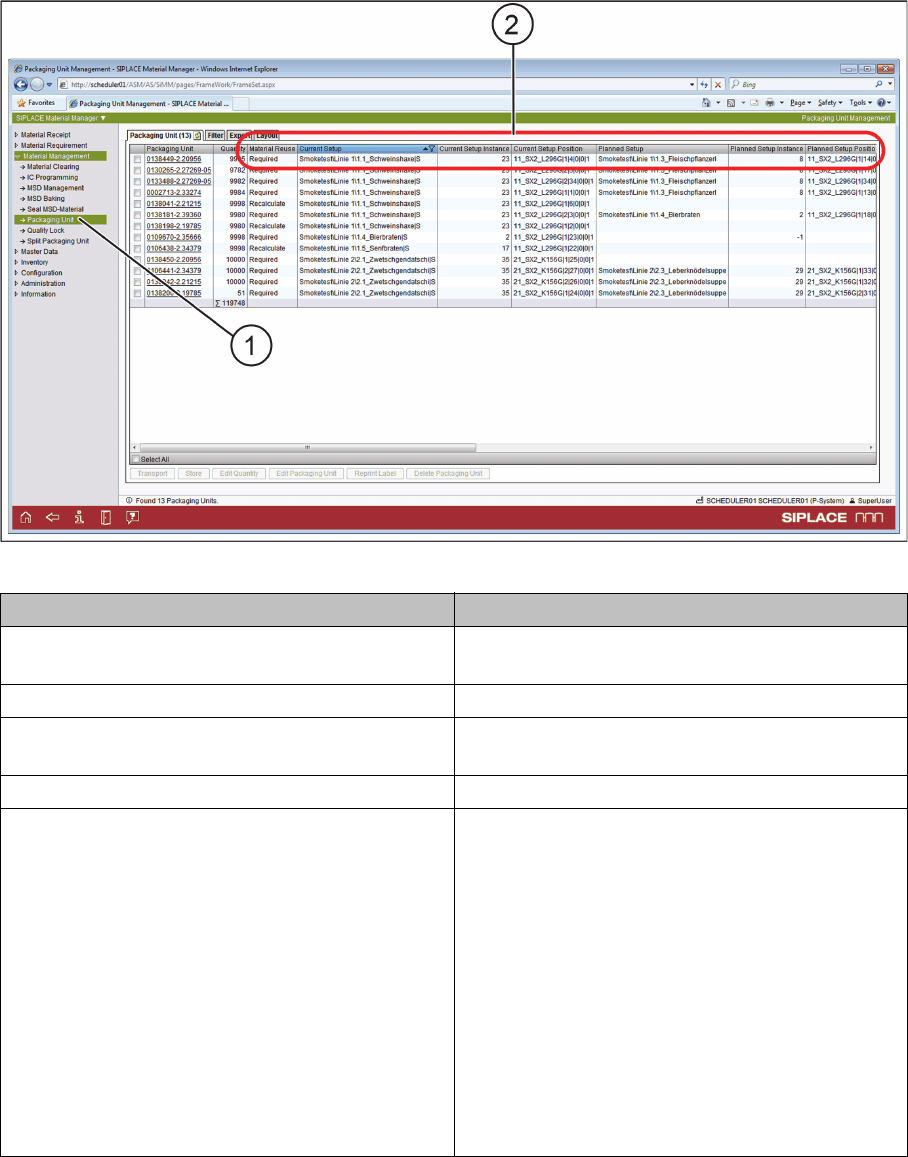
► Start the ASM Material Manager.
► In the tree view, select Material Management => Packaging Unit (1).
⇨ In Material Management => Packaging Unit, the attributes (2) for the material reuse of the relevant
packaging units are displayed.
ASM Material Manager – Packaging unit information
Attribute Description
Current setup The setup for which the current packaging units
are planned.
Current Setup Instance Task IDs of the presetup task.
Planned Setup The setup for which the packaging unit will be used
next.
Planned Setup Instance Task IDs of the presetup task.
Material reuse Not required: Material that is no longer needed in
the presetup area or on the line. The material
should be torn down and put back in the ware
-
house.
Required: Material that is needed in the presetup
area or on the line.
Recalculate: Material that is no longer needed on
this line but that can be used on another line. The
status needs to be recalculated.
Constant: The packaging unit is used on a con
-
stant setup or a fixed table.
Ignored: The packaging unit is ignored by the
SIPLACE Material Setup Assistant.

Workflow with Flexible Family Setup
Executing and Monitoring Material Picking
ASM Material Setup Assistant 2.3 (R17-1) ASM Material Setup Assistant 2.3 (R17-1) 205
5.7
5.7 Executing and Monitoring Material Picking
Executing and Monitoring Material Picking
Executing material picking with the help of the ASM Material Manager
► Use the material demand list to pick the material with the help of the PDA.
► ON the PDA, switch over to the application Picklist Processing.
► Select the warehouse area and start picking.
► Select a pick list.
► The PDA guides you through the defined warehouse area (storage zone).
► Work through the individual entries in the pick list.
⇨ During picking, the systems involved (ASM Material Manager, ASM Setup Center, and Order Man
-
ager) will be updated.
⇨ The progress and status will be shown accordingly in Order Manager – Monitoring.
⇨ The required calculations for material demand and material reuse will be performed.
► Pick the packaging units required in the list and then take these to the presetup area.
► For details of material picking with the ASM Material Manager, refer to the user manual for the ASM
Material Manager.
NOTICE
Only with ASM Material Manager - full version
You can only perform and monitor the material picking with the ASM Material Manager - full
version.
Workflow with Flexible Family Setup
Executing and Monitoring Material Picking
206 ASM Material Setup Assistant 2.3 (R17-1) ASM Material Setup Assistant 2.3
5.7.1
5.7.1 Order Manager - Monitoring Material Picking
Order Manager - Monitoring Material Picking
During the picking process, you can monitor the current material picking status.
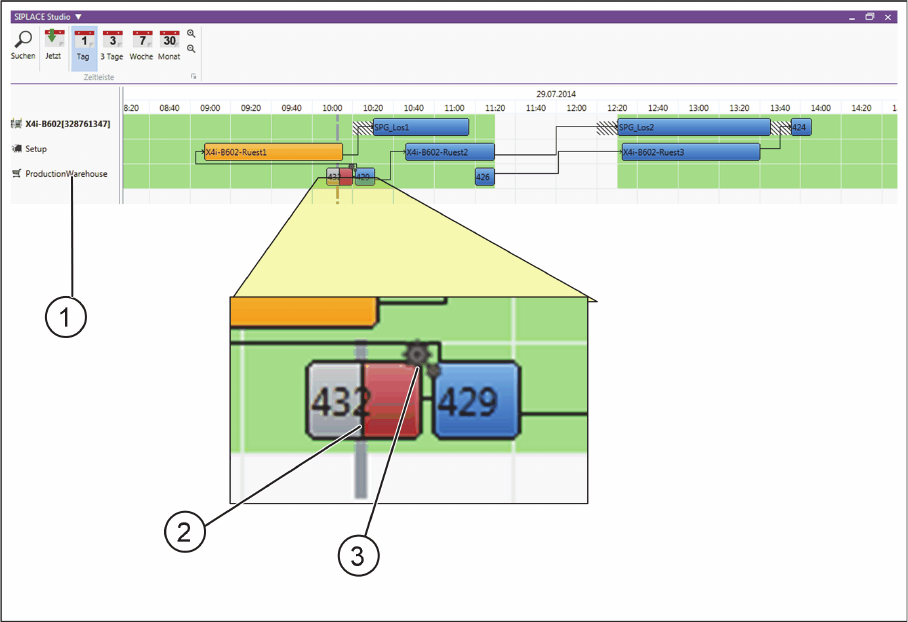
Example – material picking is running
Order Manager – Monitoring - material picking is running (example)
(1) Material picking in the Gantt diagram
(2) The picking of material for the current material picking run has been approx. 50% (gray) completed
and is approx. 50% still unfinished (red).
(3) Materials are currently being picked in your warehouse via the ASM Material Manager.