00198227-03_UM_MaterialSetupAssistant_2.3-R17-1_DE_EN.pdf - 第210页
Workflow with Flexible Family Setup Executing and Monitoring Setup Preparation 210 ASM Material Setup Assistant 2.3 (R17-1) ASM Material Setup Ass i st a n t 2 . 3 5.8 5 . 8 E x e c u t in g a n d M o n it o r in g S e t…
Workflow with Flexible Family Setup
Executing and Monitoring Material Picking
ASM Material Setup Assistant 2.3 (R17-1) ASM Material Setup Assistant 2.3 (R17-1) 209
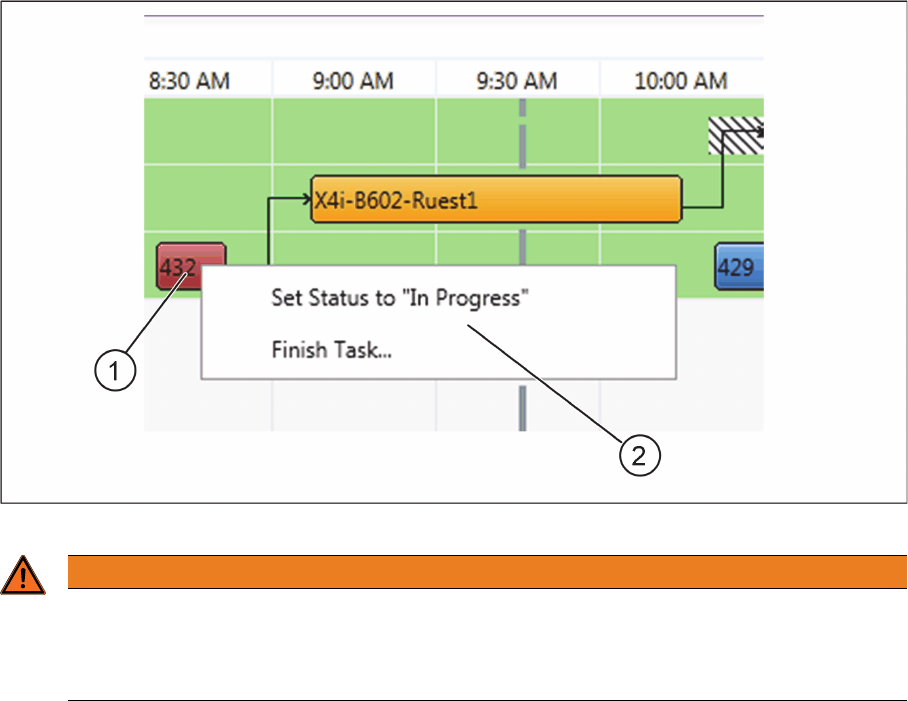
Context menu for material picking
► Right-click with the mouse on the material picking (1).
⇨ The context menu (2) will open.
Context menu for material picking
WARNING
Manual "Set Status to In Progress" and "Finish Task"
In the normal process, the functions Set Status in Progress and Finish Task are automatically
performed by the system. Manual Set Status to In Progress and Finish Task should only be
used in exceptions and may only be used by trained specialist personnel.
Workflow with Flexible Family Setup
Executing and Monitoring Setup Preparation
210 ASM Material Setup Assistant 2.3 (R17-1) ASM Material Setup Assistant 2.3
5.8
5.8 Executing and Monitoring Setup Preparation
Executing and Monitoring Setup Preparation
If the material has been picked for at least one location and has been taken to the presetup area, you
can start presetup with ASM Setup Center.
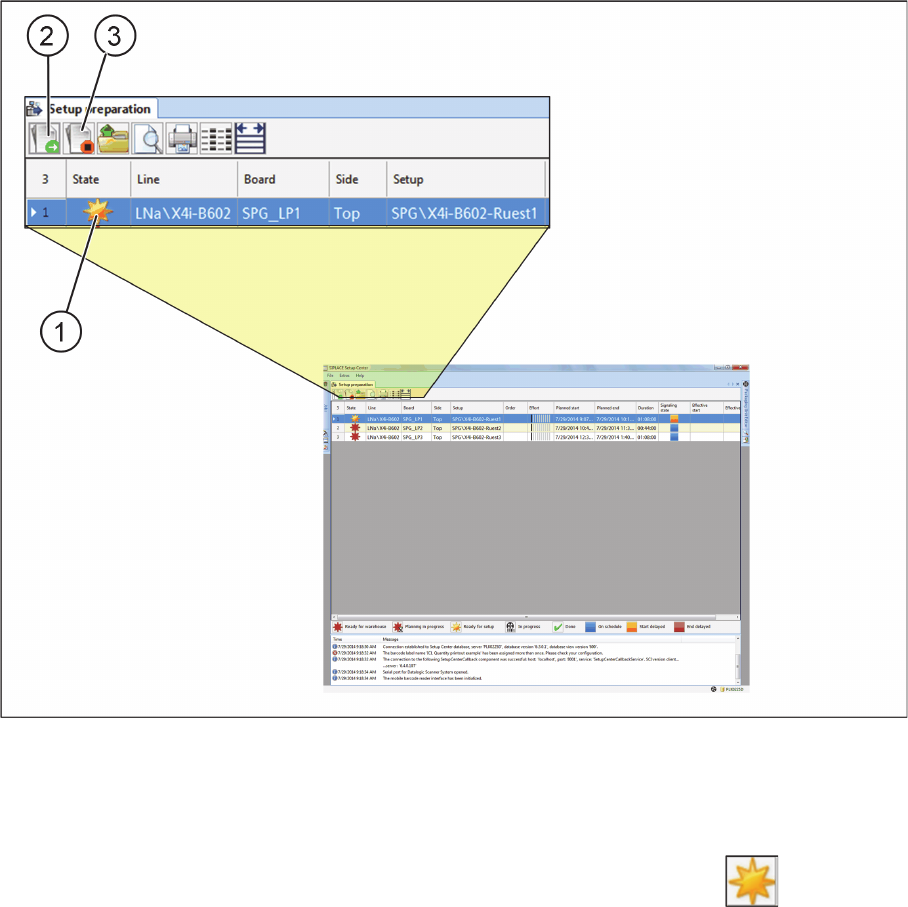
ASM Setup Center – material picking completed (example)
1. Symbol "Ready for setup"
2. Setting the start time
3. Setting the end time
Material picking has been completed for this setup and marked with the symbol (1) Ready for set
-
up. Refer to "3 Overview of Setup Preparation in ASM Setup Center" [ ➙ 169] for a description of pos
-
sible actions in the toolbar, a description of the status symbols and a description of the parameters in the
table.
► Print out the setup list.
► Scan the setup list barcode.
⇨ The scanning opens another tab with the setup currently being processed.
► Perform the pre-setup for a table as you know it from ASM Setup Center.
⇨ The progress will be shown in the display after completion of a location.
⇨ The end time is automatically set by the system, as soon as the last packaging unit has been verified.
Workflow with Flexible Family Setup
Executing and Monitoring Setup Preparation
ASM Material Setup Assistant 2.3 (R17-1) ASM Material Setup Assistant 2.3 (R17-1) 211
⇨ After all locations have been completed, setup preparation will be automatically closed.
5.8.1
5.8.1 Order Manager - Monitoring Setup Preparation
Order Manager - Monitoring Setup Preparation
During the setup process in the presetup area, you can monitor the current setup preparation status.
Example – setup preparation is running
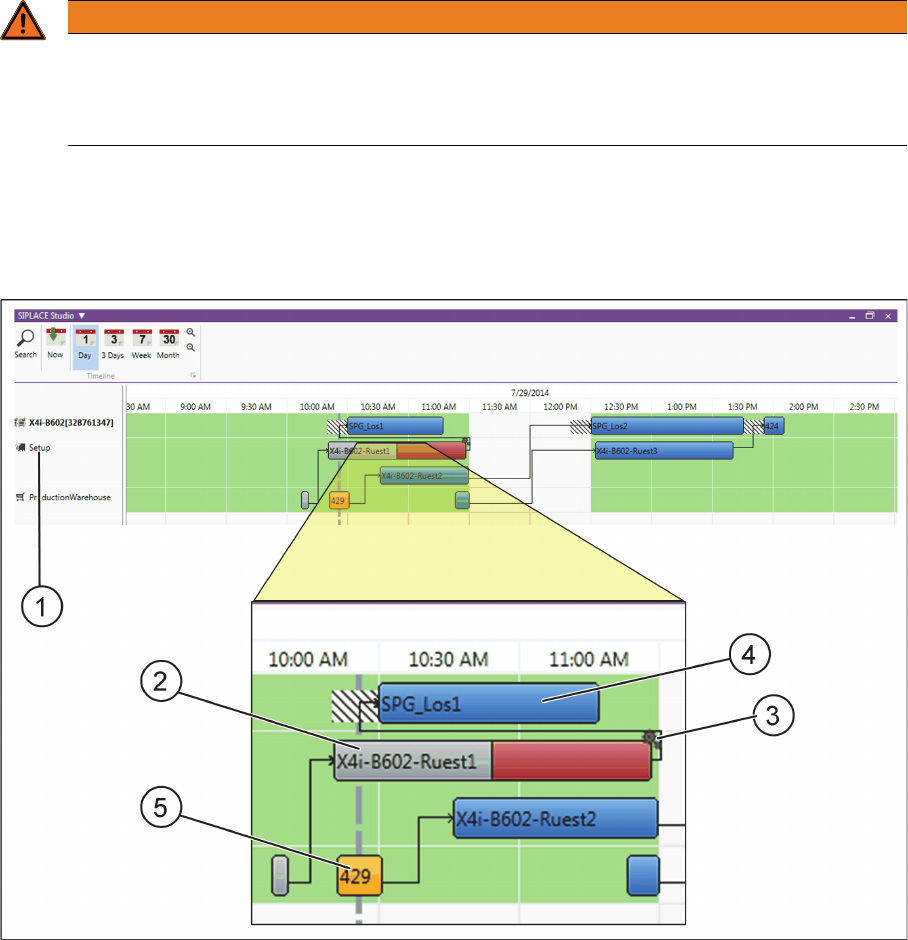
Order Manager – Monitoring – setup preparation is running (example)
(1) Display presetup area in a Gantt diagram
(2) The setup of material for the current setup preparation is approx. 50% complete (gray).
(3) The setup preparation is approx. 50% unfinished (red). The symbol shows that setup preparation
ASM Setup Center is currently being processed in your pre-setup area.
(4) The placement of this recipe could start as scheduled (blue), provided the setup preparation is com
-
pleted on schedule before the start time.
(5) The material picking for the next production job can be started on schedule (blue).
WARNING
Manually setting the start and end times
In the normal process, the functions Set start time (2) and Set end time (3) are automatically
performed by the system. The setting of start and end times should only be used in exceptions
and may only be used by trained specialist personnel.