00198227-03_UM_MaterialSetupAssistant_2.3-R17-1_DE_EN.pdf - 第219页
Workflow with Flexible Family Setup Producing Recipes on the Line ASM Material Setup Assistant 2.3 (R17-1) ASM Material Setup Ass istant 2.3 (R17-1) 219 5.9.1 5 . 9 . 1 I n f o r m a t io n a n d C o n t e x t M e n u In…
Workflow with Flexible Family Setup
Producing Recipes on the Line
218 ASM Material Setup Assistant 2.3 (R17-1) ASM Material Setup Assistant 2.3
5.9
5.9 Producing Recipes on the Line
Producing Recipes on the Line
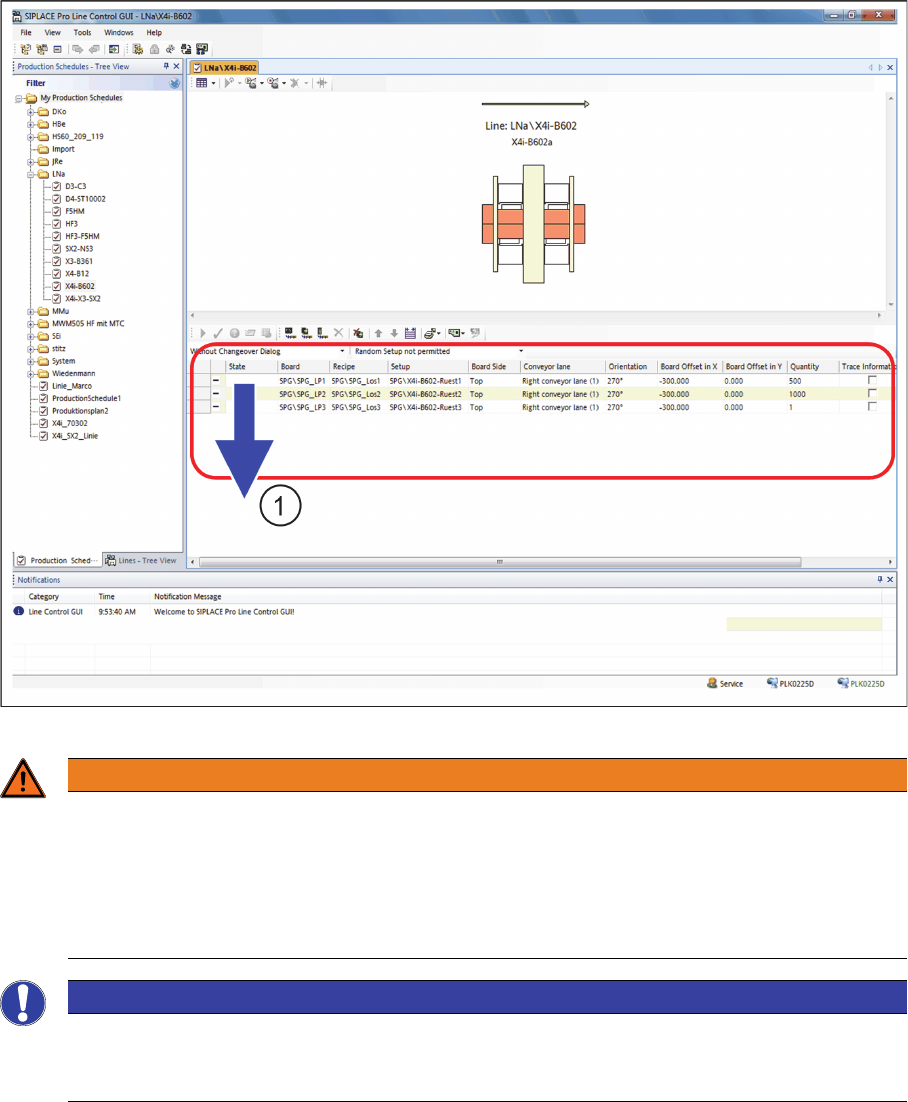
► Perform a download of the first recipe (1) for the production schedule.
SIPLACE LCGUI - Download
WARNING
Handling recipes in the production schedule
You may delete recipes that were planned with the SIPLACE Material Setup Assistant only after
they have been downloaded to the line. You can remove a recipe that has not been downloaded
to the line yet from the production schedule by recalling or deleting it with the Order Manager.
Recipes that have been planned with the SIPLACE Material Setup Assistant must not be added
manually in the SIPLACE Line Control GUI.
NOTICE
Defining restrictions in the SIPLACE Line Control GUI
To ensure that the scheduled production schedules can not be changed, we recommend ena
-
bling this restrictions. See "5.5.2.1 Defining Presettings for the SIPLACE Line GUI" [ ➙ 200].
Workflow with Flexible Family Setup
Producing Recipes on the Line
ASM Material Setup Assistant 2.3 (R17-1) ASM Material Setup Assistant 2.3 (R17-1) 219
5.9.1
5.9.1 Information and Context Menu
Information and Context Menu
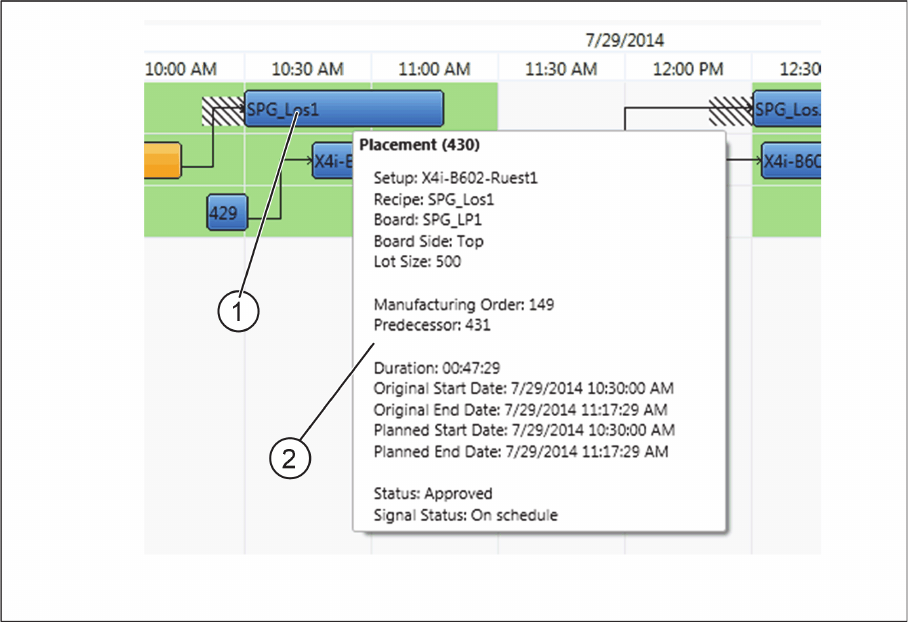
Tool tip information about placement (production of recipe on the line)
► Move the mouse over the placement (1).
⇨ A tool tip (2) with important information about the placement will be shown.
Tool tip information about placement
Workflow with Flexible Family Setup
Performing Presetups with Material Reuse
220 ASM Material Setup Assistant 2.3 (R17-1) ASM Material Setup Assistant 2.3
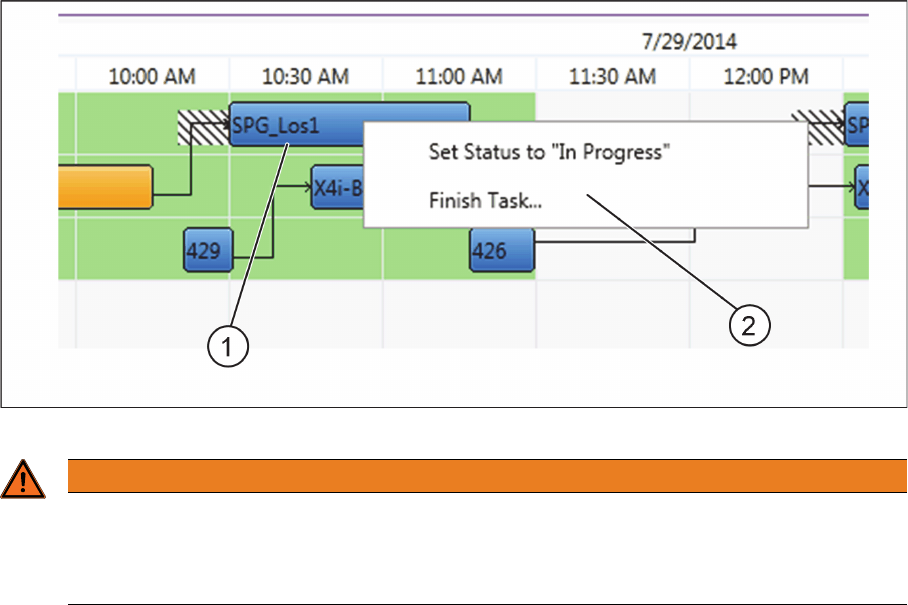
Context menu for placement (production of the recipe on the line)
► Right-click with the mouse on the placement (1).
⇨ The context menu (2) will open.
Context menu for placement
5.10
5.10 Performing Presetups with Material Reuse
Performing Presetups with Material Reuse
Material reuse means that the material from one setup (n) can be used again in the next but one setup
(n+2 rule) on the same line. Material can also be used on other lines again, if usage on the same line is
not possible. If this material comes back from the lines to the presetup area, the reuse will be shown to
the user.
In the following section, we add to the previous work steps and plan by using materials from the first set
-
up in the third setup.
The material from the first setup is brought from the line to the presetup area
► Wait until the last board has been placed.
► Undock the changeover table from the location.
⇨ The changeover table will be automatically logged off at the location.
► Bring the changeover table to the presetup area of your line.
► Move the changeover table into the docking station.
► Scan the control barcode Signal material reuse. Scanning this control barcode sets the docking sta
-
tion from mode Setup verification into the mode Signal material reuse.
⇨ You will be shown whether this feeder is "required" or "not required".
WARNING
Manual "Set Status to In Progress" and "Finish Task"
In the normal process, the functions Set Status in Progress and Finish Task are automatically
performed by the system. Manual Set Status to In Progress and Finish Task should only be
used in exceptions and may only be used by trained specialist personnel.