SM-131-006.pdf - 第114页
Device Name Chip Mounter Block Name Page No. Unit Name Revision Model Item GXH -1 Chapter 5 Head Section 4. Replacement of Nozzl e Shaft Nozzle Shaft Assembly 4.2.3 Attachment of Nozz le Shaft Holding Jig Attach the nozz…
Device
Name
Chip Mounter
Block Name
Page No.
Unit Name
Revision
Model Item GXH-1
Chapter 5 Head Section
4. Replacement of Nozzle Shaft
Nozzle Shaft Assembly
4.2 Detachment of Nozzle Shaft Assembly
4.2.1 Detachment of Large Diffusion Plate
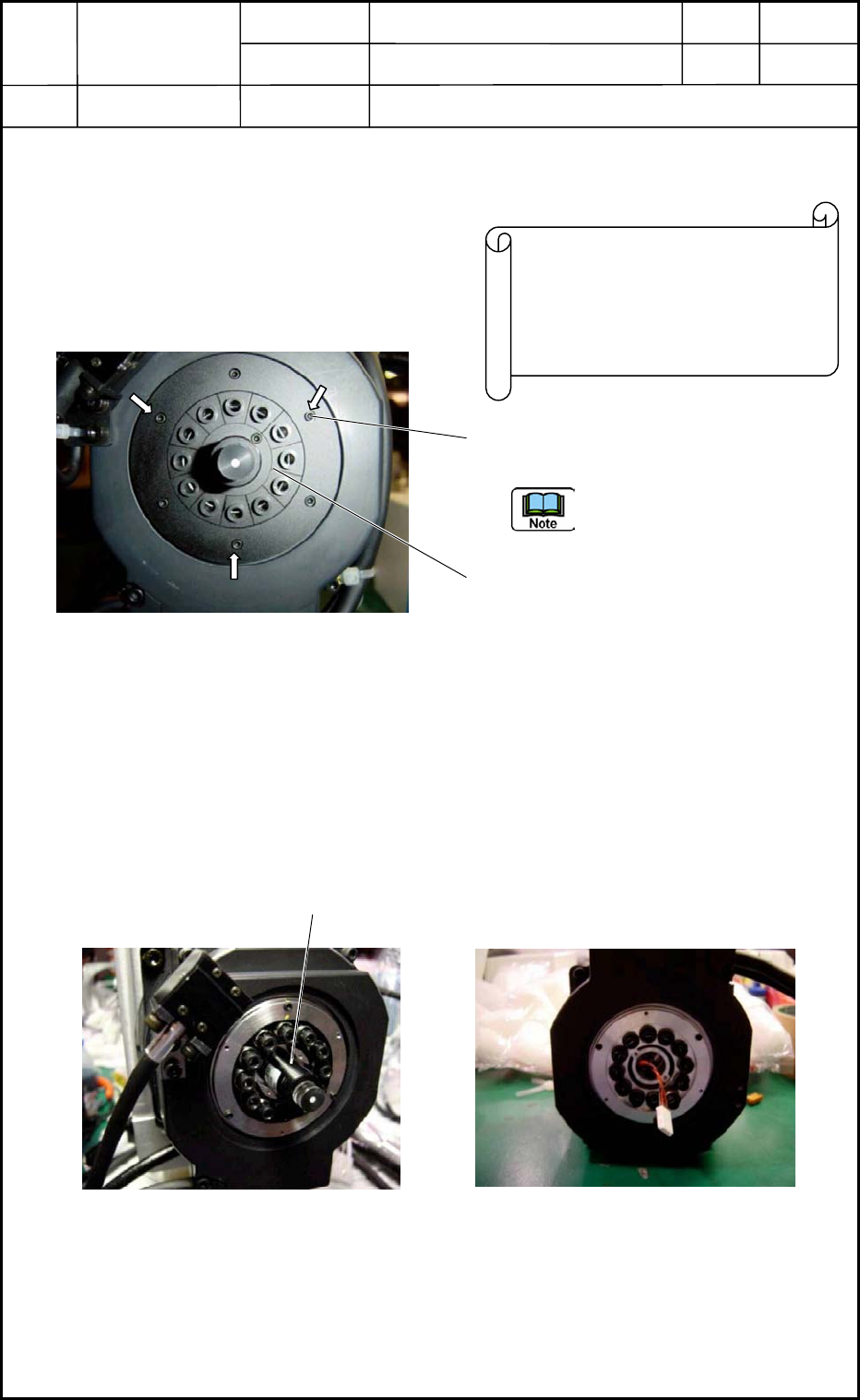
(1) Remove the three screws (M1.6L5) of
the large diffusion plate (outer side).
Pay attention to the detachment
position. Pay attention to the
detachment position.
(2) Remove the two screws (M1.6L5) of the
small diffusion plate (inner side).
4.2.2 Detachment of Linear Measure Sensor (Fig. E20)
Remove the two screws (M1.6L5) of the linear measure sensor on the light emitting side
and detach the sensor from the motor side.
Do not detach the linear measure sensor on the light receiving side.
Disconnect the connector. (Fig. E21)
Springs are used at the lower area of the
nozzle shaft. Therefore, it is required to
attach a holding plate (drop prevention)
and detach the large diffusion plate in
the assembled condition.
Fi
g
. E19 Head Bottom Area
Linear Measure Sensor
on the Light Emitting Side
Fig. E20 Linear Measure Sensor Fig. E21 Linear Measure Sensor
Connector Section
0406-001
5-12
Device
Name
Chip Mounter
Block Name
Page No.
Unit Name
Revision
Model Item GXH-1
Chapter 5 Head Section
4. Replacement of Nozzle Shaft
Nozzle Shaft Assembly
4.2.3 Attachment of Nozzle Shaft Holding Jig
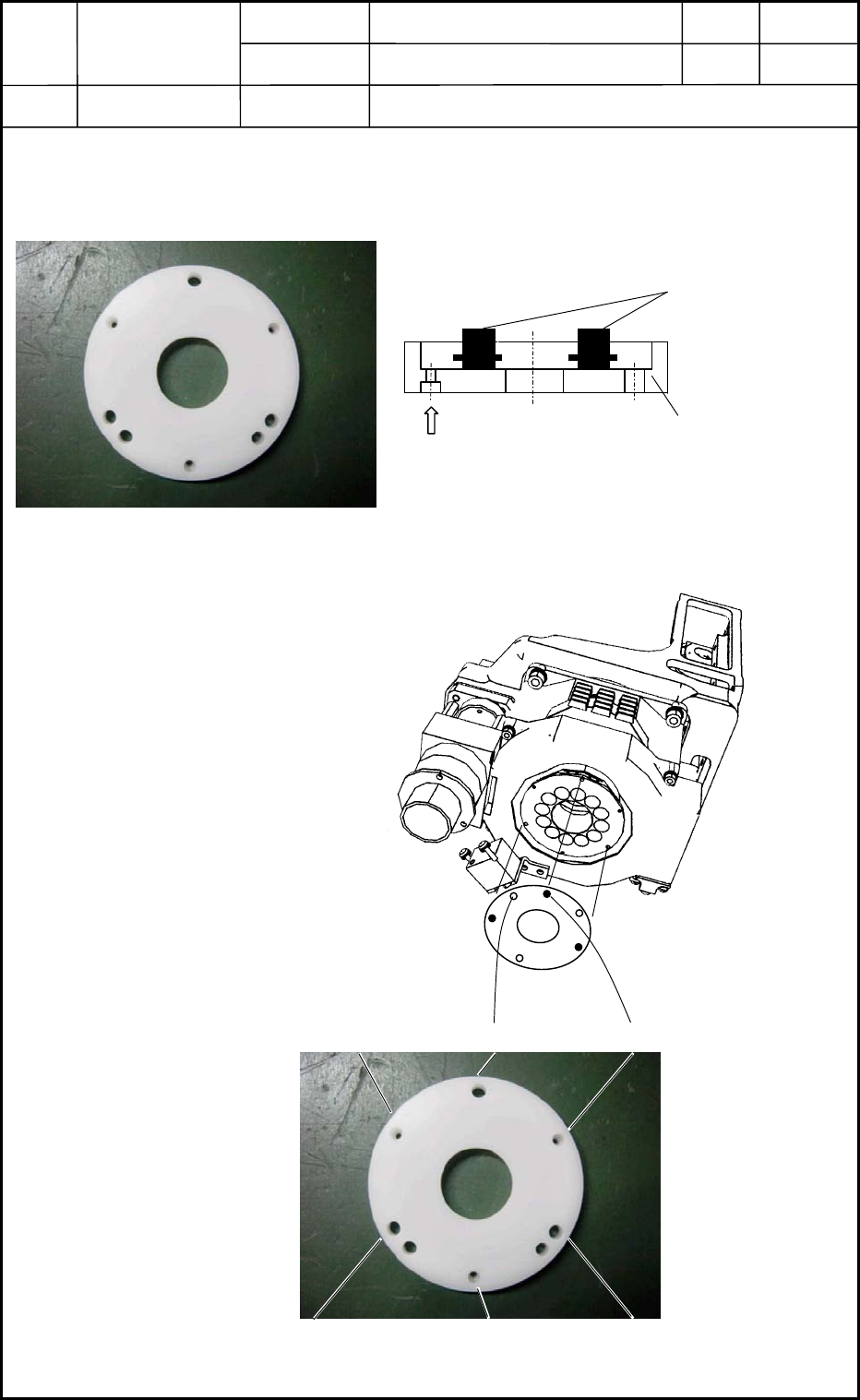
Attach the nozzle shaft holding jig to the area where the large diffusion plate was detached.
(Figs. E22 and E23)
(1) Attach the nozzle shaft holding
jig securely to the nozzle shaft
assembly (the position of the
large diffusion plate) with three
screws (M1.6L5).
(2) Connect the nozzle shaft
assembly with the motor
section.
Assemble the jig so that the
three screws (M1.6L5) can stay
visible.
0406-001
5-13
Nozzle Shaft Holding Jig
Nozzle Shaft
Fig. E23 Jig Usage
M1.6L5 (3 places)
Fig. E22 Nozzle Shaft Holding Jig
Fig. E24 Attachment of
Nozzle Shaft
Holding Jig
Fig. E25 Nozzle Shaft Holding Jig (Hole Position)
B
B
B
A
AA
Device
Name
Chip Mounter
Block Name
Page No.
Unit Name
Revision
Model Item GXH-1
Chapter 5 Head Section
4. Replacement of Nozzle Shaft
Nozzle Shaft Assembly
4.2.4 Disassembly of Cam Follower Section
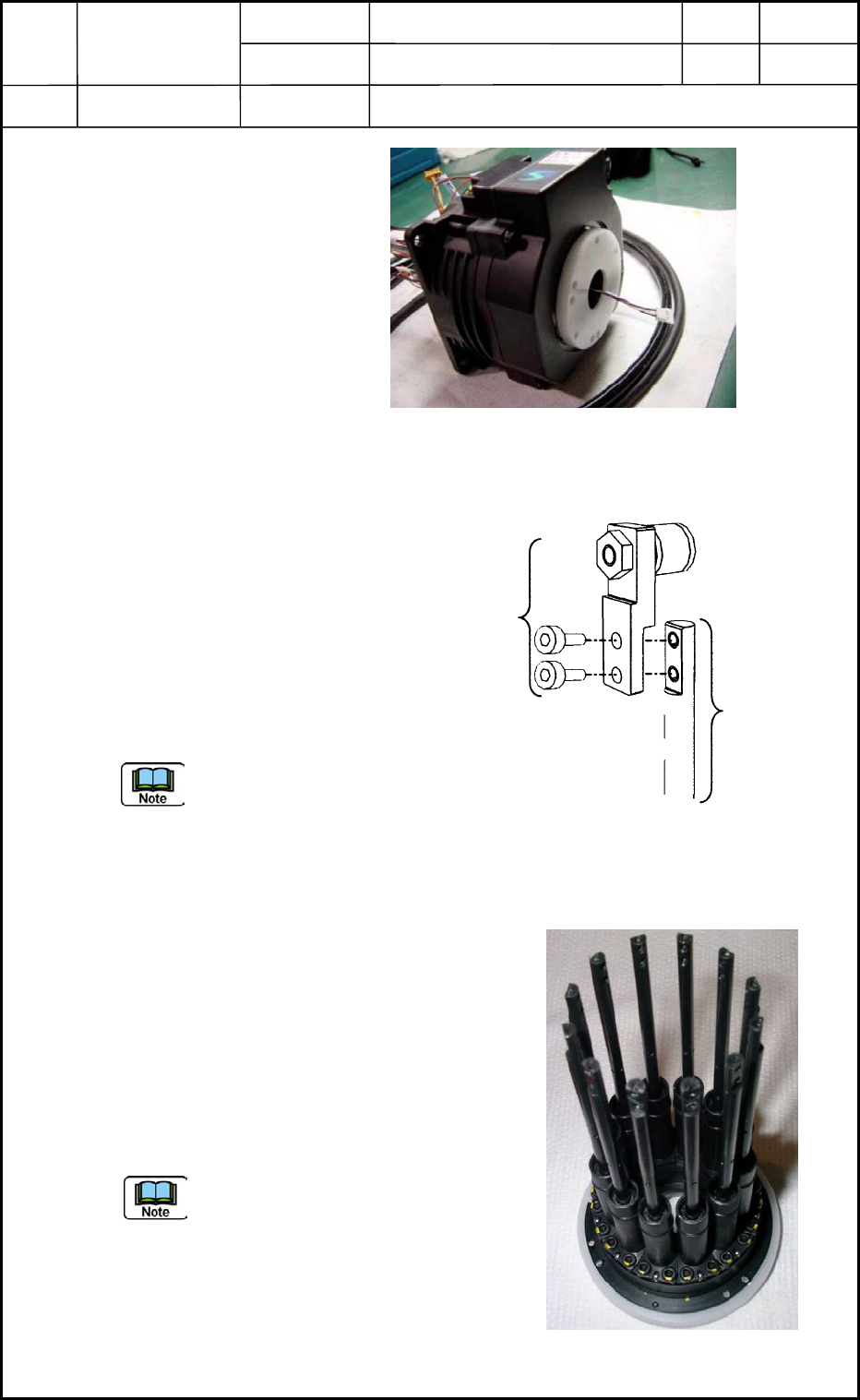
Disassemble the cam follower
section (located at the upper area
of the nozzle shaft) from the
nozzle shaft as shown in Fig. E27.
Remove the two bolts (M1.6L3).
Follow the same procedure to
disassemble the cam followers for
the twelve nozzle shafts.
The disassembled cam
follower should be
kept so as to match the
nozzle No.
4.2.5 Detachment of Nozzle Shaft Assembly
(1) Remove the three screws (M1.6L5)
(marked "B" in Figs. E24 and E25).
(2) Pull down the nozzle shaft holding jig.
When the jig is kept too tight, try to
push several areas on the upper part of
the nozzle shaft by hand.
(3) Take out the nozzle shaft assembly,
keeping it in the condition shown in Fig.
E28.
Be sure not to drop the assembly.
Fig. E26 Assembled Nozzle Shaft Holding Jig
Fig. E28 Nozzle Shaft Assembly + Jig
0406-001
5-14
Fig. E27 Disassembly of Cam Follower Section
from Nozzle Shaft
M1.6L3
Cam Follower
Section
Nozzle Shaft