SM-131-006.pdf - 第59页
Device Name Chip Mounter Block Name Page No. Unit Name Revision Model Item GXH-1 • Head Movement to Measuring Position X = Origin Position, Y1 = -514 mm (#1 and #3 Heads) 514 mm (#2 and #4 Heads) (1) Select one of the [B…
Device
Name
Chip Mounter
Block Name
Page No.
Unit Name
Revision
Model ItemGXH-1
• Clamping of Jig PCB (No Support Pins)
Required Jig: Nozzle Height Check Jig (JG-0100)
(160 × 80 mm, t = 2.3 to 2.6 mm)
Note the PCB thickness in the current pattern program.
(1) Zero the conveyor width as follows.
Open the "PRODUCT CHANGE" window and select the [L Cnvr], [Cnvr], and [R Cnvr]
buttons and press the [Zeroing] button to zero each conveyor. (Operation Sequence:
[SETUP] Button → [PROD. CHG.] Button)
Example: Selecting [L Cnvr] Button → Selecting [Zeroing] Button → Pressing
[START] Button
(2) Change the conveyor width as follows.
Enter "80" in the "Tgt Wd" text box and "0.8" in the "Clearance" text box, "200" in the
"Base Pos" text box in the "Cnvr Wd" group box of the "PRODUCT CHANGE" window.
Move the L conveyor, the conveyor, and the R Conveyor to the target positions.
Example: Selecting [L Cnvr] Button → Selecting [Desig Width] Button → Pressing
[START] Button
Conveyor Width Change Operation
• Open the "ADJUST" window. (Operation Sequence: [OPERATOR] Button
→ [MAINT.] Button → [DVC CHECK] Button → [ADJUST] Button)
Enter "80" for "Wd" and "200" for "Ofst" in relation with each item "Stg#1",
"Center", "Stg#2" in the "Suiting of width of conveyor (Start)" group box.
When each button in the "Suiting of width of conveyor (Start)" group box is
selected and the [START] button is pressed, the corresponding conveyor
width is changed.
• PCB clamping can also be performed by navigating through this window.
• After placing a PCB at the clamping position, set "BackUp Base" in the "Opn
mode" text box in the "P.C.B. transfer" group box.
Select the [Inp/Pos PCB] button and press the [START] button.
When the [START] button is pressed after the [Out PCB] button, the
clamping is released.
(3) Clamp the jig PCB.
(3.1) Put the jig PCB on the positioning center by hand.
(3.2) Use the "Output Chk" tab sheet to make the PCB clamped.
(3.3) Open the "Output Chk" tab sheet and select the [Block 5] button. (Operation
Sequence: "MAINT." Button → "DVC CHECK" Button → [INP/OUT] Button
→ "Output Chk" Tab Sheet)
(3.4) Select the [CNVRL] or the [CNVRR] button.
Select the [D4] button in the "Select Bit" group box.
[D4]: Z Clamp Cylinder Valve 1 (A) [NA] or [NC]
(3.5) Press the [ON] button in the "Control Sw" group box.
(3.6) [D5]: Z Clamp Cylinder Valve 1 (B) [NA] or [NC]
The clamping is completed.
Heads
2. Installation Offset
1-5
0403-001
Device
Name
Chip Mounter
Block Name
Page No.
Unit Name
Revision
Model ItemGXH-1
• Head Movement to Measuring Position
X = Origin Position, Y1 = -514 mm (#1 and #3 Heads)
514 mm (#2 and #4 Heads)
(1) Select one of the [Block 1], [Block 2], [Block 3] and [Block 4] buttons in the "MOTOR"
window. (Operation Sequence: [MAINT.] Button → [DVC CHECK] Button →
[MOTOR] Button)
(2) Select the [Y1] button.
Select the [Relative] button in the "Manual Axis action (start)" group box and enter the
amount of movement (travel).
(3) Select the [-] or the [+] button and press the [START] button.
• Measurement
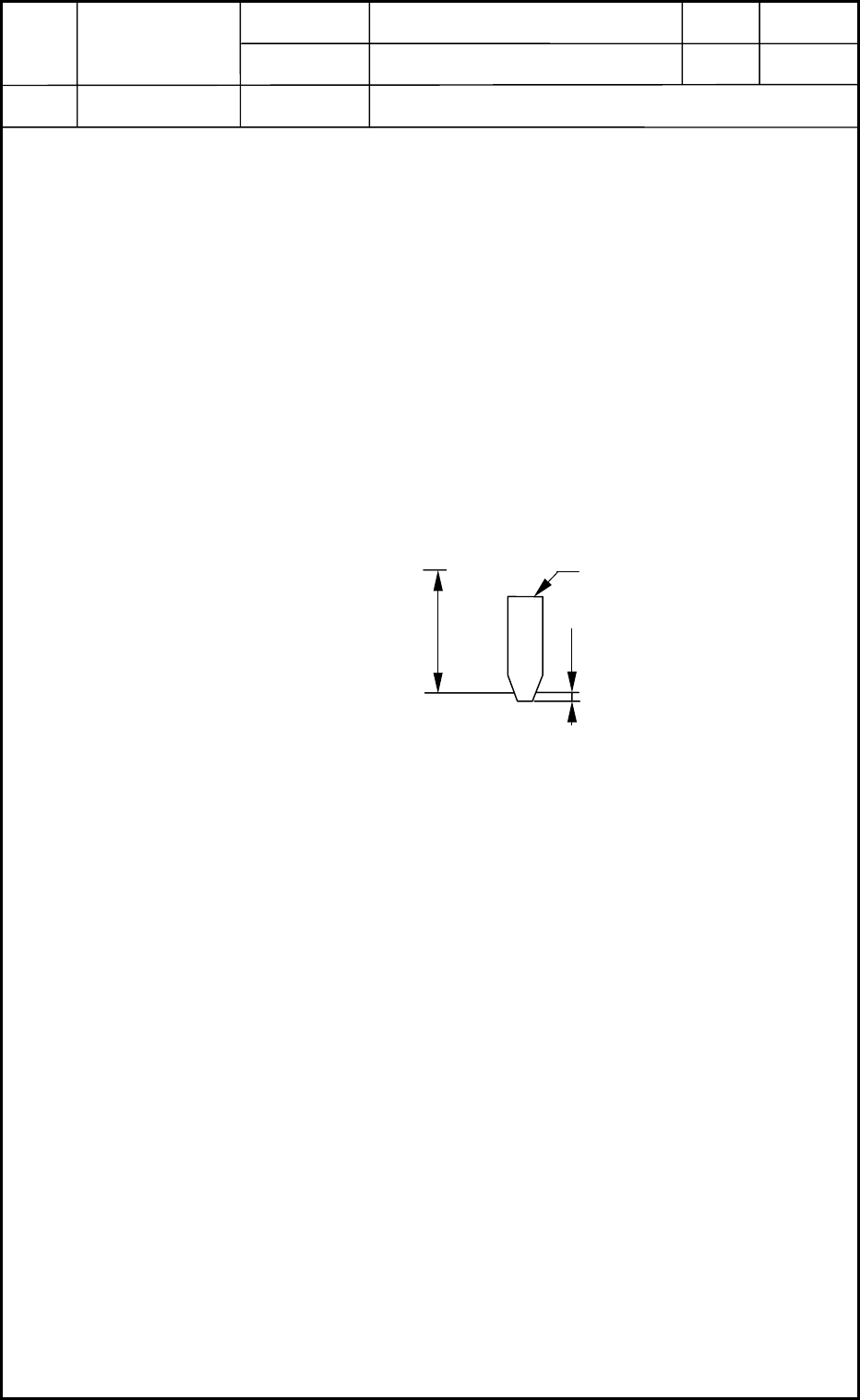
When the head is moved to the measuring position, HL and NL are related as shown in Fig.
A6 at each origin position.
Measuring Method : Example: (a) Use a block gauge (32 mm) for the measurement.
(b) Move down the HL axis (basic stroke) by 24
mm and the NL axis by 8 mm and perform the
measurement.
Example of Data Entry : When the nozzle is located below the reference plane, a plus
value must be entered. Enter "-0.1 mm" for "Head Up/Down
Offset".
• Entry of Offset Data
Enter parameters in the "Head Up/Down" tab sheet and save the changes. (Operation
Sequence: [SUPV] Button → [EDIT] Button → [SYSTEM] Button → [EDIT] Button
entitled "Machine System" → "Head" Tab Sheet → "Head Up/Down" Tab Sheet)
Heads
2. Installation Offset
1-6
Fig. A6 Measurement of Head Level Offset
PCB Upper Surface Reference Point
Design Value of
Stroke
32
Master Nozzle
0.1
L1
Unit : mm
0403-001
Device
Name
Chip Mounter
Block Name
Page No.
Unit Name
Revision
Model ItemGXH-1
2.2.2 Feeder (A) Offset (L: Up and Down)
It is required to release the [STAGE READY] switches because this maintenance
work must be performed with the doors being opened.
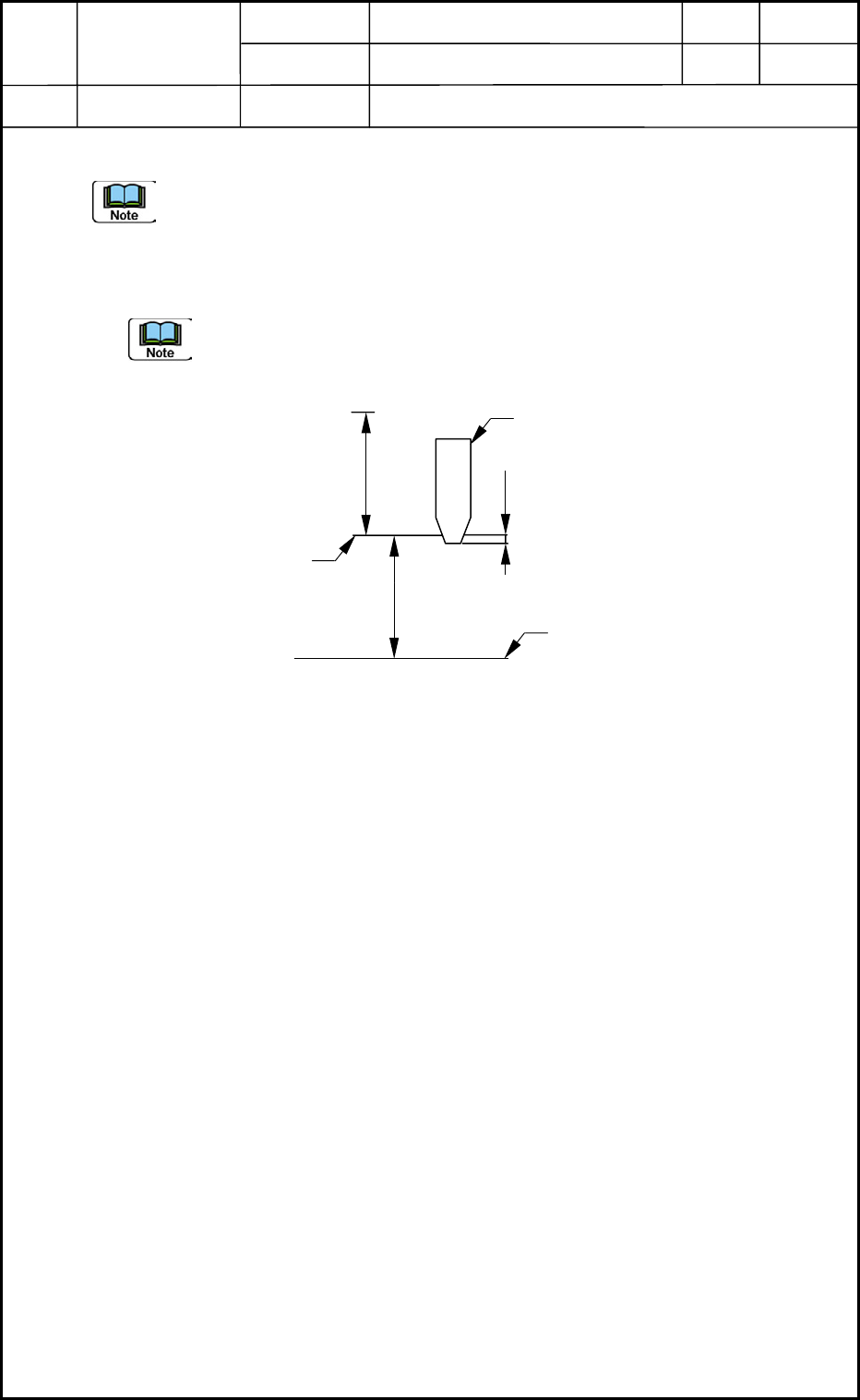
• Measurement and Entry of Offsets (compared with both ends of each feeder) and
Automatic Calculation (Expected Function) of Feeder Offsets
The head level offsets are also considered for the pickup height but not for the
inching (manual alignment) operation.
Example of Data Entry : 0.21 mm, assuming that the nozzle is located below the
reference plane and a plus value must be entered.
Regarding the head level offset as a feeder offset for which the
head level offset (L2 = -0.21), Head Level Offset L1 equals to
"-0.1 mm".
Feeder (A) Offset
L2 - L1 = -0.21 - (-0.1) = -0.11 mm
Heads
2. Installation Offset
1-7
Design Value of
Stroke
Fig. A7 Measurement of Feeder Offset
32
Master Nozzle
Pickup Upper Plane
Reference
0.21
L2
104
Upper Surface of
Feeder Base
Unit : mm
0403-001