SIPLACE Station Software 7xx to 714 介绍.pdf - 第133页
Station Software 7xx to 714.0 (R20-2) / Feature Description 11/2020 Edition 133 8.10 Position Detection of Waffle Pack Trays In SIPLACE Pro fiducials may be d efined for waffle pack tray s. The measurement is performed a…
Station Software 7xx to 714.0 (R20-2) / Feature Description 11/2020 Edition
132
Tray editor
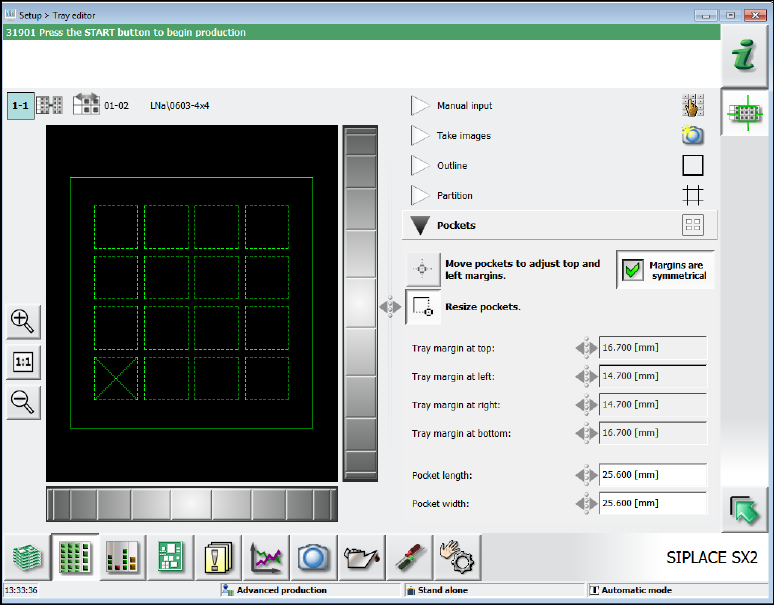
The selected setup position and the waffle pack tray name in SIPLACE Pro are displayed on the
left side of the Tray editor.
The right part of the Tray editor contains the numeric waffle pack tray description.
Figure 8-7: Tray editor
The description is divided into five areas that may be opened respectively.
Manual input
In this area the numeric values for the number of columns and rows and the waffle pack tray
height (= height of the component support base) are entered.
Take images
In this area the images are recorded to adapt the waffle pack tray description to the facts in the
following areas.
Outline
In this area the waffle pack tray position and size are entered and adjusted.
Partition
In this area the distance between the single waffle pack tray columns and rows are measured.
Additionally, the pickup sequence can be defined by selecting the edge of the first pickup
division.
Pockets
In this area the position and size of the component pockets on the waffle pack tray are
calibrated.
Station Software 7xx to 714.0 (R20-2) / Feature Description 11/2020 Edition
133
8.10 Position Detection of Waffle Pack Trays
In SIPLACE Pro fiducials may be defined for waffle pack trays. The measurement is performed
after each movement of the waffle pack tray before the next repick.
The pickup positions are corrected using the measured fiducial positions.
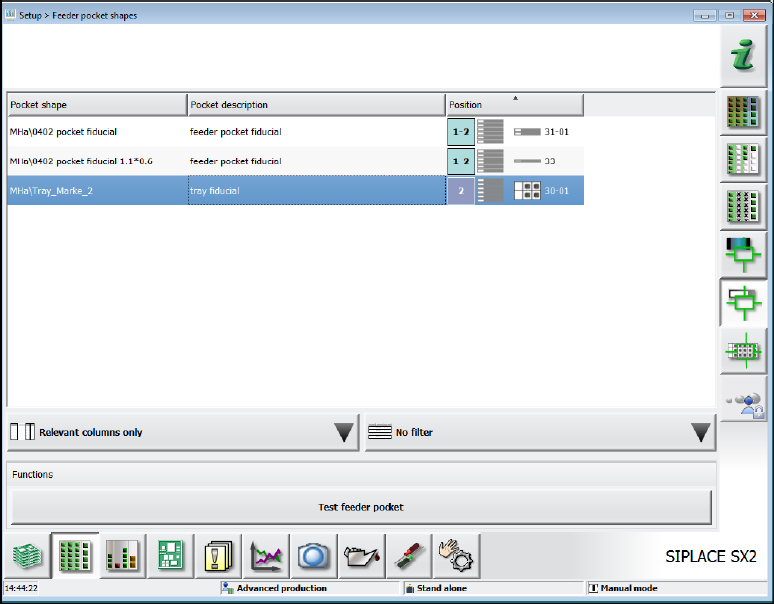
If waffle pack trays with fiducials are defined in the setup, the fiducials are displayed in the Setup –
Feeder pocket shapes view.
Figure 8-8: Fiducials for waffle pack trays
By selecting a fiducial and clicking on the Test feeder pocket button the fiducial is selected for
teaching.
Station Software 7xx to 714.0 (R20-2) / Feature Description 11/2020 Edition
134
8.11 Changing Acceleration Value for Waffle Pack Tray
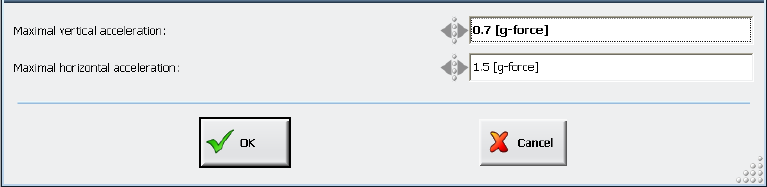
In the Setup view for waffle pack tray feeders, the acceleration values in Y- and Z-direction for
MTC and WPC may be changed at the station as of the Advanced production activity level. The
values are entered analogous to SIPLACE Pro (g= 9.81 m/s
2
) and the value ranges are also taken
over from SIPLACE Pro. However, no changes can be made for the Multiple JEDEC Tray Feeder
at the station.
Figure 8-9: Changing acceleration value
Provided that the "Download and Upload ..." handling option is set in SIPLACE Pro and the
operator at the station has the appropriate authorization, the changed acceleration values will be
uploaded to SIPLACE Pro and written into the SIPLACE Pro database.
If SIPLACE Pro rejects the access, the changed acceleration values will only remain locally at the
station until the next setup change or reboot.
8.12 Error Handling after Vision and Pickup Errors
Two new detailed warning and error messages have been introduced in response to frequent
Vision and pickup errors. The correspondent warning and error threshold can be set under
Settings – Machine options – Fault thresholds. The values are visible on all activity levels but
may only be changed as of the Machine service activity level.
Preset threshold values:
– Number of considered trials: 500 (cannot be changed by the operator)
– Warning threshold: 10 of 500 (= 2%)
– Error threshold: 25 of 500 (= 5%)
If the warning threshold is reached, a detailed warning will be displayed on the GUI and the pickup
position automatically corrected.
If the error threshold is reached, the track will be deactivated and the correspondent, detailed error
message displayed on the GUI.