SIPLACE Station Software 7xx to 714 介绍.pdf - 第142页
Station Software 7xx to 714.0 (R20-2) / Feature Description 11/2020 Edition 142 8.24 SMEMA Pass/Fail Conveyor Option The new SMEMA: Pass/Fail conveyor option has been introduced for the SMEMA interface. With this option …
Station Software 7xx to 714.0 (R20-2) / Feature Description 11/2020 Edition
141
8.22 Virtual Inkspot Handling
As of this station software version, virtual ink spots can be detected via an external Manufacturing
Execution System (MES) and the SIPLACE Board Gate Keeper (BGK) and released for the
stations in the line with the feature Whisper Down the Line (WDTL). Thus, the inkspots must not
be read by the PCB camera at each station.
The MES receives the inkspot information. The BGK inquires the inkspot information from the MES
and behaves like a preceding station to the first station in the line. The PCB barcode and the
inkspot information are transmitted via WDTL by the BGK to the first station. Thereafter, the inkspot
information is transferred via WDTL from the first station to the succeeding stations.
Prerequisites
– SIPLACE Pro Version from 11.1
– The "Whispering Down the Line" license is required for each station in the line.
– The Whisper Down the Line option must be enabled for all stations.
– The External Virtual Inkspot Handling feature must be enabled in SIPLACE Pro.
Restrictions
– Physical and virtual inkspots must not be mixed.
– The board must not contain any active inkspots.
8.23 Indicator Lamps and Audible Signals – Enhancements
The placement machines are equipped with indicator lamps to inform the operator about the
machine status. Depending on the machine type, the indicator lamp systems can be two-colored
(green / white) or three-colored (green / yellow / red).
With the Distribute button in the user settings, the active indicator lamp system configuration can
be uploaded manually to SIPLACE Pro and be distributed to all placement machines in the line that
are switched-on at that time.
Prerequisites:
– A connection to SIPLACE Pro has been established.
– The current session is valid.
– All placement machines in the line are equipped with the same type of lamp indicator system
(two-colored or three-colored).
Optionally, an audible signal may be installed for the three-colored indicator lamp system.
If the audible signal is enabled, a corresponding button is shown in the Production view on the
GUI via which the signal may be disabled.
If the operator presses the Stop button at the machine or opens the cover, the signal is disabled
automatically.
Station Software 7xx to 714.0 (R20-2) / Feature Description 11/2020 Edition
142
8.24 SMEMA Pass/Fail Conveyor Option
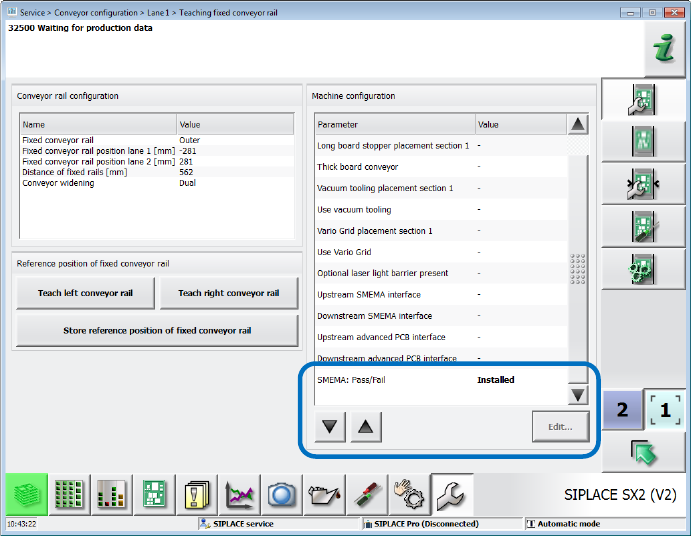
The new SMEMA: Pass/Fail conveyor option has been introduced for the SMEMA interface. With
this option an aborted board is announced to the succeeding station via another signal line. A
board that has been loaded via the new signal is identified as aborted in the machine and will thus
be passed over and locked out via the new signal line. For this, the advanced SMEMA hardware
and new SMEMA cables (item no. [00334770-xx]) are required for the placement machines.
The option is supported on the X-series S placement machines.
The SIPLACE service activity level is required to set the option in the conveyor configuration on
the GUI.
Figure 8-11: Setting SMEMA: Pass/Fail option
Station Software 7xx to 714.0 (R20-2) / Feature Description 11/2020 Edition
143
8.25 Short Tape Handling for X-Feeders
If the end of a tape has been reached on an X-feeder the cover foil breaks and an error message is
displayed. To pick up the remaining components from the tape or process short tapes without
cover foils, the short tape handling mode has been introduced for X-feeders.
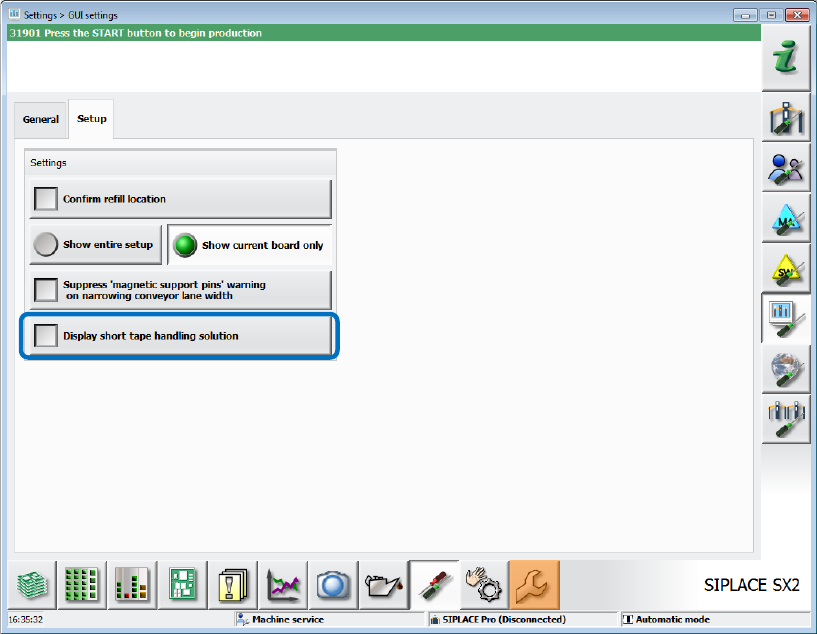
First, the Display short tape handling solution setting must be enabled under Settings – GUI
settings – Setup. For this, the Machine service activity level is required. The setting remains valid
after a restart.
Figure 8-12: Setting Display short tape handling solution