SIPLACE Station Software 7xx to 714 介绍.pdf - 第28页
Station Software 7xx to 714.0 (R20-2) / Feature Description 11/2020 Edition 28 The figure above displays that four magazine carrier locatio ns are mechanically avail able for this machine configuration. Ma gazine carrier…
Station Software 7xx to 714.0 (R20-2) / Feature Description 11/2020 Edition
27
Features for SX-Series (V703.01)
The station software supports the new SX1/SX2 placement machine (with one or two gantries).
4.11 Nozzle Changer Configuration (TwinHead, C&P20A, CPP)
Depending on the built-in hardware devices and their positions (e.g. placement head type,
stationary cameras, table position outside/inside), different nozzle changer configurations are
possible on the SX1/SX2 placement machines. The mechanically available magazine carrier
locations, the nozzle reject bin and centering station, and the available reject boxes for components
and nozzles are parts of the nozzle changer configuration. Four magazines per magazine carrier
and up to four magazine carriers per gantry are available.
4.11.1 Magazine Carrier Numbering
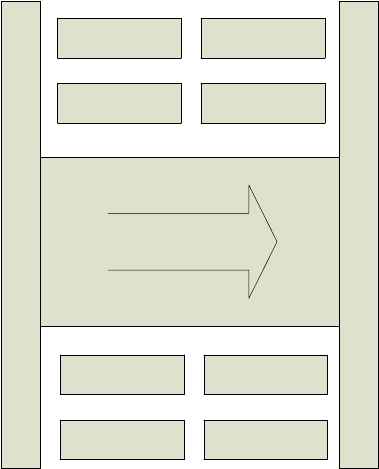
The magazine carrier numbering on the SX1/SX2 placement machine is defined as follows:
3 4
1 2
Conveyor
2 1
4 3
Figure 4-1: Magazine carrier numbering on the SX1/SX2 placement machine
The figure displays the maximal number of magazine carriers and their numbering on the SX1/SX2
placement machine. Depending on the built-in hardware, all magazine carriers are not always
available. In principle, the available magazine carrier locations differ, if the table is installed inside
or outside and if a WPC or stationary cameras are available.
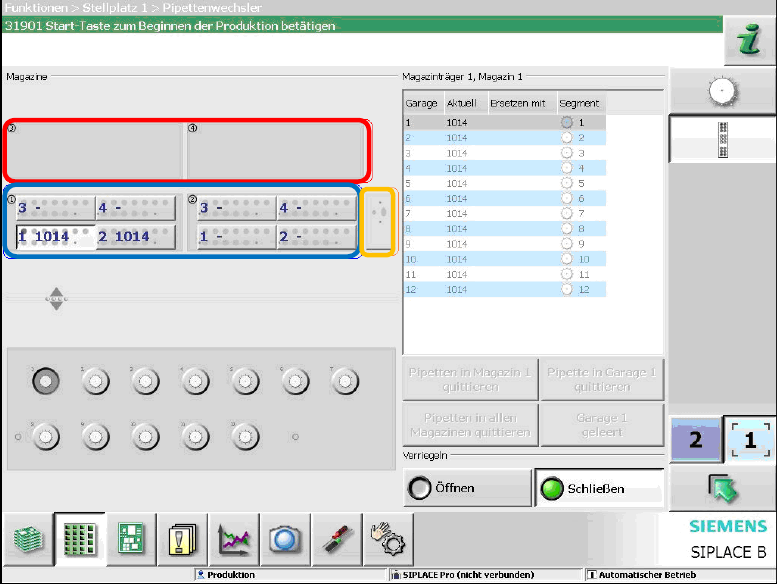
Only the magazine carrier locations that are mechanically available are displayed on the GUI. The
following example displays the available magazine carrier locations, if the table is located outside.
Station Software 7xx to 714.0 (R20-2) / Feature Description 11/2020 Edition
28
The figure above displays that four magazine carrier locations are mechanically available for this
machine configuration. Magazine carriers are installed on the magazine carrier locations 1 and 2
(blue border). The magazine carrier locations 3 and 4 (red border) are empty. The orange border
displays the nozzle reject bin.
The station software checks if the magazines are correctly installed and are valid for the installed
placement head. Otherwise, the corresponding magazine is displayed on the GUI.
4.11.2 Reject Bins
The disposal of components is a firm part of the placement cycle. Different reject bins are available,
depending on component range, placement head and machine type. For each reject procedure the
suitable bin is found and accessed.
Always the smallest possible bin for the component is selected and only as a last possibility, the
nozzle reject bin is used. If several bins or the component reject channel are considered, the travel
distance is minimized.
For each gantry on the SX1/SX2 placement machine there are five positions for component reject
bins and nozzle reject bins, four positions for the components and one position for the nozzles.
Maximal four reject bins can be installed at the same time (three for components and one for
nozzles). The station software checks if the reject bins are available and correctly installed.
Otherwise, the missing/incorrectly installed reject bin is diplayed on the GUI.
4.12 Gripper for TwinHead
The station software supports the gripper (non-standard nozzle) for TwinHead on the SX1/SX2
placement machine.
Station Software 7xx to 714.0 (R20-2) / Feature Description 11/2020 Edition
29
4.13 New PCB conveyor system
A new PCB conveyor system has been introduced for the SX1/SX2 placement machine. The most
important features of the conveyor system are listed in this section.
4.13.1 Transport Modes
The station software supports the single conveyor and dual conveyor modes on the SX1/SX2
placement machine. The "Quad Lane" conveyor mode is not supported.
4.13.2 Fixed Rail Position in Single Conveyor Mode
In single conveyor mode the rail is fixed with screws on the SX1/SX2 placement machine. The rail
can be adjusted to three additional positions. For this, the operator first has to set the desired
position on the GUI (SIPLACE Service activity level, under Conveyor Configurations – Fixed rail
options) and then unscrew the screws manually.
In dual conveyor mode the rail can be automatically adjusted in the same way as on the X-series.
4.13.3 Calibration Data for Conveyor Control
After booting, the conveyor type of the conveyor system is checked. If the corresponding ID differs
in conveyor system and station software an error message is displayed. The operator is prompted
to calibrate the conveyor manually and to restore the calibration data of the conveyor. If the ID was
"0" in the conveyor system, a generated ID is transferred to the conveyor system together with the
calibrated and restored machine data.
The ID cannot be entered manually.
4.13.4 Thick Board Option
Boards with a thickness up to 6.5 mm can be transported and clamped with this option. After an
appropriate hardware rebuild, the option can be set under SIPLACE Service – Conveyor
Configurations on the station software GUI and gets stored in the conveyor system.
4.13.5 Heavy Board Option
The conveyor system can handle heavy boards on the SX1/SX2 placement machine. In single
conveyor mode boards up to 5 kg and in dual conveyor mode boards up to 2 kg can be
transported.
The heavy board mode has to be set in den PCB Options in Siplace Pro and is transmitted to the
conveyor system. The option is displayed as a small weight icon between input conveyor and
processing conveyor in the Production view.
If the conveyor system detects a heavy board and the heavy board mode was not set, an error
message is displayed at the station. If the operator has inserted a heavy board manually, he or she
will be prompted to remove it.