SIPLACE Station Software 7xx to 714 介绍.pdf - 第171页
Station Software 7xx to 714.0 (R20-2) / Feature Description 11/2020 Edition 171 For optimum use of the function, the nominal pitch values must be set to the higher value in SIPLACE Pro for those compone nts that are deli…
Station Software 7xx to 714.0 (R20-2) / Feature Description 11/2020 Edition
170
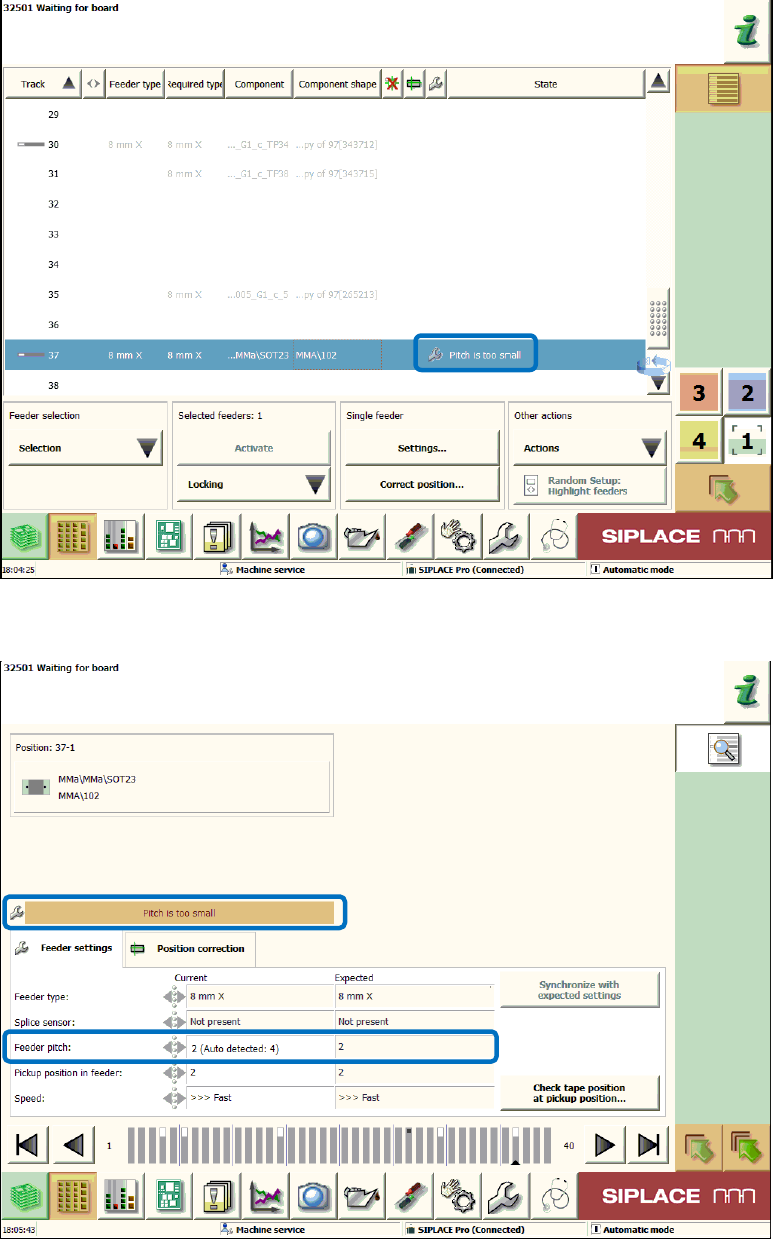
The software does not increase any pitch setting automatically. In case of incorrect detection, 50 %
of the components would be rejected. If the pitch is too small, this is displayed with the icon for
deviating parameter settings and the Pitch too small complement in the setup view of the
locations.
Figure 9-16: Setup view for the locations – Pitch too small
This will also be displayed in the Details view of the feeder under Feeder settings.
Figure 9-17: Feeder settings – Pitch too small
Station Software 7xx to 714.0 (R20-2) / Feature Description 11/2020 Edition
171
For optimum use of the function, the nominal pitch values must be set to the higher value in
SIPLACE Pro for those components that are delivered with different feeder pitches. This ensures
that the pitches are always corrected automatically by the software.
9.24 Additional Repick
Compatible mode: Complete
To prevent a machine stop, this option allows an additional repick although the value for repicks is
set to 1 in SIPLACE Pro.
An additional repick will be performed in the following cases, provided that 500 successful repicks
have been performed before (valid for each case):
– after SIPLACE Vision has recognized a material defect
– after an empty tape pocket was recognized
The option is set in the SetupCtrl.xml configuration file.
9.25 Handling of Frequent Vision Errors
Compatible mode: Complete
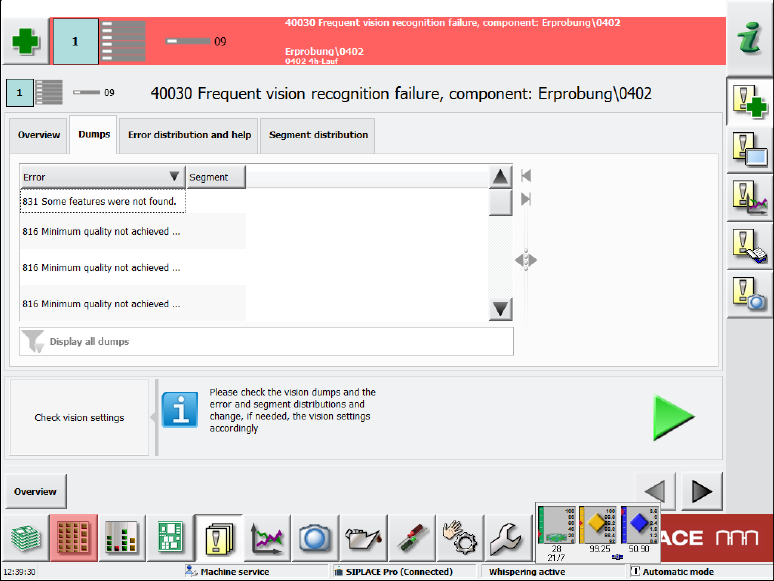
The display of detailed messages for frequent Vision errors has been enhanced.
In the Overview tab the same information on component and error rate is displayed as before.
In the Dumps tab the dump files are displayed. Beneath the list it can also be filtered by error
numbers and their frequency.
Figure 9-18: Frequent Vision errors – Dumps tab
Station Software 7xx to 714.0 (R20-2) / Feature Description 11/2020 Edition
172
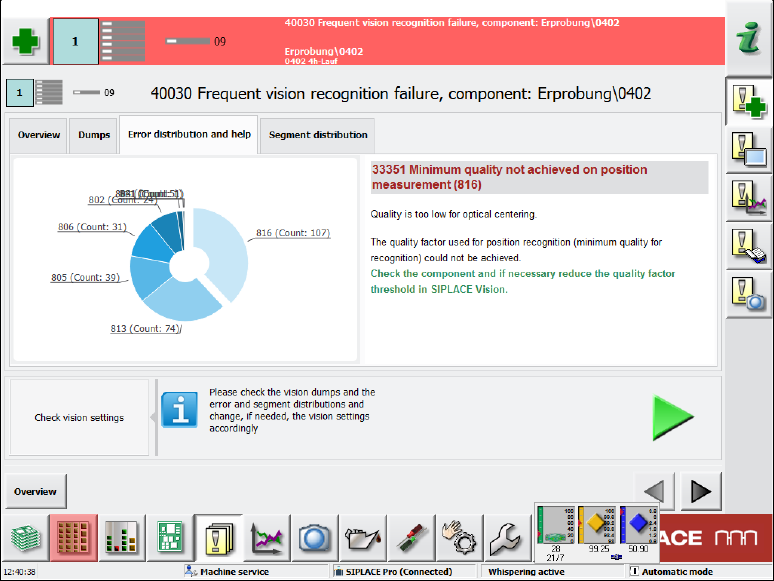
In the Error distribution and help tab a diagram displays all errors. If an error is selected by
clicking on it, corresponding help assistance is displayed to the right.
Figure 9-19: Frequent Vision errors – Error distribution and help tab
In the Segment distribution tab, the same diagram is displayed but additionally with the counter
for the respective segment.
9.26 Enhanced Placement Error Analysis
Compatible mode: Complete
In the Board view, an inspection option can be selected for each placement position. A Vision
image can be taken of the components before pickup and after placement on the board and the
dump files can be stored. However, with these analysis options it is not possible to differentiate if
the placement problem occurred on the way to the placement position, during placement or after
placement. For this, an inspection of the component position is required for one or several
placement positions immediately before the placement process takes place (before the z-axis is
started for placement).
The diagnosis functionality in the Board view has been enhanced by the Compare Image before
placement option.