SIPLACE Station Software 7xx to 714 介绍.pdf - 第157页
Station Software 7xx to 714.0 (R20-2) / Feature Description 11/2020 Edition 157 9.10 Triggering Automatic Error Reports Compatible mode: Complete Automatic error reports can be t riggered for unplanned machine stops duri…
Station Software 7xx to 714.0 (R20-2) / Feature Description 11/2020 Edition
156
NOTICE
When upgrading from a previous station software version to the 708.0 version, segments
with the Disabled or Not used states will be automatically reset to the Enabled status! If
required, the state has to be changed manually again for such segments.
9.9 Endurance Run with Components
Compatible mode: Complete
To test parts and modules adequately on early failures before a machine is delivered, an
endurance run has been developed for a possibly real placement mode.
In the endurance run, components are picked up and placed on a board as specified in SIPLACE
Pro. Thereafter, the components are removed from the board in the same sequence they were
placed and recycled before the cycle restarts. Special components, waffle pack trays and boards
are used for this. The waffle pack tray is fed via the conveyor. For higher robustness, fiducials can
be defined on the waffle pack tray.
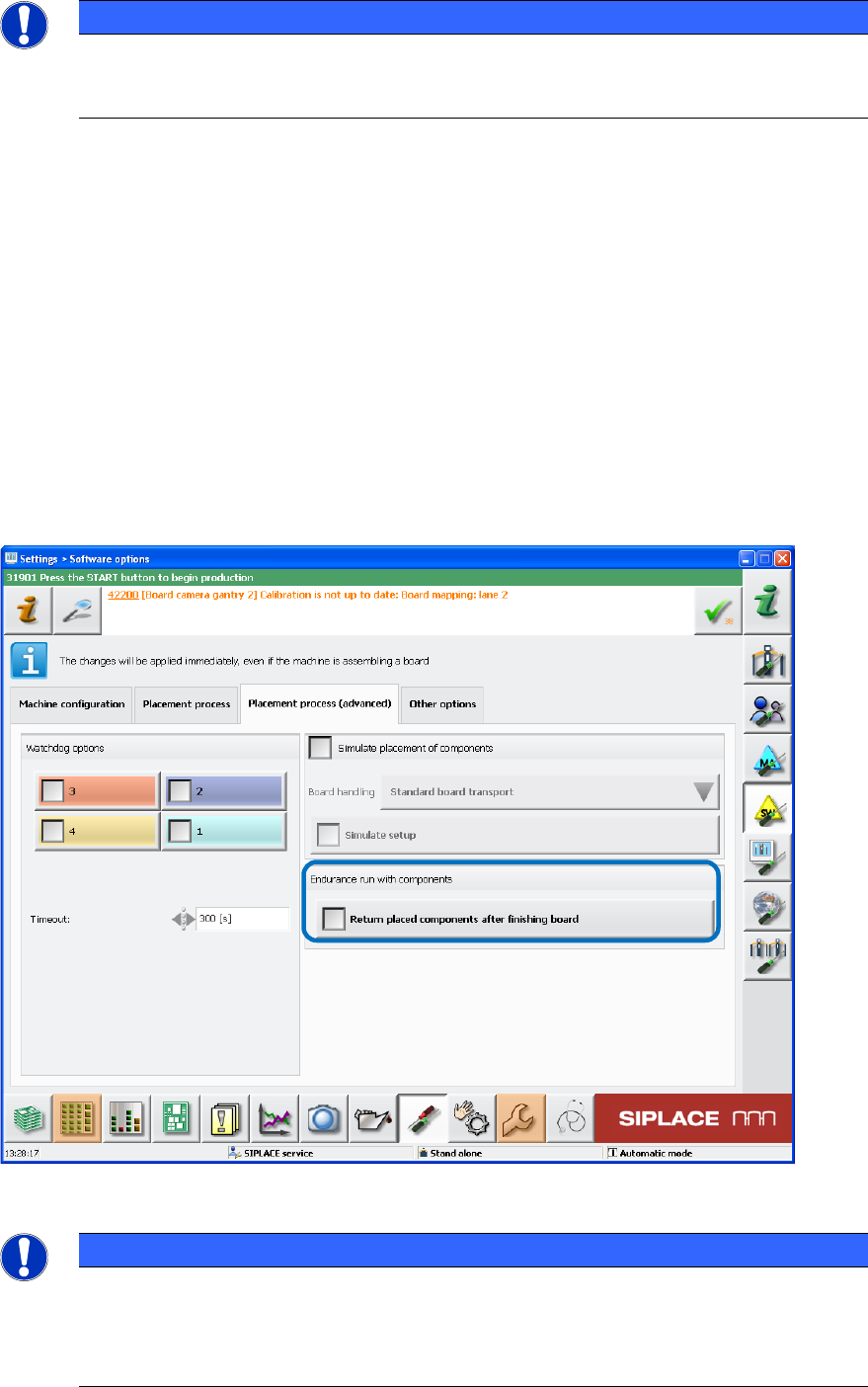
The endurance run will run automatically and can be enabled under Settings – Software options
– Placement process (advanced) – Endurance run with components as of the Machine
service activity level.
Figure 9-5: Endurance run with components
NOTICE
For operators of previous station software versions:
The already available settings for endurance run without components (Simulate
placement of components) have been moved from the Placement process tab to the
new Placement process (advanced) tab.
Station Software 7xx to 714.0 (R20-2) / Feature Description 11/2020 Edition
157
9.10 Triggering Automatic Error Reports
Compatible mode: Complete
Automatic error reports can be triggered for unplanned machine stops during reference runs and
dry-runs in this station software version. For this, the monitoring of the head axes must be set
manually. With the recorded data it is possible to detect and analyze the causes of malfunction and
fix the faults faster. The monitoring function is available for the SIPLACE Service activity level.
At first, the desired endurance run must be started under Settings – Software options –
Placement process (advanced). When all head axes are running, the monitoring must be
configured.
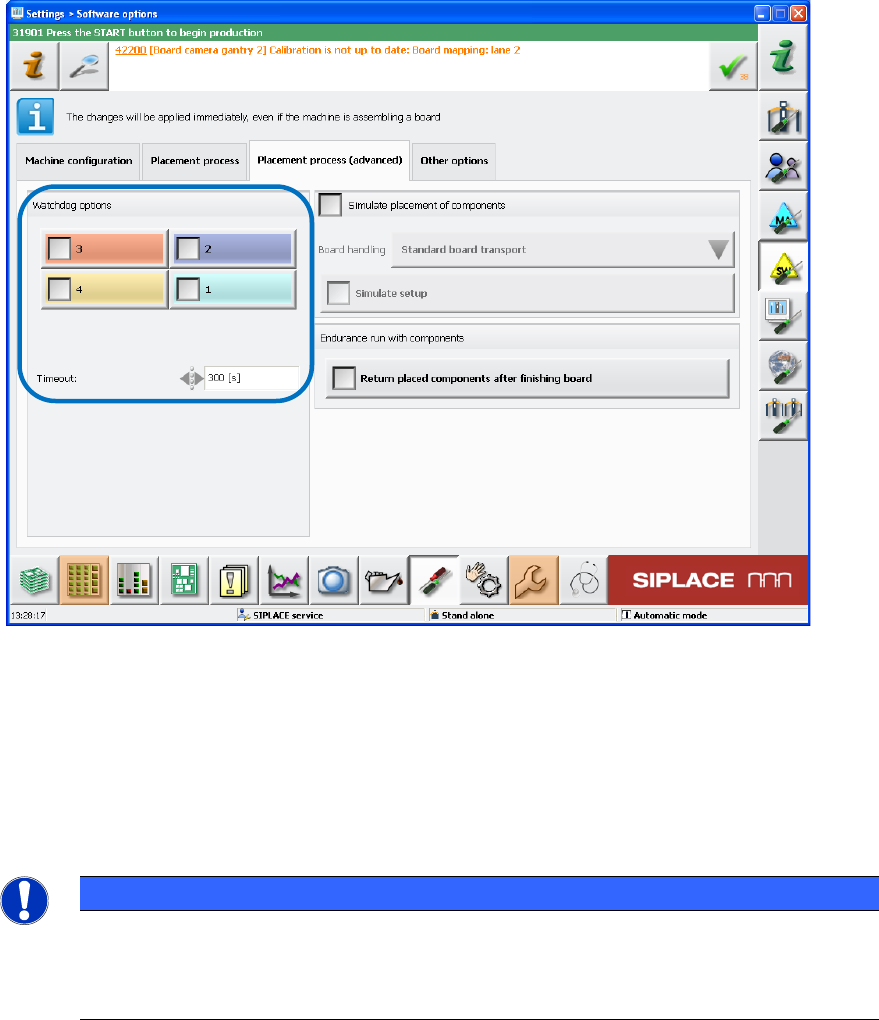
The head axes to be monitored must be selected manually and if required, the monitoring time can
be changed for the current endurance run. Then the monitoring must be enabled via the Watchdog
options check boxes. The set head axes also remain stored after a machine restart.
Figure 9-6: Enabling monitoring
The selected head axes will be monitored after the monitoring has been enabled. If one of these
head axes should not start after the set time, a respective automatic error report will be triggered.
If new / other endurance runs are started or an automatic error report has already been triggered,
the monitoring must be enabled again.
The monitoring must be disabled either via the Watchdog options check boxes or the Stop
button.
NOTICE
If a program is used in dry-run, it must be considered that the placement program
specified in SIPLACE Pro does not contain longer pause times for a head axis as the set
time in the monitoring function. Otherwise, the monitoring function would trigger the error
report.
Station Software 7xx to 714.0 (R20-2) / Feature Description 11/2020 Edition
158
9.11 Conveyor Carrier X for Measurements
Compatible mode: Not supported
For machine accuracy measurements as i.e. ACT or MFU, the glass components in the waffle pack
tray and the glass plate had to be set up on the component table. If required, feeders had to be
removed for this. With the new Conveyor Carrier X, the waffle pack tray and the glass plate can
be set up via the board conveyor instead. Thus, an intervention in the customer setup is avoided
and time saved.
The Conveyor Carrier X occupies one virtual track on the table – like the Arbitrary Carrier X.
The Conveyor Carrier X must be set up manually on any empty track in an opened setup. The
waffle pack tray with the glass components must be set up manually on the carrier as well. Then
the carrier position and the conveyor lane (1 or 2) must be set in SIPLACE Pro.
Fiducials can be defined on the waffle pack tray for a higher pickup accuracy.
As the loaded waffle pack tray is always set to full component filling level, the operator must ensure
that the waffle pack tray is filled.
The board description for the Conveyor Carrier X has to be adapted in SIPLACE Pro. In case of
dual lane conveyor, the conveyor must be operated in synchronous dual conveyor mode.
Additionally, the operator must ensure that the waffle pack tray is available on the second lane.
Restrictions
– No travel range check.
– No pickup simulation.
– The Conveyor Carrier X uses one track on an X-table virtually. If the real table should be
completely occupied, the operator might have to remove a feeder from the table to create place
for the virtual feeder.
– No I-Placement mode.
– The SIPLACE Pro Optimizer does not consider the time it takes to fill up a tray with
components and change it.
9.12 Checking the Placement Heads
Compatible mode: Complete
To reduce unplanned machine stops, the placement heads can be checked with functions of the
SIPLACE Head Care Station. The functions are integrated in the station software and can be
performed for the CPP, C&P20A and C&P20 P placement heads on the Machine service activity
level. The head check mode and the placement head can be selected in the ToolTestBench view.