SIPLACE Station Software 7xx to 714 介绍.pdf - 第53页
Station Software 7xx to 714.0 (R20-2) / Feature Description 11/2020 Edition 53 3) / 4) Possible workflow s and workflow directive s Here the possible troubleshooti ng workflows are displaye d as buttons. For some workflo…
Station Software 7xx to 714.0 (R20-2) / Feature Description 11/2020 Edition
52
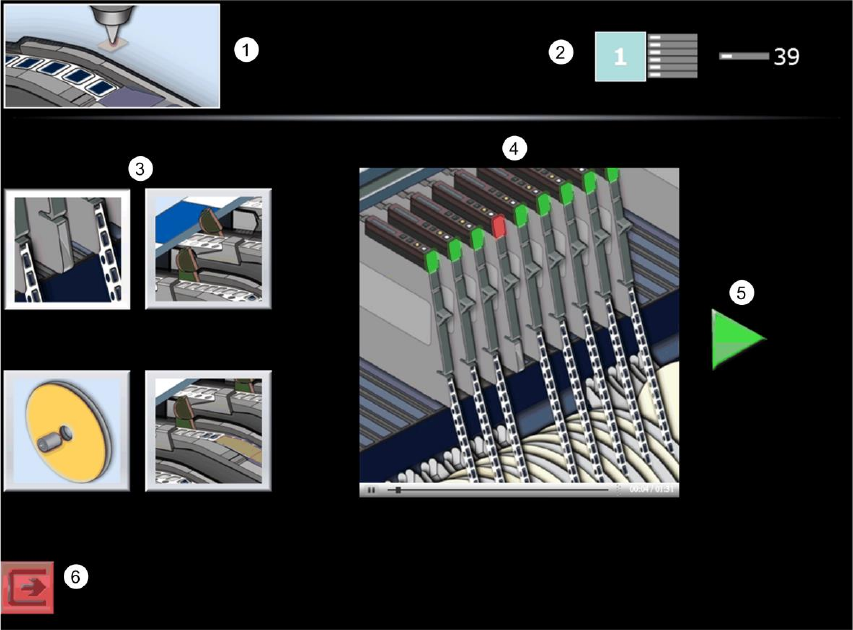
Troubleshooting assistance is automatically offered in a graphical form in the SIPLACE Smart GUI
for the most frequent downtime causes. The assistance instructions display where the problem
occurred, which problem has occurred and how the problem can be solved. In all other cases an
icon is displayed that prompt the operator to call for a skilled operator for assistance.
Figure 6-4: View with troubleshooting assistance
1) Error / Assist type
Here the error / assist type is displayed. Error / assist types exist for the following problems:
– Pick-up failure
– Dirty nozzle
– Cover foil torn
– Cover foil peeled
– Refill components
– Conveyor board jam
– PCB fiducial recognition
2) Problem location
Here the location is displayed, where the problem occurred.
Station Software 7xx to 714.0 (R20-2) / Feature Description 11/2020 Edition
53
3) / 4) Possible workflows and workflow directives
Here the possible troubleshooting workflows are displayed as buttons. For some workflows up to
four troubleshooting possibilities are displayed. By pressing a button, a corresponding
troubleshooting assistance is displayed to the right. It is automatically switched between the single
steps in the assistance. Some workflows change if Setup Center is present or not.
5) Confirmation
By pressing the green arrow symbol the operator confirms that troubleshooting has been
performed and production can continue. If necessary, further dialogs appear (e.g. prompting to
press the Start key on the machine, close the cover etc.).
6) Switch to station software GUI
With this button it is possible to switch to the regular station software GUI.
6.11 Automatic Storage of Feeder Parameters
If the option for automatic synchronization is activated, all changes to the feeder parameters (pitch,
speed or pick-up position) are automatically sent to SIPLACE Pro in order to store them in the local
setup. A corresponding icon appears in the Feeder details view. If the option is deactivated, no
values are sent to SIPLACE Pro and it is not possible to send the values manually from the station
to SIPLACE Pro either. However, in case that the values do not correspond to the set values in
SIPLACE Pro, the values in SIPLACE Pro can be transferred manually.
6.12 New Feeder Types
The following new feeder types are supported by this station software version:
4mm X-feeder, 16mm XN-feeder, 104mm X-feeder and Surftape AX.
The Surftape AX feeder is designed for the chips (bare dies) placement in the machine and is
supported for the 8mm, 12mm and 16mm widths. This feeder is a 3rd-party feeder and is not
delivered by ASM Assembly Systems GmbH & Co. KG. It is placed on the X-table via the X-feeder
adapter and is mounted on the adapter via a separate adapter plate.
6.13 Station-Wise Download with WDTL
As of this station software version, the “Whispering down the Line” (WDTL) function is supported
for station-wise download, i.e. the last board of the previous recipe only has to be confirmed at the
first station. Additionally, in synchronous dual conveyor lane mode a batch change at the first
station only has to be confirmed at the conveyor lane on which the board type changes.

Station Software 7xx to 714.0 (R20-2) / Feature Description 11/2020 Edition
54
6.14 SIPLACE Random Setup Feature for Trays
The station software offers the SIPLACE Random Setup feature for a flexible setup of tray feeders.
The most important feature is the random setup for trays. For this, the trays have to be marked as
random in SIPLACE Pro and the system has to be run together with SIPLACE Setup Center.
The following use cases are possible:
– A tray that is described in the target setup can be set up on another level. Thereby, another
random target specification may be suppressed. Target setup means the setup that is specified
in SIPLACE Pro and is sent to the station.
– A tray that is described in the target setup can be set up several times, i.e. additional trays may
be added.
The feature can be used for WPC5, WPC6 und MTC.
At the station random feeders / trays are marked with a double arrow ( ) in the Feeders,
components and nozzles view.
Restrictions
The feature only works in combination with SIPLACE Setup Center.
6.15 Pneumatic Stopper for SX-Series
As of this station software version all SX-series conveyors are equipped with pneumatic stoppers
instead of the former standard mechanical stoppers. The conveyors recognize different
configurations and so they can be operated with different stopper configurations.
6.16 Zero Point Calibration for Twin /DP Axes
Until now the zero correction for Twin / dp axes was determined with the aid of a special calibration
nozzle.
As of this station software version the empty nozzle interface of the segment (i.e. without nozzle) is
measured via SIPLACE Vision for calibration instead. The operator only has to remove the existing
nozzle from the segment before. Additionally, the calibration is not performed segment-wise but
head-wise.