SIPLACE Station Software 7xx to 714 介绍.pdf - 第250页
Station Software 7xx to 714.0 (R20-2) / Feature Description 11/2020 Edition 250 Figure 13 -3: Cracked compon ent detected In SIPLACE Pro, the inspection can optionally be activated for a d efined period and the feeder de…
Station Software 7xx to 714.0 (R20-2) / Feature Description 11/2020 Edition
249
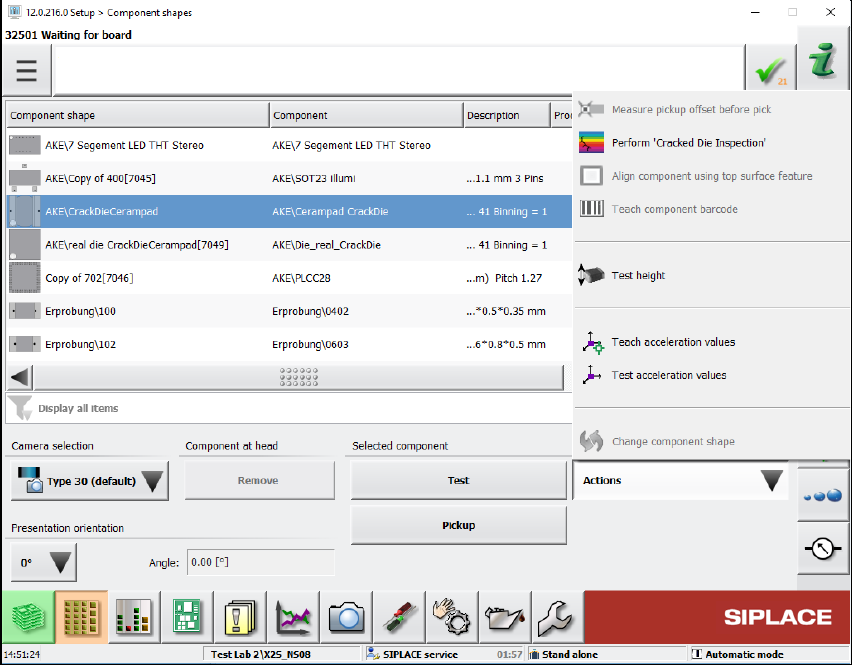
Figure 13-2: Perform "Cracked Die inspection"
Cracked components are marked with the rainbow-colored icon in the Processing options column
of the component list.
Station Software 7xx to 714.0 (R20-2) / Feature Description 11/2020 Edition
250
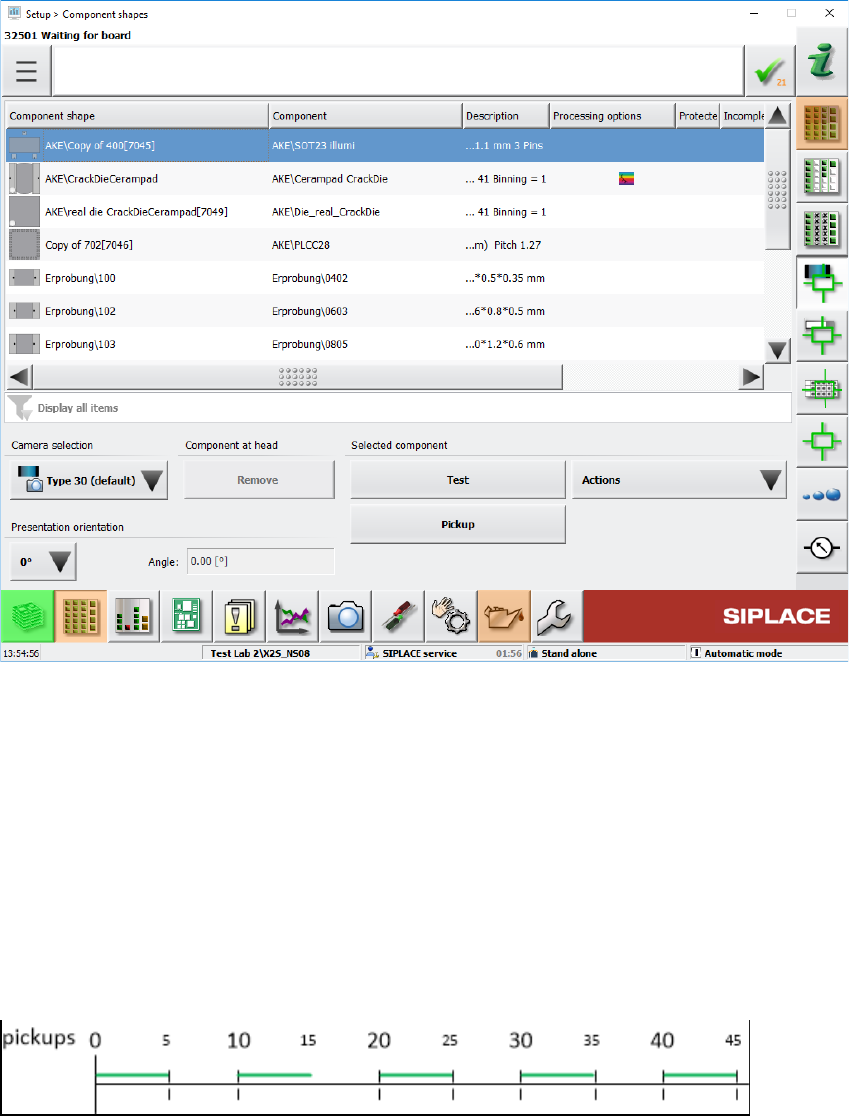
Figure 13-3: Cracked component detected
In SIPLACE Pro, the inspection can optionally be activated for a defined period and the feeder
deactivated after a defined number of detected cracked components (see example below).
Example
– Number of measurements; x = length of measurement cycle (default = 1) – periodic
measurement
– Restart measurement after y components (default = 1)
– Stop station after z number of cracked components
x = 5; y= 10; z = 2
The "Cracked Die inspection" runs during the green phases. If two cracked components are
detected during the green phase, the feeder will be deactivated.
Station Software 7xx to 714.0 (R20-2) / Feature Description 11/2020 Edition
251
13.11 Measuring Barcode on Bottom Side of Component
Compatible mode: Not supported
For a component it can be specified that its barcode on the bottom side shall be read with the
component camera and stored in the Traceability data. A corresponding barcode description must
have been defined in SIPLACE Pro. The barcode data is generally the same as for barcodes that
can be read by the board camera.
If the barcode could not be read, the component will be:
– rejected if it was picked up from a feeder
– returned to its pick location if it was picked up from a tray
– returned to reject conveyor or reject plate, if available
13.12 Pass-Through Mode for Boards without Recipe
Compatible mode: Compatible
If the Transport through conveyor mode is set for the conveyor, the recently used board length is
used when transporting the boards. The board length is mandatory for transporting a board without
a recipe. Usually, customer boards are used for setting up and testing a new line. These boards
may have another length than the test boards used before.
To avoid conveyor errors, the current board length can now be modified without being connected to
SIPLACE Pro. An editable field for the board length has been added to the Lane – Functions
dialog in the conveyor settings.
Restrictions
The feature is not supported for lines containing shuttles.