SIPLACE Station Software 7xx to 714 介绍.pdf - 第192页
Station Software 7xx to 714.0 (R20-2) / Feature Description 11/2020 Edition 192 By selecting the reject plat e button, the following dialog box open s: Figure 10 - 16 : Rejected components on the reject plate This dialog…
Station Software 7xx to 714.0 (R20-2) / Feature Description 11/2020 Edition
191
Features (V709.1: Compatible Mode 708.2)
10.11 SIPLACE TX-Series – Enhancements
Compatible mode: Not supported
10.11.1 Reject Plate Supported on GUI
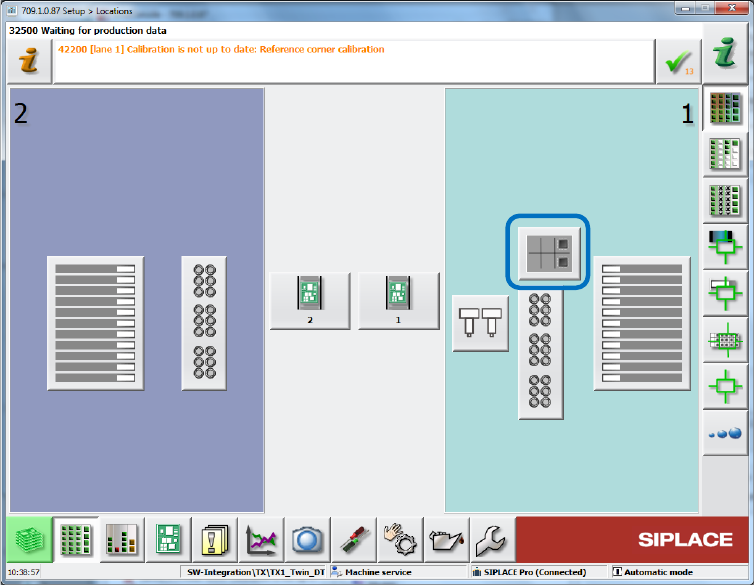
The reject plate is a fixed mounted plate on which the station can drop rejected components after
the SIPLACE Vision system detected errors. If a reject plate is installed in a SIPLACE TX
placement machine, a corresponding button will be displayed in the main menu of the station
software. This option must be enabled in SIPLACE Pro for the respective component / component
shape.
Figure 10-15: Reject plate in main menu
Station Software 7xx to 714.0 (R20-2) / Feature Description 11/2020 Edition
192
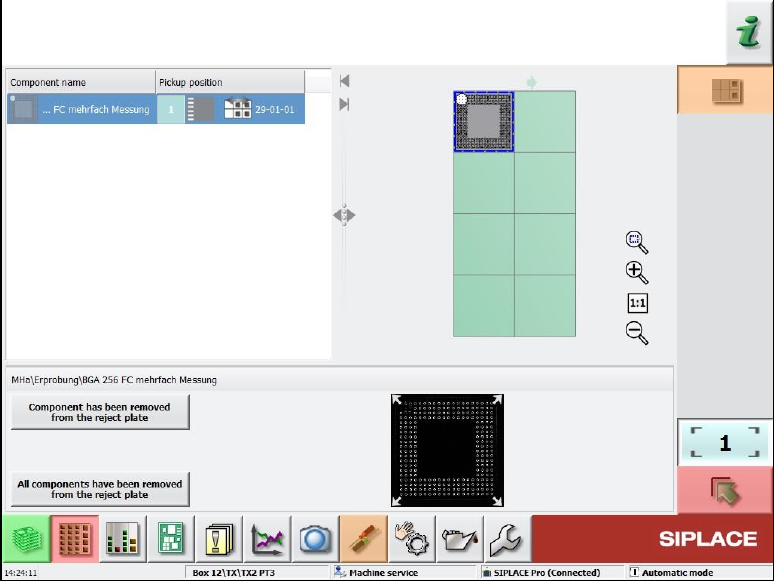
By selecting the reject plate button, the following dialog box opens:
Figure 10-16: Rejected components on the reject plate
This dialog box contains a list of the components put onto the reject plate and a graphical
representation (grid) of the plate with the components on it. A component can be selected from the
list or in the grid, the selection is automatically synchronized.
Additionally, the pickup position from where the component was picked up is displayed. If a
component was picked up from a tray, only the level and magazine number are displayed, not the
pickup position in the magazine!
Once a component has been selected, the attached Vision dump is displayed (if still existing on the
drive).
With this information the operator can check whether the component is ok or not and decide to put
it back in the feeder again. This requires that the feeder from which the component was picked up
is still inserted in the machine at the same location.
The operator can confirm the removal of the component from the reject plate with the Component
has been removed from reject plate button. Confirmation must be done for each component.
A multiple selection is not available.
10.11.2 Increased Component Range for Twin Head
Until now, the component range for Twin Head on SIPLACE TX-series placement machines was
limited to 55 x 45 mm due to the reject bin size. To allow larger connectors to be placed, the
component range has been increased to 75 x 10 mm from this station software version. For this,
the nozzle reject bin must be removed from the side on which the Twin Head is mounted. If the
components are correspondingly marked in SIPLACE Pro, they will be rejected onto the reject
plate.
Station Software 7xx to 714.0 (R20-2) / Feature Description 11/2020 Edition
193
10.12 Independent Placement – 2-in-1 Mode
Compatible mode: Complete
I-Placement is a placement mode in a dual gantry placement area, where every gantry only places
components on the board of the assigned conveyor lane. This mode can be used to boost
performance and decouple the operation of the left and right conveyor lane. From this station
software version, it is also possible to operate the placement machine independently for the two
lanes. The placement machine is then running in 2-in-1 mode.
Prerequisites
– 2-in-1 mode only applies for dual conveyor placement machines in which independent jobs
have been started on both lanes.
– The two recipes must have no gantry in common (for placing, measuring) on this placement
machine.
The following actions can be performed on one conveyor lane while another product is being
produced on the other conveyor lane:
– Teaching board fiducials
– Teaching fiducials for feeder modules (e.g. component pocket)
– Teaching component shapes
– Pin1 detection
– Correcting pickup position
– Teaching placement positions
– Inspecting a position to decide whether it should be placed or not
– Teaching trays
– Skipping a placement head segment
– Changing the placement list