SIPLACE Station Software 7xx to 714 介绍.pdf - 第35页
Station Software 7xx to 714.0 (R20-2) / Feature Description 11/2020 Edition 35 5 Feature Description – Station Software V704.x Features (V704.01) 5.1 Support of SX+ Placement Mac hine The station software supp orts the S…
Station Software 7xx to 714.0 (R20-2) / Feature Description 11/2020 Edition
34
4.27 Non-Standard Nozzles Can Be Rejected
In SIPLACE Pro there is a setting for non-standard nozzles to be rejected or not. The station
software version now supports this feature.
Features (V703.03: Compatible Mode to V704.02)
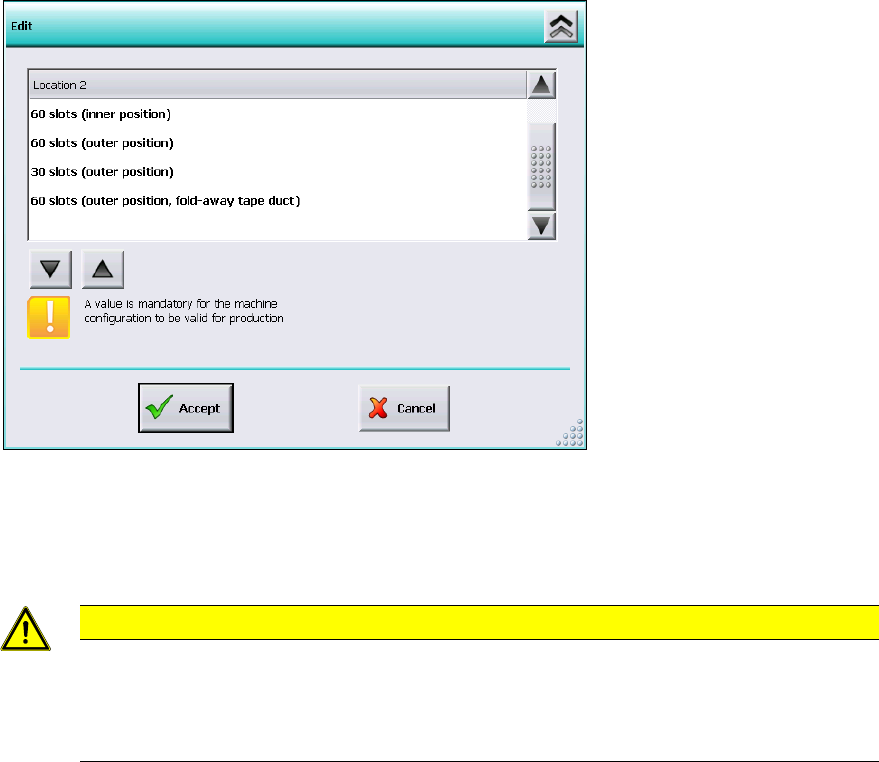
4.28 Settings for Manual Tray Carrier SX
If the manual tray Carrier SX is used, the insert frame with the fold-away tape guide channel is
required. For this, the operator has to make manual settings in the Auto-configuration under
Machine configuration on the Machine service activity level.
Figure 4-2: Settings for manual tray Carrier SX
The 60 slots (outer position, fold-away tape duct) entry has to be set for the table location.
Thus, the 27x27 reject bin and the left reject channel on the location are excluded from the
configuration.
CAUTION
If this setting is not made the component may be rejected over the tray and the Z-axis
may dash hard against the tray.
On upgrading from station software versions <=704 the settings in the Auto configuration
have to be checked accordingly, if the manual tray Carrier SX is used.
4.29 Two-Row Nozzle Changer on SX1/SX2 for C&P20 and CPP
The two-row nozzle changer is supported for the C&P20 and CPP placement heads on the
SX1/SX2-series placement machines.

Station Software 7xx to 714.0 (R20-2) / Feature Description 11/2020 Edition
35
5 Feature Description – Station Software V704.x
Features (V704.01)
5.1 Support of SX+ Placement Machine
The station software supports the SX+ placement machine. This is an SX placement machine
without gantries, but with changeover tables, moving-in mechanism, tape cutter etc. The placement
machine can be flexibly used, i.e. as a pure conveyor range or together with gantries that can be
added or removed according to the requirements. The SX+ can be upgraded to an SX1/SX2
placement machine by a service engineer.
NOTICE
If the SX+ placement machine shall be used without gantries, this has to be configured in
the Auto-configuration after the machine has been booted for the first time. For this the
"Ignore gantries" entry has to be selected at the processing area in the machine
configuration dialog.
5.2 Support of New Feeders
The station software supports the new "Carrier SX" feeder. The "Carrier SX" is placed on the tracks
1-25 on the changeover table 60 and is displayed as a manual tray on the GUI.
Further the 3
rd
party feeder "Data I/O RoadRunners" and the 3
rd
party LED feeders "HanSan" and
"Top Engineering" are supported via the FFI protocol. The 3
rd
party feeders are displayed as
X-adapter feeders on the GUI.
5.3 Fast Gantry Exchange on SX Placement Machines
For slave gantries with CPP/C&P20A placement heads a fast gantry exchange is possible when
gantries are added, exchanged and removed, due to the fact that neither board camera mapping
nor head mapping has to be performed on site.
5.4 WPC6 with Non Stop Module
With the Non Stop Module for WPC6 a waffle pack tray change without placement stoppage is
supported. The Non Stop Module can be utilized together with the setup verification. The waffle
pack tray change is selected via the "Refill level" button on the GUI and performed via a wizard.
Station Software 7xx to 714.0 (R20-2) / Feature Description 11/2020 Edition
36
5.5 Long Board Option
As of this station software version the Long Board option is also supported on the SX1/2 placement
machine in single lane and dual lane transport modes.
With this option boards with a length of up to 610mm can be placed on this machine. For this, the
enlarged positioning range in X-direction is utilized in the SX1/2 placement area. No stepping is
necessary for the board.
The board mapping procedure for the machine has been modified in order to use the option on the
SX1/2 machine. During calibration the mapping plate is measured on two stop positions of the
conveyor. By default, this is performed as the machine is booted for the first time after installation.
By upgrading from station software 703.x to 704 and higher a board mapping must be performed
for the machine, see Installation Manual for the station software, item no. [00196715-xx].
When the Long Board option is used on the SX1/2 machine, the 704 station software checks if
placement shall take place on a position located out of the mapped area. In this case an error is
output that blocks the production. To correct the error a board mapping has to be performed for the
machine. Alternatively, the configuration check may be disabled for the machine. However, then
the specified machine accuracy cannot be ensured anymore.
5.6 Automatic Exchange of Defective Nozzles
For errors that occur during the nozzle scanning and which would result in an automatic exchange
of defective nozzles, the operator can adjust the corresponding settings for the reaction of the
placement machine on the GUI (ignore, display a warning, stop, only clean or clean and replace).
For this the "Machine Service" activity level is required. The adjusted options get stored and are
available after a reboot or a new installation. This function can be globally enabled or disabled via
the "Skip nozzle scanning" machine option on the GUI.