SIPLACE Station Software 7xx to 714 介绍.pdf - 第228页
Station Software 7xx to 714.0 (R20-2) / Feature Description 11/2020 Edition 228 ● If WDTL is used, the data o f the board located in the shut tle is stored to support a uto recovery. ● Station-wise download is now s uppo…
Station Software 7xx to 714.0 (R20-2) / Feature Description 11/2020 Edition
227
11.13 Vacuum Tooling
The station software supports the following new features for vacuum toolings.
11.13.1 Verifying the Vacuum Tooling
Compatible mode: Not supported
The vacuum tooling must exist in SIPLACE Pro. The SIPLACE Pro user selects the vacuum tooling
for each location in the setup and enters it into a list of each board in the recipe. The selected
vacuum tooling must have been configured in the station software by selecting it manually in the
auto configuration at the station.
11.13.2 Checking the Vacuum Tooling Fiducials
Compatible mode: Not supported
If the vacuum tooling is equipped with fiducials, these will be checked by the board camera at the
station and compared with the imported target positions of the tool.
If vacuum tooling fiducials are used, the station software performs a plausibility check while
calibrating the vacuum tooling to ensure that the correct data set is used. If the fiducials are not
plausible (e.g. distances between the fiducials are larger than 4 µm), a corresponding warning is
displayed. Additionally, the station software checks the assembling position of the vacuum tooling.
11.14 Providing Process and Board Data via ASM OIB
Compatible mode: Not supported
To provide a defined set of process and board data via ASM OIB, the station software OIB
interface has been extended accordingly. Because of the expected huge amount of data, the
information will be sent in portions during placement. This is a licensed feature.
11.15 Shuttle Extension for SIPLACE TX-Series – Enhancements
Compatible mode: Not supported
The following enhancements have been implemented for the shuttle extension for SIPLACE TX-
series in this station software version:
● Optionally, a barcode reader can be installed in the shuttle for reading barcodes on the top and
bottom side.
In this case, the following hardware options are required in the shuttle configuration in the
station software:
– Conveyor belt extension
– Barcode scanner – Lane 1/2 – top/bottom
Under Manual operations – Shuttle manual operations the new Read barcode button is
offered if at least one barcode reader is installed. After pressing this button, the configured
barcode readers are displayed for selection.
If a barcode is required but barcode reading fails during production, a detailed error is
displayed. The operator can select to cancel the board or enter the barcode manually.
Station Software 7xx to 714.0 (R20-2) / Feature Description 11/2020 Edition
228
● If WDTL is used, the data of the board located in the shuttle is stored to support auto recovery.
● Station-wise download is now supported together with the shuttle.
Restrictions
SIPLACE Pro does not send any information of the barcode position on the board top side.
11.16 Board Inspections – New Types
Compatible mode: Not supported
Additional inspections can be coupled to a placement position. The board camera is used for those
inspections.
Detailed information on the board inspections can be found in the Onboard PCB Inspection User
Guide, item no.: [00198375-xx].
11.17 Alternative Components – Enhancements
Compatible mode: Not supported
When alternative components are used, the station software now supports setup changes without
running the machine empty.
11.18 Temperature-Based Head Recalibration
Compatible mode: Not supported
The temperature sensor at the head plate is now used within the station software for recalibrating
the placement head on TX2 micron and TX2i micron placement machines. The temperature sensor
triggers recalibrations during production to achieve an optimal placement rate.
A new repetition strategy in the accuracy procedures ensures that recalibrations are performed
more often when the machine is changing rapidly (indicated by a change of the temperature) and
seldom when the machine reaches its operating point (indicated by a stable temperature).
11.19 Touchless Placement – New Placement Process
Compatible mode: Not supported
A new placement process has been introduced for placing very sensitive components in the chip
process. With the Touchless Placement process, components will be placed on a board for which
the position of height measurement points has been defined in SIPLACE Pro. Detailed information
can be found in the Touchless Placement User Guide, item no: [00198376-xx].
Station Software 7xx to 714.0 (R20-2) / Feature Description 11/2020 Edition
229
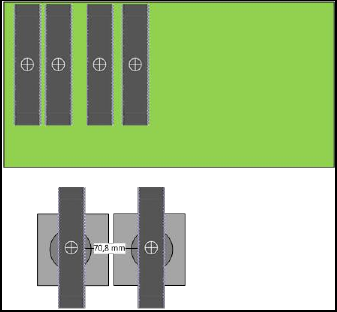
11.20 Twin Head – Placing Two Long but Narrow Components in One
Cycle
Two long but narrow components can now be placed in one Twin Head cycle even if the
components have a diagonal bigger than a segment distance of 70.8 mm.
Example:
If these components are placed in an angle of 90 or 270 degrees, they do not collide during
teaching and placing.
11.21 Nozzles – New Concave Nozzles
Compatible mode: Not supported
The station software supports the new concave nozzles 1204, 2204 and 4204.
11.22 Long Board Option up to 1525 mm
Compatible mode: Complete
The licensed Long Board Option up to 1500 mm - Machine Connection license now supports
boards up to 1525 mm. The relevant settings must be enabled in SIPLACE Pro.
Detailed information on the Long Board Option can be found in the LBO User Manual,
item no.: [00197085-xx].
11.23 Automatic Calibration – System Identification for SX-series
Compatible mode: Complete
The System identification calibration feature has been introduced for the SX-series placement
machines in the automatic calibration. Therefore, an additional calibration step may be required
after the station software has been installed. Please refer to the Installation Manual,
item no.: [00198236-xx].