SIPLACE Station Software 7xx to 714 介绍.pdf - 第167页
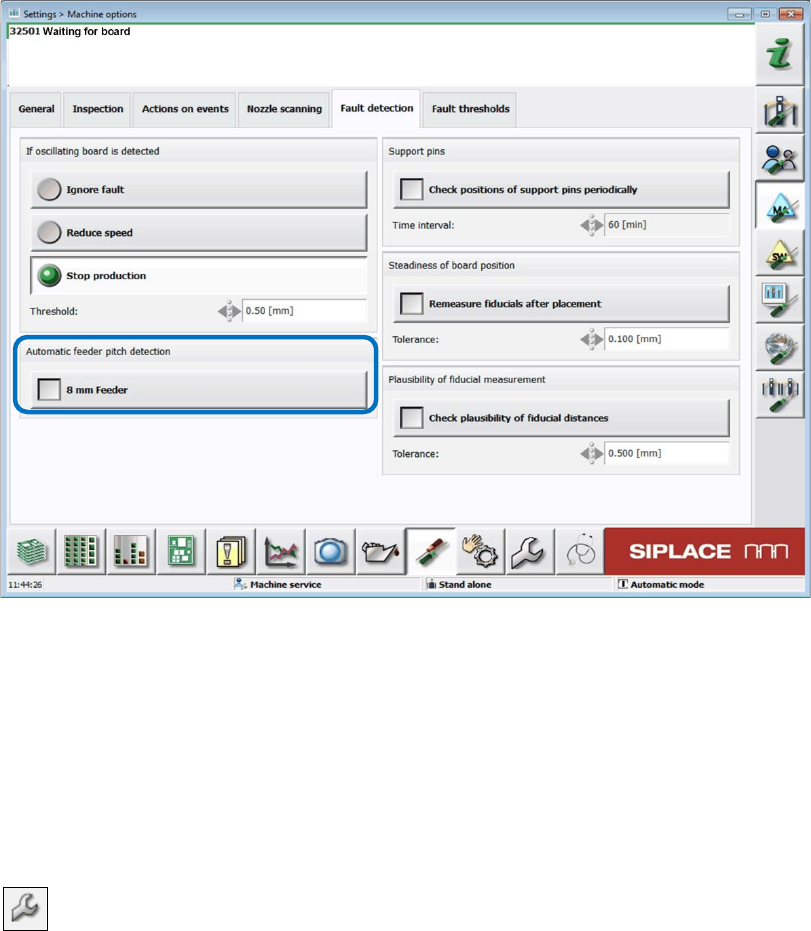
Station Software 7xx to 714.0 (R20-2) / Feature Description 11/2020 Edition 167 The function can be enabled or di sabled in the Machine options on the GUI of the station software. Figure 9- 12 : Enabling Automati c feede…

Station Software 7xx to 714.0 (R20-2) / Feature Description 11/2020 Edition
166
9.22 Placement of Components 03015 / 0201 with C&P20 A or C&P20 P
Compatible mode: Not supported
The component shapes that can be selected in SIPLACE Pro for the placement process are based
on the imperial units, i.e. on inches (1 inch = 2.4 cm) with one exception: component shape 03015
is based on the metric system.
As of this station software version, a new metric-based component shape 0201 can be defined in
addition to the existing, inch-based component shape 0201.
For the metric-based component shape0201, a new nozzle type has been introduced that is
supported by the C&P20 A and C&P20 P placement heads. The nozzle number 1002 is assigned
to the C&P20 A placement head and 4102 to the C&P20 P placement head.
NOTICE
Selection of the component shapes in SIPLACE Pro
In SIPLACE Pro, the component shapes 0201 (= inch-based) or 03015m
(= metric-based) can be selected for the placement process.
SIPLACE Pro treats the metric-based component shapes 0201 as component shapes
03015m. Therefore, in this case 03015m has to be selected and not 0201!
9.23 Optional Automatic Detection of the Feeder Pitch
Compatible mode: Complete
Components in tapes are often delivered with different feeder pitches dependent on the
manufacturer. In this case, the operator must adapt the pitch manually what might cause a big loss
of components from a tape reel if the setting is incorrect.
For this, the already available Automatic feeder pitch detection function (see section 5.7) has
been enhanced. As of station software version 708.1, an optional automatic feeder pitch detection
can be set and performed during runtime.
The automatic feeder pitch detection can currently solely be performed for 8 mm and 2x8 mm
X-feeders.
Prerequisite
The operator must be authorized to download from and upload to SIPLACE Pro, see
section 7.38.
Station Software 7xx to 714.0 (R20-2) / Feature Description 11/2020 Edition
167
The function can be enabled or disabled in the Machine options on the GUI of the station
software.
Figure 9-12: Enabling Automatic feeder pitch detection
Functionality
The component nominal width is used to calculate the theoretically minimum possible value. The
feeder pitch detection starts with this minimum pitch. 10 components are picked up to check the
pitch setting. If pickup errors occur (pattern: OK, NOK, OK…), it is assumed that the setting is too
small, and the pitch will be increased by one step in the next step and the measurement repeated.
This process is repeated until pickup can be performed without pitch errors.
If the function is enabled, the feeder pitch detection is displayed by the following icon for deviating
parameter settings in the setup view of the locations:
Station Software 7xx to 714.0 (R20-2) / Feature Description 11/2020 Edition
168
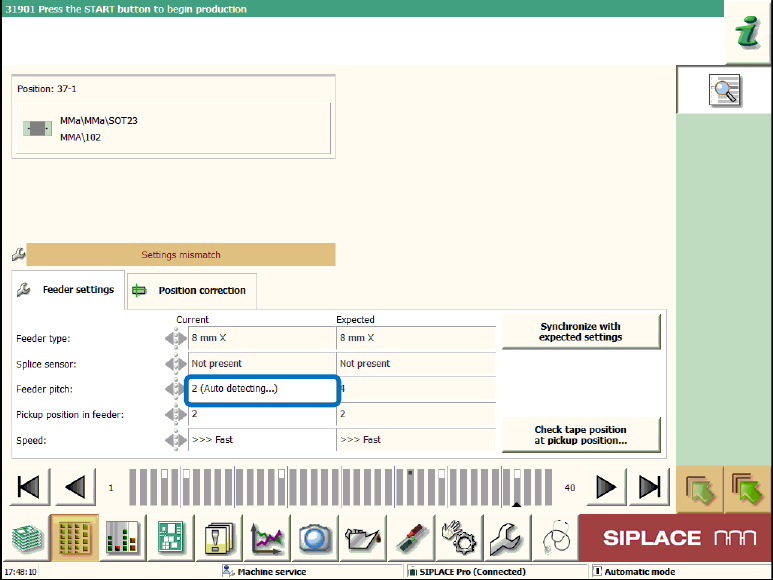
Additionally, the (Auto detecting...) supplement is displayed in the Details view under Feeder
settings.
Figure 9-13: Feeder pitch detection enabled
If the feeder pitch detection cannot be performed due to a generally reduced pickup reliability, the
Too many errors during automatic pitch detection message is displayed.