SIPLACE Station Software 7xx to 714 介绍.pdf - 第262页
Station Software 7xx to 714.0 (R20-2) / Feature Description 11/2020 Edition 262 – There is no plausibility c heck for the width supplied b y IPC-HERMES-9852 or the station interface. – This feature only ap plies to machi…
Station Software 7xx to 714.0 (R20-2) / Feature Description 11/2020 Edition
261
Changed Behavior for Errors on Alternative Components
Compatible mode: Complete
The needed operator actions for when a vision error occurs concerning alternative components has
been reduced.
Detection of Protruding Empty Tape
Compatible mode: Complete
It is possible that empty component tapes do not enter the tape channel which may cause head
crashes if not detected. To prevent this, special structures on the track ruler are measured to detect
any tapes not entering the tape channel.
Restrictions
– Component tapes not entering the tape channel can only be detected after some time has
passed during production. For the detection it is necessary that the fiducials are always within
the PCB camera field of view.
– The inspection can only be carried out on machines on which the track ruler has fiducial
structures (cross-shaped fiducials) printed on it.
Using Individual Pickup Error Thresholds for Components
Compatible mode: Hidden
The station software issues warning and error messages when pickup errors occur (including vision
errors). These warning and error messages are triggered by threshold values, which, by default,
are identical for all tracks. However, as of SIPLACE Pro 16.1 it is possible to configure these
threshold values individually in SIPLACE Pro, overruling the default values from the station
software.
The station software adopts the individual threshold values from SIPLACE Pro. If no individual
threshold values are specified, the default values from the setup configuration are used.
13.19 "IPC-HERMES-9852" – Enhancements
Compatible mode: Complete
The following enhancements have been made in the implementation of the "IPC-HERMES-9852"
protocol for Hermes 1.1 for the placement machines:
Whispering of IPC-HERMES-9852 Data
IPC-HERMES-9852 data can be whispered down a line even if a SIPLACE machine equipped with
“Advanced PCB interface”, i.e. a machine that does not support IPC-HERMES-9852, is part of the
line.
Barcode Controlled Production for Boards with Different Width
When IPC-HERMES-9852 is activated on a machine, this machine can use the board width
provided by IPC-HERMES-9852 data to adjust its conveyor rails accordingly. This way, barcode
controlled production is no longer limited to boards of equal width.
The Adjust width dialog under Setup > Conveyor has been extended to support this new feature.
Restrictions
– If the upstream machine does not provide a barcode with width information via
IPC-HERMES-9852, no width adjustment will be performed.
Station Software 7xx to 714.0 (R20-2) / Feature Description 11/2020 Edition
262
– There is no plausibility check for the width supplied by IPC-HERMES-9852 or the station
interface.
– This feature only applies to machines that support IPC-HERMES-9852. SIPLACE machines
equipped with “Advanced PCB interface” are excluded.
13.20 Smart Pin Support – Enhancements
Compatible mode: Complete
Pin Pickers in SIPLACE Pro can place pins either on the front area or the rear area of the lifting
table, including an area where these front and rear areas overlap. This overlapping area can be
used to hand over pins from the front area to the rear area and vice versa, enhancing the
placement of pins in all areas.
13.21 Saving of Data – Enhancements
Compatible mode: Complete
Saving Machine Data
When saving machine data using the archive dialog, all machine data is saved in one single *.zip
archive instead of several files.
The machine data can be imported from the *.zip archives as well.
Extended HDD Quota for Board History Files
The HDD quota for board history files is extended to 3 GB.
13.22 Pickup Position Teaching – Enhancements
Compatible mode: Complete
Taking pictures during the pickup position teaching has been enhanced so that the images taken
do no longer display an offset.
Station Software 7xx to 714.0 (R20-2) / Feature Description 11/2020 Edition
263
14 Feature Description – Station Software V713.x
Features (V713.0 (R19-2): Compatible Mode 712.2)
14.1 Smart Pin Support for TX V2 – Enhancements
The Smart Pin Support for the TX V2 has been enhanced by the functions described below.
Using Partly Accessible Nozzle Magazines
Compatible mode: Complete
A new nozzle magazine with 20 garages has been introduced for the CPP head and C&P20 P / P2
head each:
– Nozzle magazine for CPP head: 20xx magazine, item no. [03135469-xx]
– Nozzle magazine for C&P20 P / P2 head: 40xx magazine, item no. [03218226-xx]
If the TX V2 is configured with Smart Pin Support, not all garages in these nozzle magazines can
be reached by the placement head. To avoid the entire nozzle magazine from being blocked, only
the garages out of reach are blocked and marked as such. All reachable garages can be used.
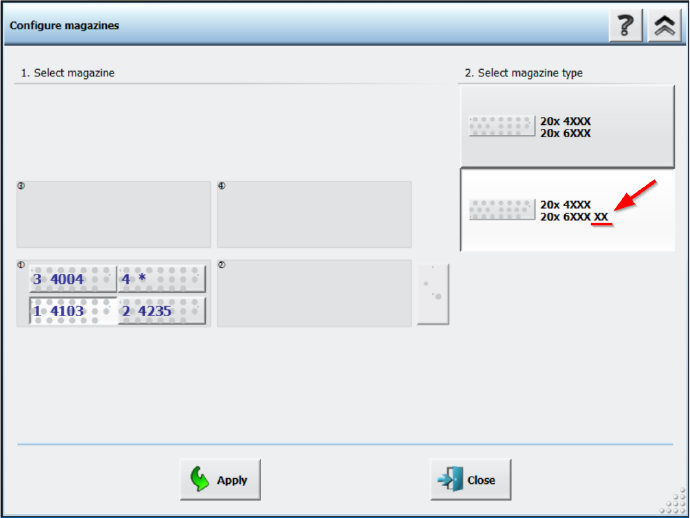
Nozzle magazines that are only partially reachable are marked with an additional “XX” behind the
magazine type name in the Configure magazines dialog.
Figure 14-1: Partly reachable nozzle magazine in Configure magazines dialog