SIPLACE Station Software 7xx to 714 介绍.pdf - 第230页
Station Software 7xx to 714.0 (R20-2) / Feature Description 11/2020 Edition 230 11.24 Miscellaneous Improve ments and Adaptions 11.24.1 Audible Signal for Indicator Lamps – New Pulse State Compatible mode: Complete The a…
Station Software 7xx to 714.0 (R20-2) / Feature Description 11/2020 Edition
229
11.20 Twin Head – Placing Two Long but Narrow Components in One
Cycle
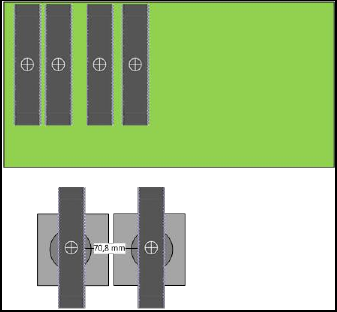
Two long but narrow components can now be placed in one Twin Head cycle even if the
components have a diagonal bigger than a segment distance of 70.8 mm.
Example:
If these components are placed in an angle of 90 or 270 degrees, they do not collide during
teaching and placing.
11.21 Nozzles – New Concave Nozzles
Compatible mode: Not supported
The station software supports the new concave nozzles 1204, 2204 and 4204.
11.22 Long Board Option up to 1525 mm
Compatible mode: Complete
The licensed Long Board Option up to 1500 mm - Machine Connection license now supports
boards up to 1525 mm. The relevant settings must be enabled in SIPLACE Pro.
Detailed information on the Long Board Option can be found in the LBO User Manual,
item no.: [00197085-xx].
11.23 Automatic Calibration – System Identification for SX-series
Compatible mode: Complete
The System identification calibration feature has been introduced for the SX-series placement
machines in the automatic calibration. Therefore, an additional calibration step may be required
after the station software has been installed. Please refer to the Installation Manual,
item no.: [00198236-xx].
Station Software 7xx to 714.0 (R20-2) / Feature Description 11/2020 Edition
230
11.24 Miscellaneous Improvements and Adaptions
11.24.1 Audible Signal for Indicator Lamps – New Pulse State
Compatible mode: Complete
The audible signal for the indicator lamps has been enhanced and now supports three states: On,
Off and Pulse (new). The Pulse state is like the lamp indicators flashing state.
Allowed pulse values: 50 ms on, 950 ms off.
The audible signal can be switched off in the Production view on the station software GUI.
11.24.2 Station Software GUI – Adaptions
Compatible mode: Complete
– For the following detailed errors, a button in the message bar is offered to confirm the error
directly:
40022 Position of dispenser nozzle has not been measured
40040 Reject plate must be empty
40039 Reject plate is full
40033 Prerequisites for changing lane width …
40025 Inspection of dispenser nozzle failed
– When the top side of a component is taught, the wizard will be offered instead of the SIPLACE
Vision teaching page.
Station Software 7xx to 714.0 (R20-2) / Feature Description 11/2020 Edition
231
12 Feature Description – Station Software V711.x
Features (V711.0 (R17-2): Compatible Mode 710.2)
12.1 "The Hermes Standard" – New Communication Protocol
Compatible mode: Partly compatible
"The Hermes Standard" is a new communication protocol for SMT assembly lines that can be used
alternatively to the electrical SIPLACE SMEMA interface. With this protocol, more information can
be transferred with the board down the line like unique board Ids, barcodes, conveyor speed, board
length / width / thickness. All this information can be transferred down the complete line, without
any interruption. Up to now, this was only possible within a SIPLACE SMEMA cluster. If all devices
in the line support "The Hermes Standard", whispering down the line is possible within "The
Hermes Standard" cluster as it is within the SIPLACE SMEMA cluster.
"The Hermes Standard" is supported on the X-series S, TX-series and TX micron-series placement
machines.
The sequence of machines and devices (SIPLACE, ASYS, others) must be configured in SIPLACE
Pro so that every machine / device in the production chain knows about its next and previous
device per transport lane including their according IP-addresses.
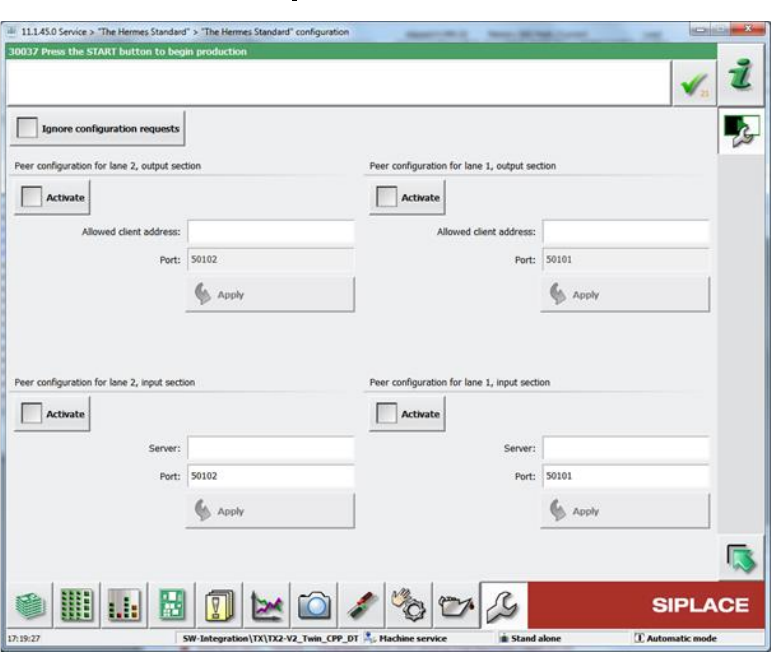
The hardware options (activate peer, host, IP address) related to "The Hermes Standard" can be
configured on the station software GUI in the "The Hermes Standard" configuration dialog under
Service – Configure machine – "The Hermes Standard".
Figure 12-1: "The Hermes Standard" configuration dialog