SIPLACE Station Software 7xx to 714 介绍.pdf - 第187页
Station Software 7xx to 714.0 (R20-2) / Feature Description 11/2020 Edition 187 In the middle the individual maintena nce steps can be selected. The available functions depend on the head / machine configu ration. To the…
Station Software 7xx to 714.0 (R20-2) / Feature Description 11/2020 Edition
186
10.9 Improved Handling of Maintenance Steps
The maintenance steps have been bundled into three views available on the GUI under the
Maintenance Tool:
– Preventive maintenance view
– Predictive maintenance view
– Head verification view
The three views are superficially presented in the next sections. Detailed information can be found
in the Online help.
10.9.1 Preventive Maintenance View
The Preventive maintenance view is available as of the Advanced Production activity level.
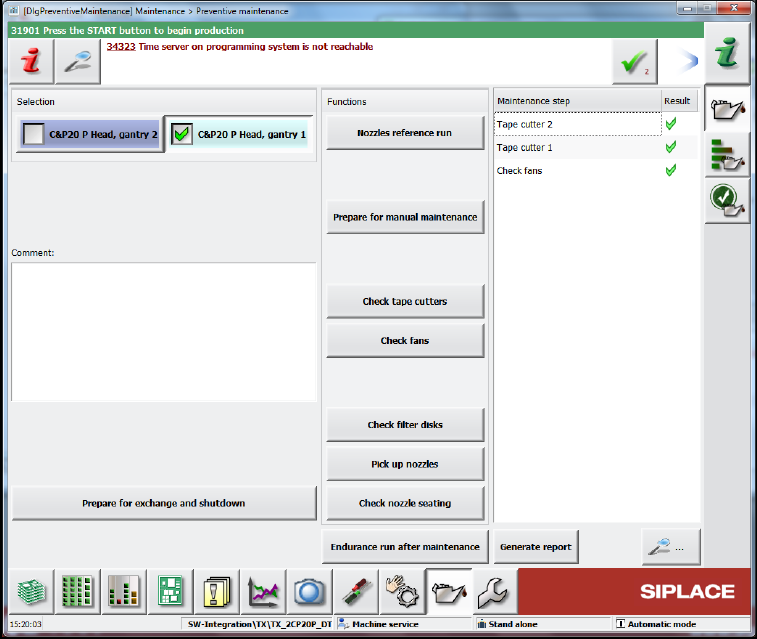
Figure 10-10: Preventive maintenance view
To the left the placement head(s) can be selected for maintenance. Additionally, a text field is
available for entering comments.
The Prepare for exchange and shutdown option prepares the machine for exchange of the
selected placement head(s). This option also offers to create a report before executing preparation
and shutting down the machine.
Filename: Maintenance_<MachineType>_<MID>_<Date>_<Time>(Exchange).pdf
During preparation the concerned placement heads return currently mounted nozzles, the gantries
move to the setup position and, if possible, tables are moved out of the machine before shutdown.
After exchange, the automatically detected exchanged placement heads are displayed with a
preset calibration type (Standard Calibration or Brief Calibration) and can be selected for
calibration. For the TX-series placement machines, the calibration steps X-axis parametrization,
System identification and Identify head parameter will be performed additionally. After
successful calibration, the placement heads reject the calibration nozzles.
Station Software 7xx to 714.0 (R20-2) / Feature Description 11/2020 Edition
187
In the middle the individual maintenance steps can be selected. The available functions depend on
the head / machine configuration.
To the right the results of the performed maintenance steps are listed. With the button a
detailed view of the selected result entry opens.
The Endurance run after maintenance option performs three machine endurance run cycles.
Upon successful completion of the endurance run the maintenance task is considered finished and
the list of results is cleared. Otherwise, error information is displayed.
With the Generate report button a report with detailed results of all maintenance steps can be
generated and stored into the MaintenanceReports subdirectory in the work directory of the station.
Filename: Maintenance_<MachineType>_<MID>_<Date>_<Time>.pdf
NOTICE
– The reports can be collected by SIPLACE Pro Line Diagnostics.
– The station software deletes maintenance reports older than 90 days automatically.
10.9.2 Predictive Maintenance View
The Predictive maintenance view is available on the Machine Service activity level.
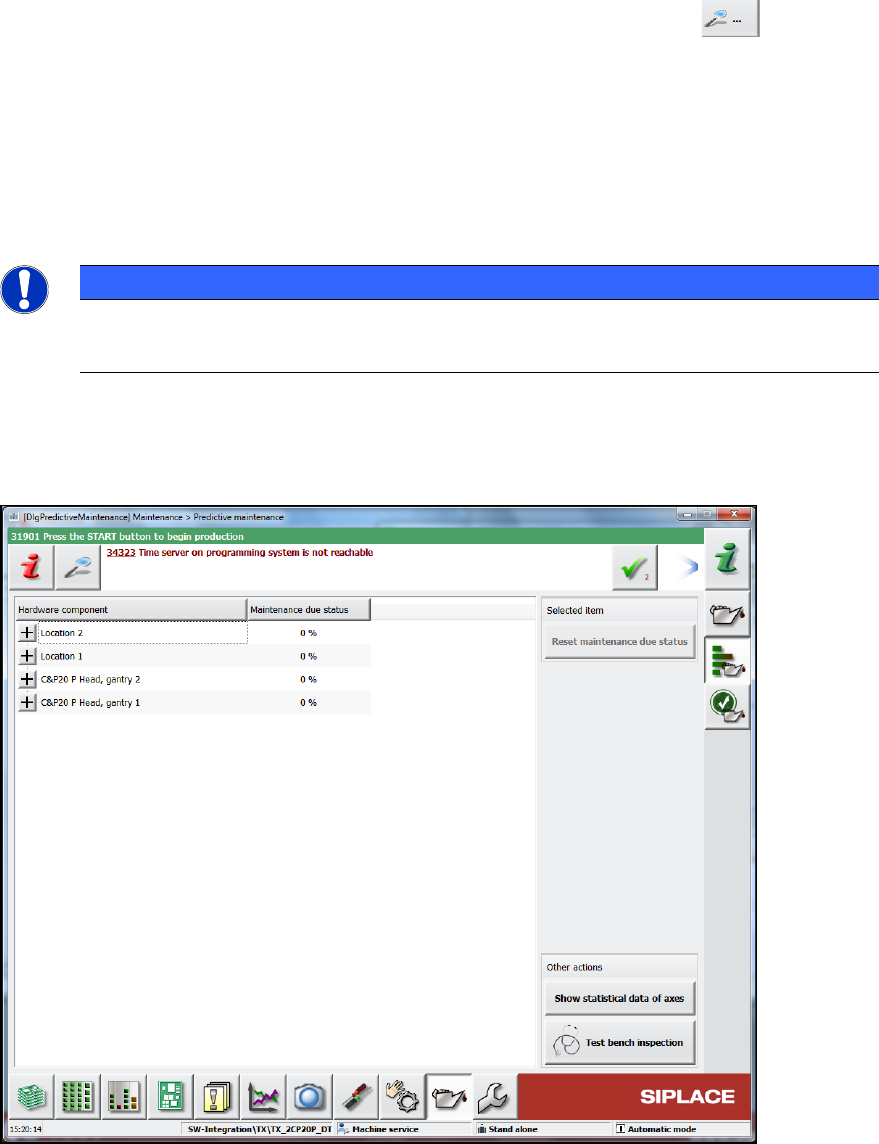
Figure 10-11: Predictive maintenance view
The existing maintenance view from previous station software versions has been integrated into
this view (Displays all available hardware related maintenance data). Additionally, maintenance
data for the vacuum pump and the tape cutters is displayed.
The Show Statistical data of axes button opens the view with statistical data of gantry and head
axis.
Station Software 7xx to 714.0 (R20-2) / Feature Description 11/2020 Edition
188
The Test bench inspection button opens the correspondent tool wizard. Reports are automatically
stored to the preconfigured C:\Sirio\Protocols\<Head-Type> directory from where they can be
collected by SIPLACE Pro Line Diagnostics.
10.9.3 Head Verification View
The Head verification view is available as of the Advanced Production activity level.
The C&P20 A, C&P20 M, C&P20 P and CPP placement heads can be verified.
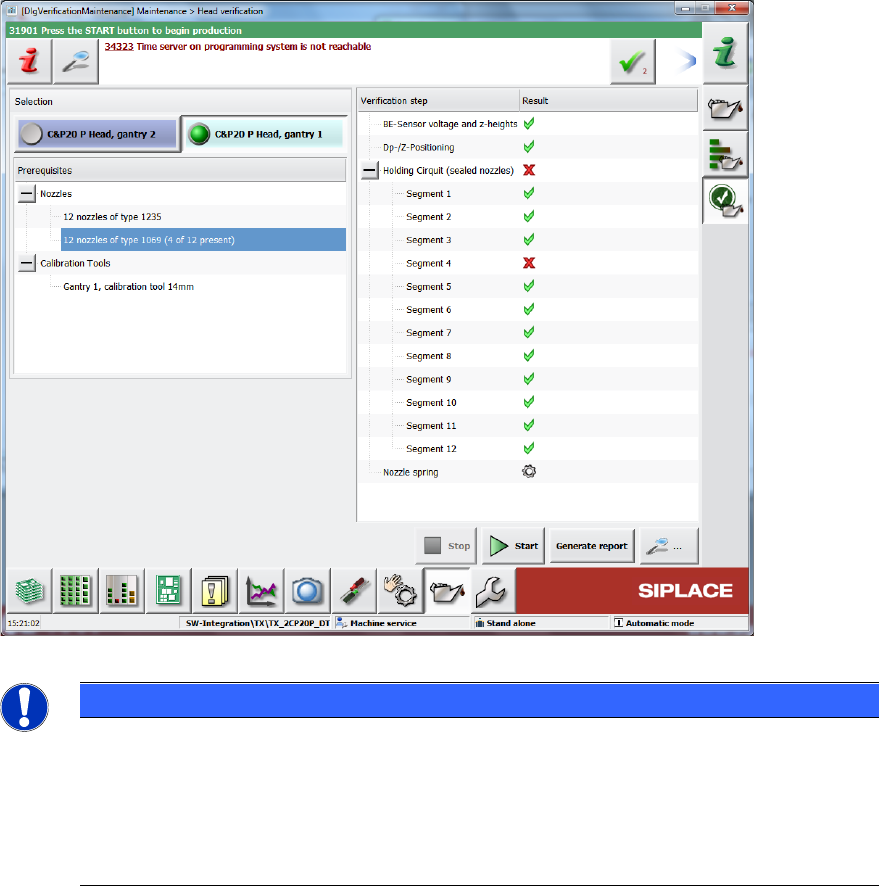
Figure 10-12: Head verification view
NOTICE
Nozzle changer configuration available on Advanced Production activity level!
Changing nozzles and adapting the nozzle changer configuration is part of the head
verification workflow. Therefore, the nozzle changer configuration is also available on the
Advanced Production activity level (previously on the Customer service activity level
only).
This applies for all customers even if they do not use the Head verification feature!
When selecting a placement head, the Prerequisites view is filled, and the Cancel button enabled.
The machine checks whether the required nozzles are available in the nozzle changer. If not, the
quantity of missing nozzles is displayed. Calibration tools cannot be detected by the machine, so
the user is asked to verify the presence of the calibration tool. When all nozzle prerequisites are
fulfilled, the Start button is enabled.
By clicking the Start button, the Stop button is enabled the head selection disabled and the scripts
are executed in sequence. If any nozzles are disabled, the user is asked whether to enable them.
In the results view, the currently running script is displayed as well as the overall results of
completed scripts. If a script has an overall failed result, the results for the single segments are
displayed. Anytime during execution of the scripts, pop-up windows can be displayed, requesting
information or actions by the user.