SIPLACE Station Software 7xx to 714 介绍.pdf - 第97页
Station Software 7xx to 714.0 (R20-2) / Feature Description 11/2020 Edition 97 WARNING Changing Filling Level M anually after Exchanging Waf fle Pack Tray and Pick-up Errors! With the buttons on the feeder a new waffle p…
Station Software 7xx to 714.0 (R20-2) / Feature Description 11/2020 Edition
96
7.31 New TrayStak Feeder AX Feeder Type
Compatible mode: Not supported
As of this station software version, the new TrayStak Feeder AX feeder type is supported on the
X4i S placement machine for CPP placement heads.
The TrayStak Feeder AX has one level with a waffle pack tray for which the size is defined in the
setup, and a stacked inventory of further waffle pack trays that obeys the FIFO rule. The current
waffle pack tray cannot be exchanged by another tray of the inventory until all components have
been picked up.
The behavior after pick-up errors is as follows:
– If a component is rejected by SIPLACE Vision, the software searches for an empty division in
the current tray. The current tray might not be the same as the original pick-up tray.
– If the current tray is complete, the component is rejected.
– If an empty division is found, the software reserves it to put the component back there later.
– At that time, no more components are picked up to prevent that the current tray with the empty
division(s) gets exchanged.
– Pick-up will not be possible until all components have been successfully put back.
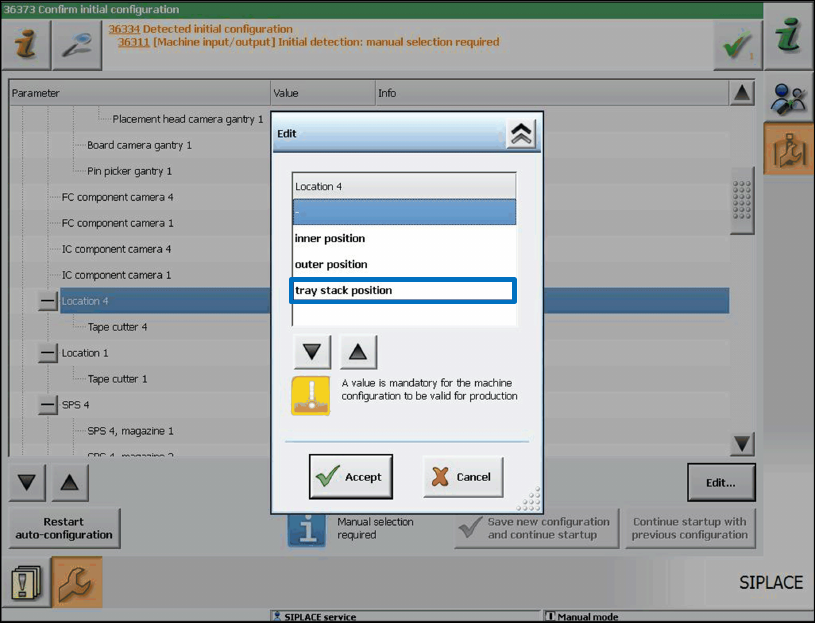
Due to mechanical deviations on the installed feeder, the operator must define manually for each
location in the Auto Configuration when the software is started for the first time, whether there is a
TrayStak Feeder AX on it.
Figure 7-30: TrayStak Feeder AX present
Station Software 7xx to 714.0 (R20-2) / Feature Description 11/2020 Edition
97
WARNING
Changing Filling Level Manually after Exchanging Waffle Pack Tray and Pick-up
Errors!
With the buttons on the feeder a new waffle pack tray can be made available. However,
the filling level is not automatically modified at the station.
If the operator does not change the filling level manually, the pick-up sequence will be
continued at the filling level of the last waffle pack tray and some components will get
lost.
If the filling level is not manually modified after a waffle pack tray has been exchanged
and the components will be put back in the tray according to the configuration, it may
happen that they are put pack at occupied positions. Thus, strange noises arise, and
damages might result.
7.32 FCU State Display on the GUI
Compatible mode: Complete
In combination with a manual table, the LED state display and the DIP switch on the FCU (Feeder
Control Unit) are invisible or inaccessible on the SX1/SX2, DX1/DX2, SX4 and DX4 placement
machines.
For check and test purposes it is therefore possible to display the following states for the locations
1-4 on the GUI for these placement machines.
1. Lock state of the single nozzle changers (open / closed).
2. Magazine checking state for the single nozzle changer magazine location of the different
nozzle changers (magazine present / not present).
3. States of the reject bin query sensors (bin available / not available). The states of the sensors
that are not requested in the current bin configuration are explicitly shown (head / gantry
modularity).
4. Air blast valve output of the nozzle station (air blast enabled / disabled).
5. Current preset state of the FCU DIP switch (enabled / disabled).
Station Software 7xx to 714.0 (R20-2) / Feature Description 11/2020 Edition
98
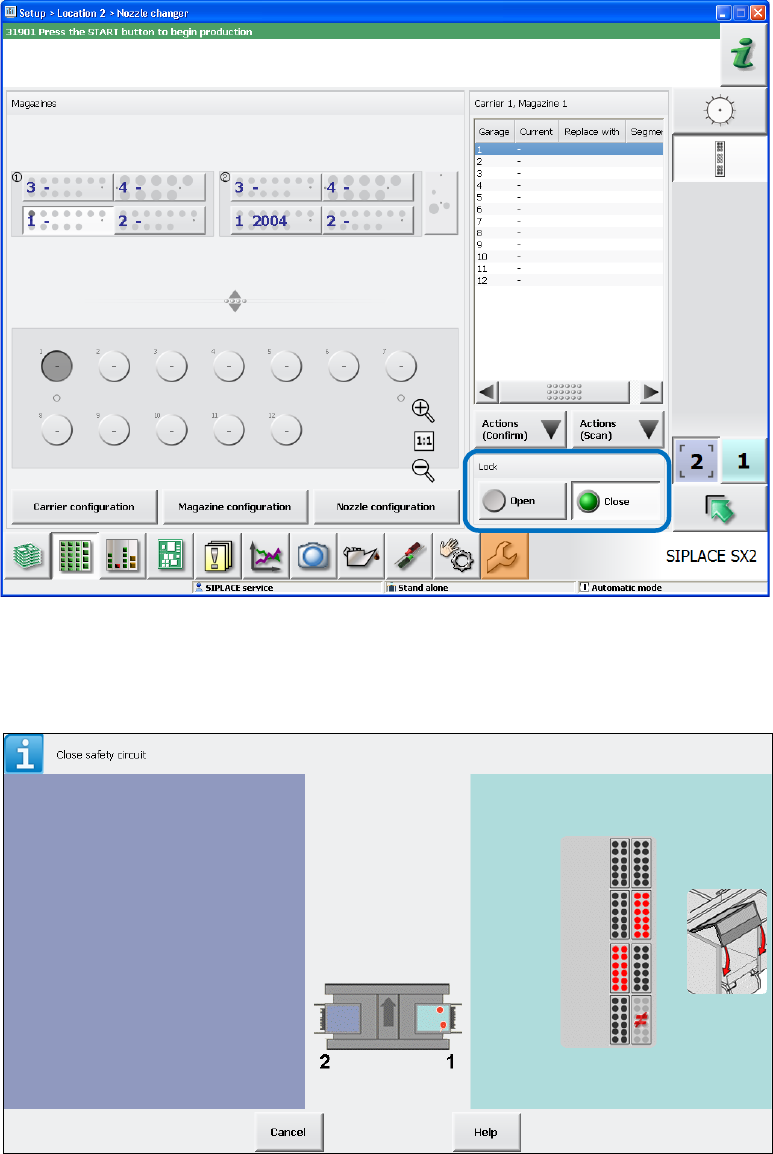
Item 1: Nozzle Changer State
This state is displayed in the Nozzle changer view on the GUI. The state can be modified (Open /
Close).
Figure 7-31: Lock state of nozzle changer
Item 2: Magazine State
This state is displayed in the Safety circuit view on the GUI.
Figure 7-32: Magazine state