SIPLACE Station Software 7xx to 714 介绍.pdf - 第38页
Station Software 7xx to 714.0 (R20-2) / Feature Description 11/2020 Edition 38 5.7 Automatic Recognition of Feeder P itch For the 8mm and 2x8mm X-feede rs the smallest possible feeder pitch f or the next component can be…
Station Software 7xx to 714.0 (R20-2) / Feature Description 11/2020 Edition
37
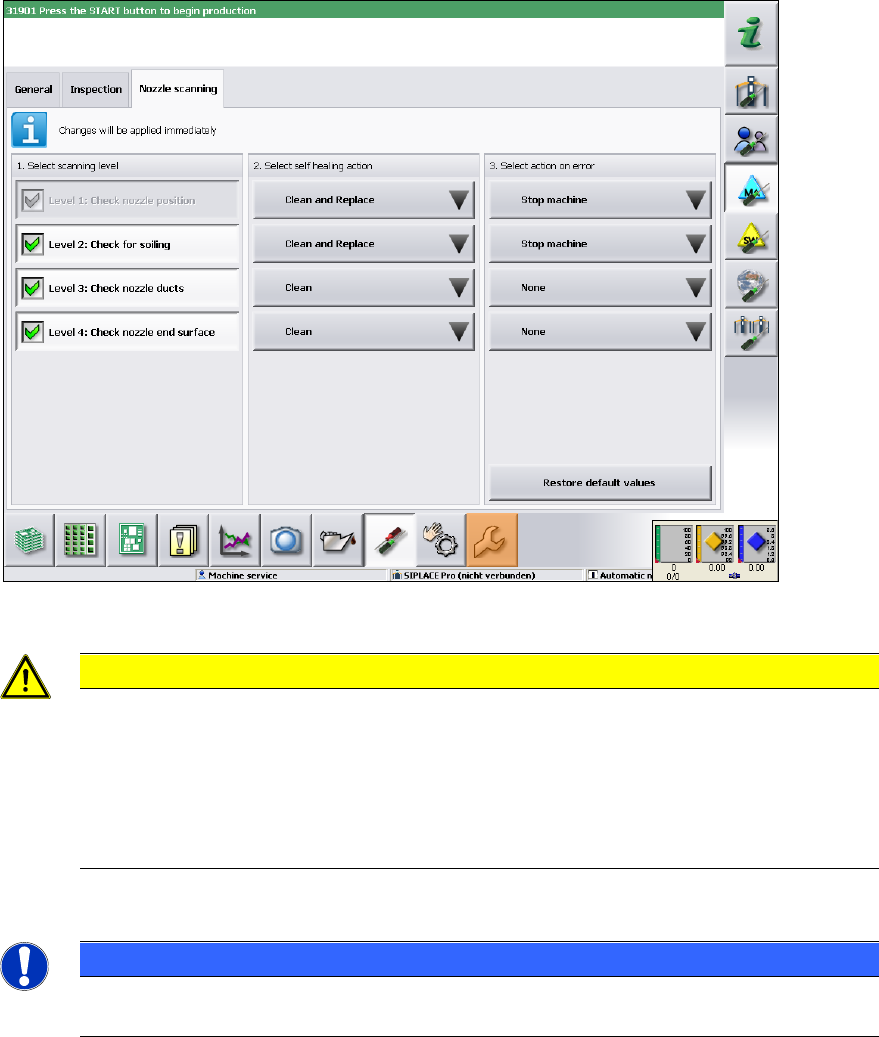
The following figure displays the default settings when nozzle scanning is enabled.
Figure 5-1: Default settings when nozzle scanning is enabled
CAUTION
When selecting the scanning level, please note that the default setting for the self-
healing action has been changed for Level 1 and Level 2 since the last version! If an
error occurs, Clean and Replace is performed for these levels. I.e., the machine attempts
to clean the nozzle with compressed air. If the subsequent nozzle scanning still detects
an error, however; the nozzle is moved to the nozzle reject bin and is replaced by a new
one from the nozzle changer. If not possible (for example, if the nozzle changer is
empty), the placement machine is stopped.
Detailed information on single settings can be found in the online help of the station software.
NOTICE
However, cleaning or automatical nozzle change might be impossible for some
(non-standard) nozzles.
Station Software 7xx to 714.0 (R20-2) / Feature Description 11/2020 Edition
38
5.7 Automatic Recognition of Feeder Pitch
For the 8mm and 2x8mm X-feeders the smallest possible feeder pitch for the next component can
be automatically recognized (Auto Pitch detection). For feeders for which Auto Pitch detection is
offered, "Auto detection" can be selected on the GUI and started with the "Submit changes"
button. The status is displayed directly in the display area of the currently set pitch. The procedure
is automatically terminated when the feeder pitch has been recognized or is canceled with an error
message in the following cases:
– The set feeder pitch differs from the specification in SIPLACE Pro. This is displayed with a
spanner icon in the "Details" view and in the table overview as well.
– The operator changes a feeder parameter on the feeder during the Auto Pitch detection (pitch,
pick-up position or speed).
– The Auto Pitch detection is started manually on a feeder for which a setup change takes place
and feeder data is changed simultaneously (pitch, pick-up position or speed).
After cancelation, the feeder pitch that was set before is restored, except for the case that the
cancelation was caused by a manual feeder pitch change by the operator.
Restrictions
– Track-empty errors are not recognized.
– Only possible, if a direct component recognition through a vacuum or a component sensor is
set in SIPLACE Pro.
– When single functions are used simultaneously (e.g. component or component shape teaching)
not every pick-up trial will be successful.
5.8 Improved Operator Guidance
The error handling on the GUI has been improved so that the operator on the "Basic Production"
and "Advanced Production" activity levels is able to restart the placement faster after an error has
occurred during production. Additionally to the information in the status area, the site where the
error occurred is graphically depicted. A button guides the operator directly to a detailed error/error
correction dialog box. If several errors occurred, an overview dialog is displayed as a table, in
which it is possible to navigate to an error or between the errors. The following errors are
addressed:
– Track empty
– Nozzle dirty
– Torn foil
– Fiducial not recognized
5.9 Automatic Product Changeover (Barcode Controlled Production)
In barcode controlled production the station requires the job from LineControl via a read board
barcode. As soon as the job is specified by LineControl and is active on the station, the station
starts placing automatically. Thus, different products can be placed simultaneously and the
operator does not have to pay attention to the specification of the appropriate job. The active
barcode controlled production is displayed by a correspondent icon in the main view.
If it was impossible to read a barcode, the barcode scanner sends a read error to the station
software and a dialog box opens, in which the operator can enter the barcode manually. Via OIS
the already read board barcodes can be displayed. Additionally, by clicking on a board icon in the
main view of the station software, the barcode that has been read for this board can be displayed.
Station Software 7xx to 714.0 (R20-2) / Feature Description 11/2020 Edition
39
In SIPLACE Pro it is possible to make settings for the board handling, if no recipe data exists for a
barcode in LineControl:
– The board is transported to the output section of the machine, if an output section exists. The
operator is prompted to remove the board manually. If the machine does not have any output
section from which the board can be removed, the board is transported to the next machine
that has an output section.
– The board is transported to the end of the placing line without being processed.
Barcode controlled production is also possible in synchronous dual lane transport mode.
5.10 Controlled Board Transfer between Placement Machines
With this feature the board individual data is transferred from one placement machine to another
one (Whispering down the Line). The board individual data (e.g. ink spots, barcode, board state,
flag for canceled etc.) are collected in a logical container that is linked to a physical board. When
the board is transferred physically to a placement machine, also the content of the logical container
(or parts of it) gets transferred. The controlled board transfer is supported for lines that are
operated with station software 704. Amongst others, the feature is required for the following
reasons:
1. Transfer of board states (e.g. cancelation, inspection) is required because the machine cannot
be accessed (boards cannot be removed between two placement machines).
As the SX-series placement machines do not have any extension kits, boards are not
accessible at the beginning and the end of the machine and cannot be removed from the line
between two SX placement machines. Therefore, canceled boards are transported down the
line to a machine whose output section is accessible. A station now has to know, if a
transferred board has been canceled in a preceding machine to be able to decide, whether the
board shall be placed or only transported. This information is part of the board individual data.
2. Increased line performance due to reduced downtime (because of the accuracy only ink spot
measurements are transferred).
As the information is transferred, which panels have to be placed, only the first placement
machine in a sub-line has to measure ink spots.
3. Removal of functionality from a SIPLACE placement machine (e.g. barcode scanners).
As the barcode is transferred between the placement machines, only the first placement
machine in a sub-line requires a barcode scanner.
The controlled board transfer is set in SIPLACE Pro and is displayed on the GUI on the "Advanced
Production" activity level under "Settings – Display neighbor machines". Here the preceding
and succeding placement machines and their connection states are visualized. If the connection is
interrupted or the board transfer fails, the operator is guided via dialog boxes in order to correct the
errors.