SIPLACE Station Software 7xx to 714 介绍.pdf - 第52页
Station Software 7xx to 714.0 (R20-2) / Feature Description 11/2020 Edition 52 Troubleshooting assistance is automatically offered in a graphi cal form in the SIPLACE Smart GUI for the most frequent downtime cau ses. The…
Station Software 7xx to 714.0 (R20-2) / Feature Description 11/2020 Edition
51
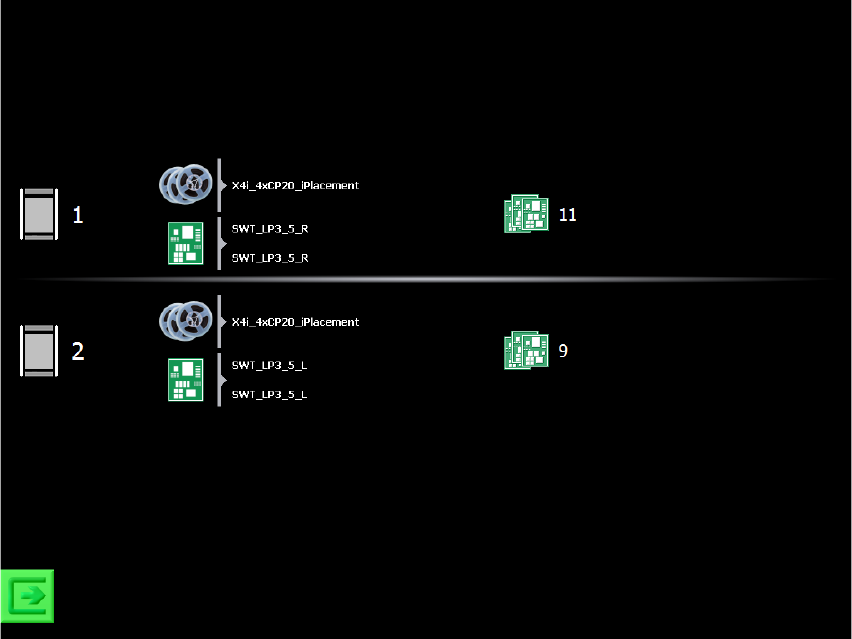
During production a simple overview with information on the setup and the number of produced
boards is displayed:
Figure 6-3: SIPLACE Smart Tool view
The recipes are displayed in table form (one row for each recipe). Each row displays the setup
name, recipe name and board name. If these names are given in form of a path with the separator
“\” (backlash), only the last part of the path will be displayed. Additionally, the lane where the recipe
is produced is displayed. If the recipe is produced in dual conveyor mode, then the lane numbers
are also displayed. The number of produced boards is displayed at the end of the row (i.e. boards
that left the machine and were not aborted).
At the bottom to the left there is a button for switching to the station software GUI. The service icon
is only displayed if a skilled operator is needed for assistance.
As soon as a detailed message arrives, a search for troubleshooting assistance is started in the
SIPLACE Smart GUI. If assistance is available, the standard view is replaced by a corresponding
troubleshooting / assistance view.
Station Software 7xx to 714.0 (R20-2) / Feature Description 11/2020 Edition
52
Troubleshooting assistance is automatically offered in a graphical form in the SIPLACE Smart GUI
for the most frequent downtime causes. The assistance instructions display where the problem
occurred, which problem has occurred and how the problem can be solved. In all other cases an
icon is displayed that prompt the operator to call for a skilled operator for assistance.
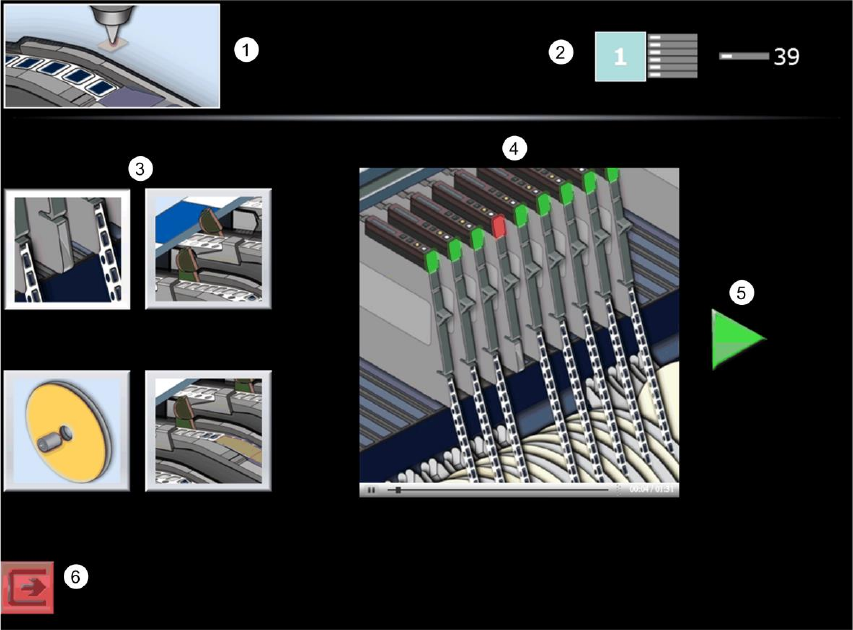
Figure 6-4: View with troubleshooting assistance
1) Error / Assist type
Here the error / assist type is displayed. Error / assist types exist for the following problems:
– Pick-up failure
– Dirty nozzle
– Cover foil torn
– Cover foil peeled
– Refill components
– Conveyor board jam
– PCB fiducial recognition
2) Problem location
Here the location is displayed, where the problem occurred.
Station Software 7xx to 714.0 (R20-2) / Feature Description 11/2020 Edition
53
3) / 4) Possible workflows and workflow directives
Here the possible troubleshooting workflows are displayed as buttons. For some workflows up to
four troubleshooting possibilities are displayed. By pressing a button, a corresponding
troubleshooting assistance is displayed to the right. It is automatically switched between the single
steps in the assistance. Some workflows change if Setup Center is present or not.
5) Confirmation
By pressing the green arrow symbol the operator confirms that troubleshooting has been
performed and production can continue. If necessary, further dialogs appear (e.g. prompting to
press the Start key on the machine, close the cover etc.).
6) Switch to station software GUI
With this button it is possible to switch to the regular station software GUI.
6.11 Automatic Storage of Feeder Parameters
If the option for automatic synchronization is activated, all changes to the feeder parameters (pitch,
speed or pick-up position) are automatically sent to SIPLACE Pro in order to store them in the local
setup. A corresponding icon appears in the Feeder details view. If the option is deactivated, no
values are sent to SIPLACE Pro and it is not possible to send the values manually from the station
to SIPLACE Pro either. However, in case that the values do not correspond to the set values in
SIPLACE Pro, the values in SIPLACE Pro can be transferred manually.
6.12 New Feeder Types
The following new feeder types are supported by this station software version:
4mm X-feeder, 16mm XN-feeder, 104mm X-feeder and Surftape AX.
The Surftape AX feeder is designed for the chips (bare dies) placement in the machine and is
supported for the 8mm, 12mm and 16mm widths. This feeder is a 3rd-party feeder and is not
delivered by ASM Assembly Systems GmbH & Co. KG. It is placed on the X-table via the X-feeder
adapter and is mounted on the adapter via a separate adapter plate.
6.13 Station-Wise Download with WDTL
As of this station software version, the “Whispering down the Line” (WDTL) function is supported
for station-wise download, i.e. the last board of the previous recipe only has to be confirmed at the
first station. Additionally, in synchronous dual conveyor lane mode a batch change at the first
station only has to be confirmed at the conveyor lane on which the board type changes.