00197395-03_AI_3D_Sensor-Koplan_X-Serie_S_DE_EN.pdf - 第135页
3 Installation 3.17 Commissioning with SW 70x Assembly Instructions / Montageanleitung SIPLACE X-Series S 3D-Sensor 06/2020 135 Fig.87: Loading the calibration script file ► Open the C:\Sirio\Bin\scriptfiles (1) folder…
3 Installation
3.17 Commissioning with SW 70x
134 Assembly Instructions / Montageanleitung SIPLACE X-Series S 3D-Sensor 06/2020
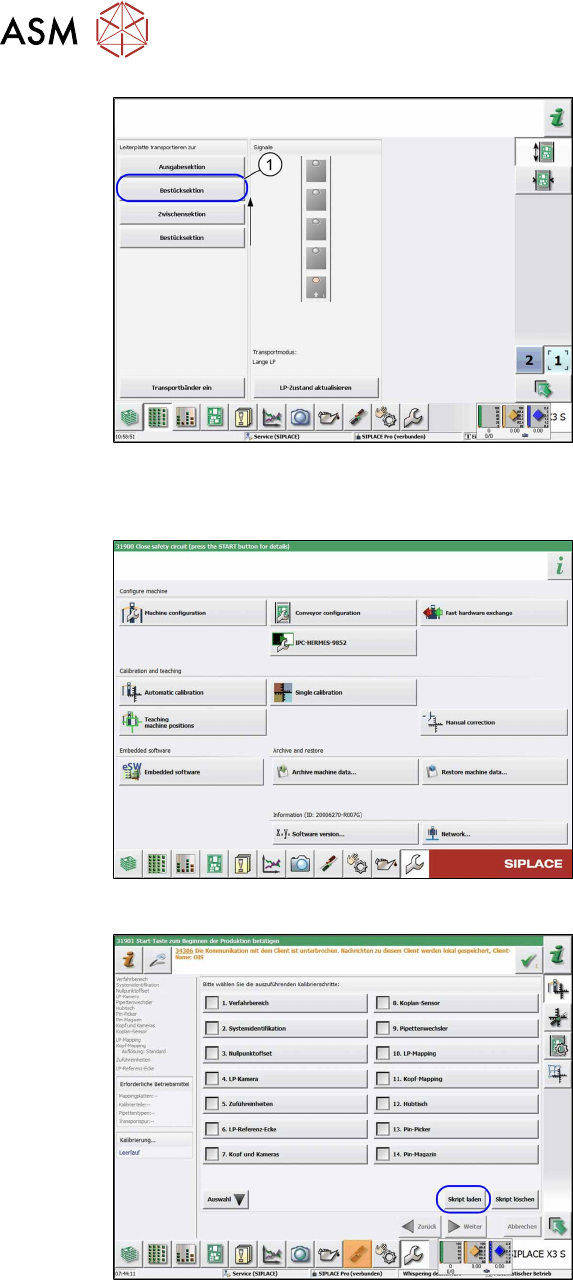
Fig.84: Placement sections view
► Click on the following buttons in se-
quence Placement section, Interme-
diate section and Placement sec-
tion(1).
ð The board moves into placement
section 2.
Up to SW 711.x
Fig.85: Automatic calibration
► Select the Automatic calibration but-
ton.
ð The calibration selection view will be
opened.
Fig.86: Calibration step "coplanarity sensor" option
► Go to the Automatic calibration menu
and select the Load script
button.
ð The Load calibration scripting file
view will be opened.
3 Installation
3.17 Commissioning with SW 70x
Assembly Instructions / Montageanleitung SIPLACE X-Series S 3D-Sensor 06/2020 135
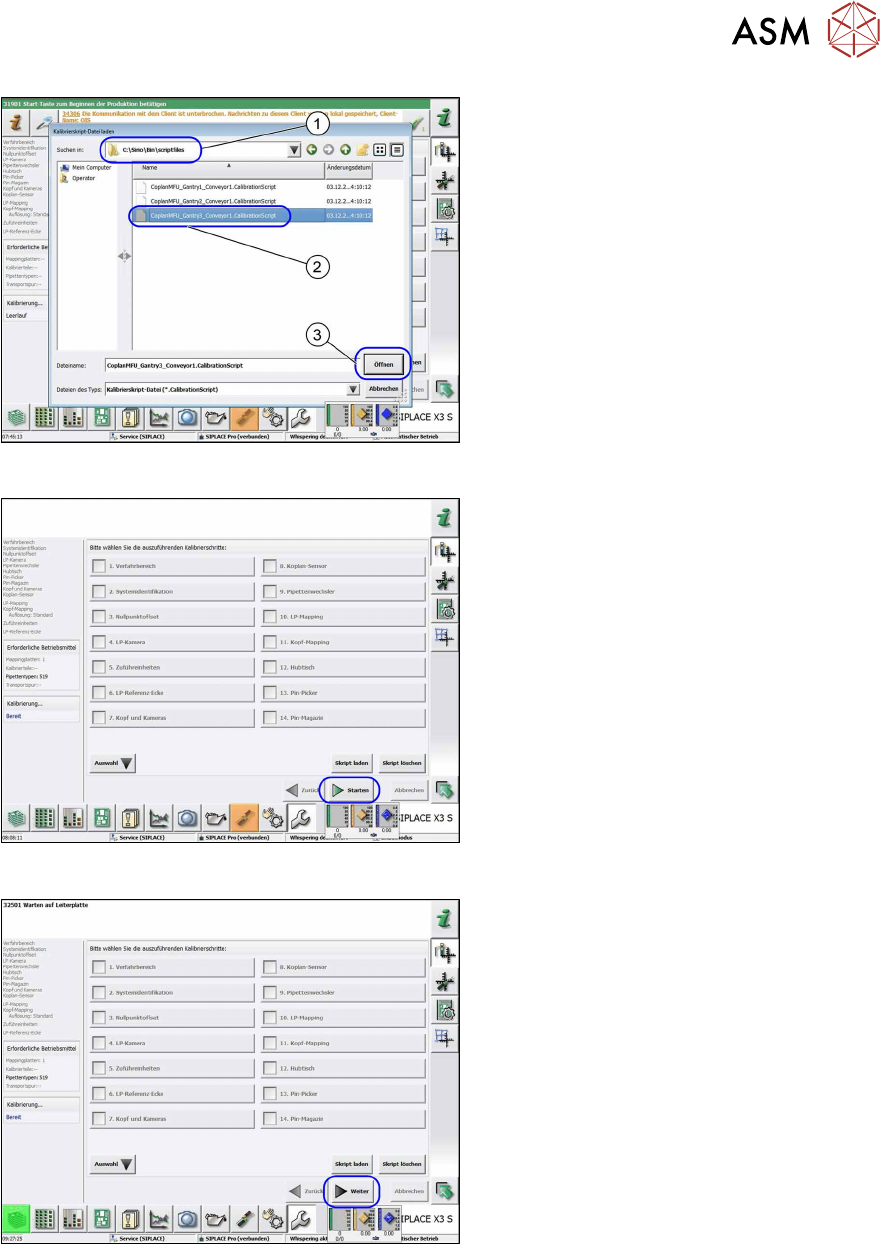
Fig.87: Loading the calibration script file
► Open the
C:\Sirio\Bin\scriptfiles
(1) folder.
► Select the relevant file for the gantry
(2)
.
► Select the Open(3) button.
ð The calibration selection view will be
opened.
Fig.88: Calibration steps options
If there are already nozzles of type 519 on
the TwinHead, the Start
button will be act-
ive.
► Select the Start button to begin cali-
bration.
Fig.89: Calibration steps options
If the right nozzles are not on the head, the
Next
button will be active .
► Choose the Next button.
ð The dialog for correcting the nozzle
type will appear.
3 Installation
3.17 Commissioning with SW 70x
136 Assembly Instructions / Montageanleitung SIPLACE X-Series S 3D-Sensor 06/2020
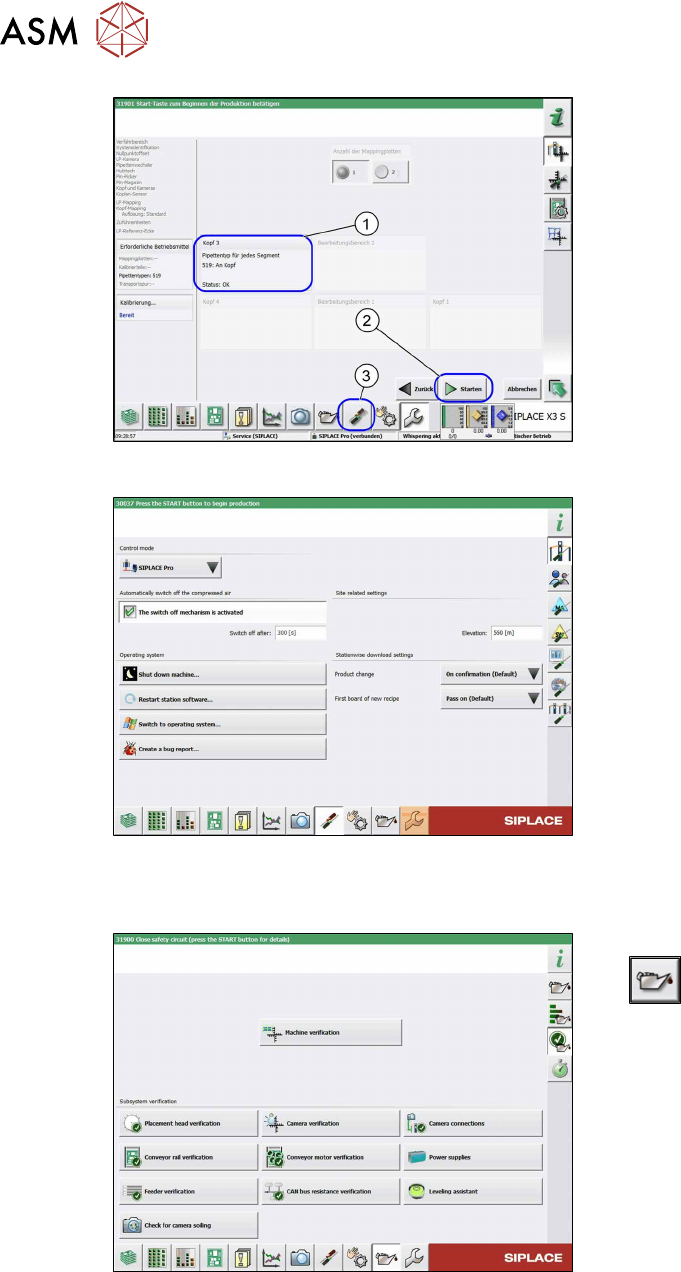
Fig.90: Nozzle setting
► Pick up nozzles of type 519 (1).
► Select the Start(2) button to begin cali-
bration.
► After successful calibration, click on the
Settings and Options
(3) button.
ð The Set Settings and Options
view will be opened.
Fig.91: View: Set Settings and Options
► In the Set Settings and Options view,
select Switch to operating system
.
► In the Windows Explorer, select the op-
erating system level and the folder C:
\sirio\work.
► Copy the file MFU coplan onto a USB
stick.
From SW 712.x
Fig.92: Maintenance menu
► Switch over to the maintenance menu
.
► Select Machine verification.
Follow the instructions on the next pages.