CP7 Series Level3 Tutorial Manual.pdf - 第23页
6. Before Operation Prior to operating the machine, make sure that no one is near the machine, or that anyone other than yourself is touching the machine. 7. Do not Leave T ools in or on the Machine Following maintenance…
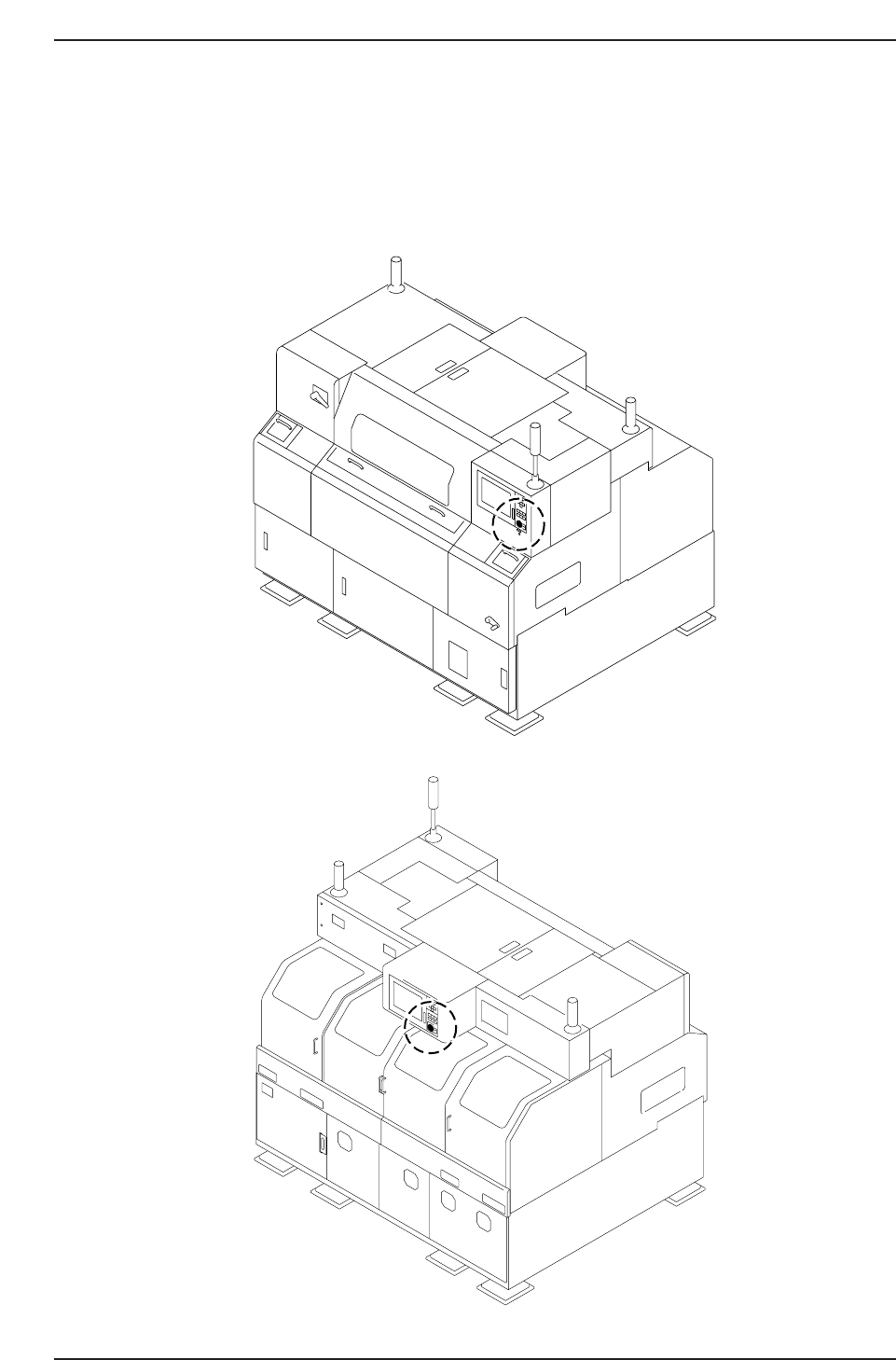
5. The EMERGENCY STOP Buttons
In the event of an emergency, press any of the red EMERGENCY STOP buttons located
on the machine at the positions indicated in the figures below.
Note: The same applies for the CP-742E and CP-742ME machines.
Front Side
Rear Side
C73M0003
Safety Guidelines
Edition 2.0 10 CP-7-series Level 3 Tutorial

6. Before Operation
Prior to operating the machine, make sure that no one is near the machine, or that
anyone other than yourself is touching the machine.
7. Do not Leave Tools in or on the Machine
Following maintenance on a machine, make sure that no tools have been left in or on the
machine. Tools that get caught in the machine's moving parts may cause severe damage
to the machine.
Safety Guidelines
Edition 2.0 11 CP-7-series Level 3 Tutorial

Notes:
Safety Guidelines
Edition 2.0 12 CP-7-series Level 3 Tutorial