CP7 Series Level3 Tutorial Manual.pdf - 第45页
Chapter 1 1.5 Replacing the Z-Motor Edition 2.0 1-20 CP-7-series Level 3 T utorial 1.5.2 Installing the Z-Axis Motor Procedure: 1. Secure a new motor to the machine. 2. Reconnect the two (2) electrical connectors to the …
Chapter 1 1.5 Replacing the Z-Motor
Edition 2.0 1-19 CP-7-series Level 3 Tutorial
1.5.1 Removing the Z-Axis Motor
Procedure:
1. Turn OFF the machine power.
2. Disconnect the two (2) electrical connections to the motor (at front of the
XY-table).
3. Retract both the IN and OUT carriers, and widen the machine’s conveyor
rails to allow better access to the machine.
4. Move the XY-table to the out loading position.
5. Manually raise the table using the Z-axis timing belt on the left hand side
of the table.
Note: It is possible that timing belt slippage may occur when adjusting the table height using
the timing belt at the right hand s ide o f the table..
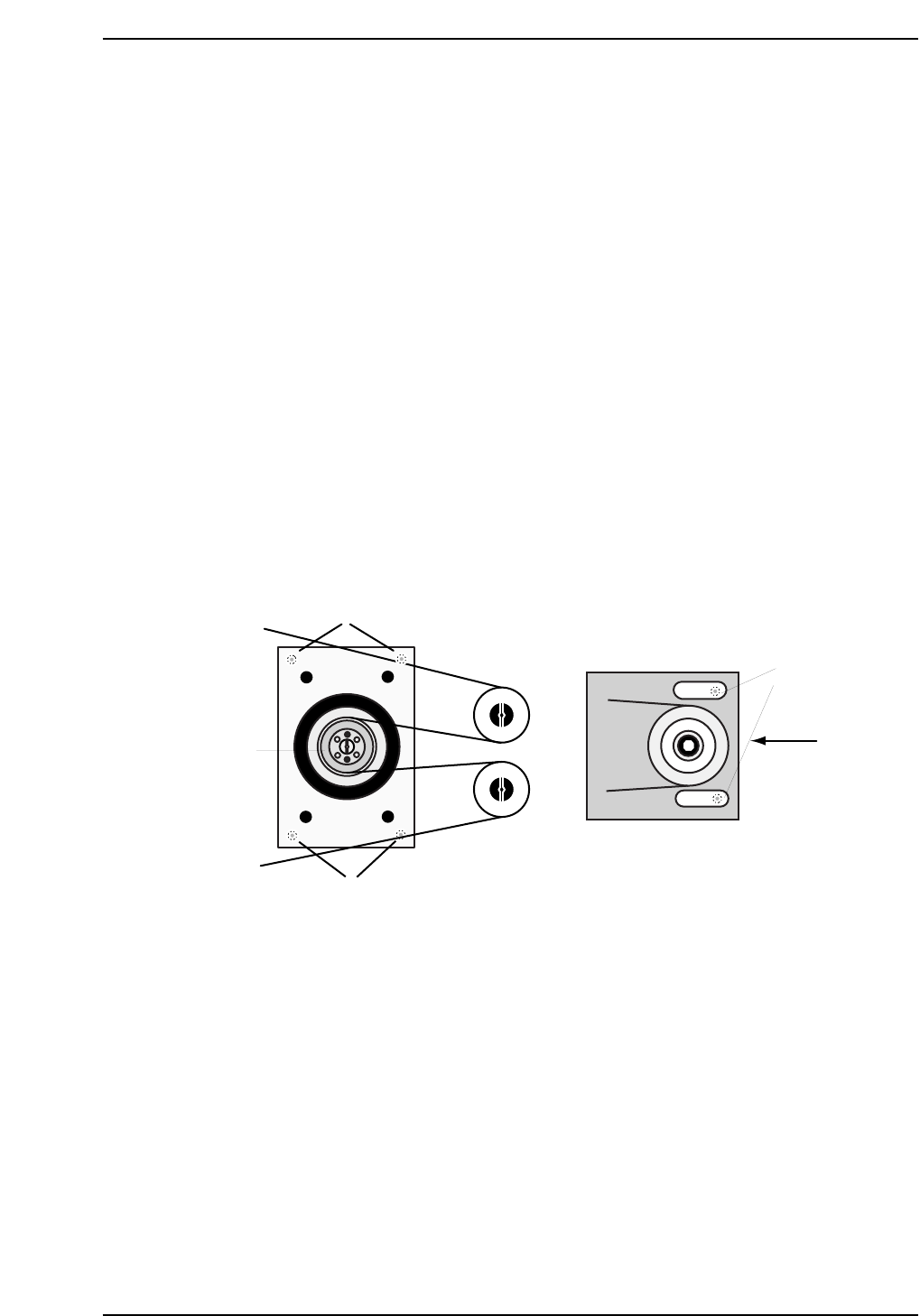
6. Loosen the belt tension by loosening the two (2) allen bolts on the right
hand side of the table, and then lower the tension using the adjustment
bolt as shown below.
8. Pop the span-ring by removing the four (4) allen bolts and screwing two
of them into the adjacent holes until loose. Remove the span-ring.
9. Remove the motor gear followed by the four (4) mounting bolts securing
the motor bracket to the XY-table.
10. Remove the motor and separate from the bracket by removing the four
(4) mounting bolts on the underside.
Tension
Adjustment
Bolt
Bracket Mounting
Bolts
Motor Mounting
Bolts
Z-motor
span-ring
CP7T31017
Loosen here
Chapter 1 1.5 Replacing the Z-Motor
Edition 2.0 1-20 CP-7-series Level 3 Tutorial
1.5.2 Installing the Z-Axis Motor
Procedure:
1. Secure a new motor to the machine.
2. Reconnect the two (2) electrical connectors to the motor.
3. Replace the motor and fasten in place with the four (4) mounting bolts.
4. Replace the table top and secure using the lock nut jig.
1.5.3 Adjusting the Table Top Parallelism
There may be occasions where it is necessary to adjust the parallelism of the table top.
An excessively uneven table top will result in damaged nozzles in some areas and
tombstoning of parts in others.
Procedure:
1. Push the adjustable rail towards the back of the table, while ensuring to
leave the lock nuts exposed.
2. Inch the table in the X and Y-directions towards their respective minus
side mechanical stoppers, while taking care not to enter overtravel.
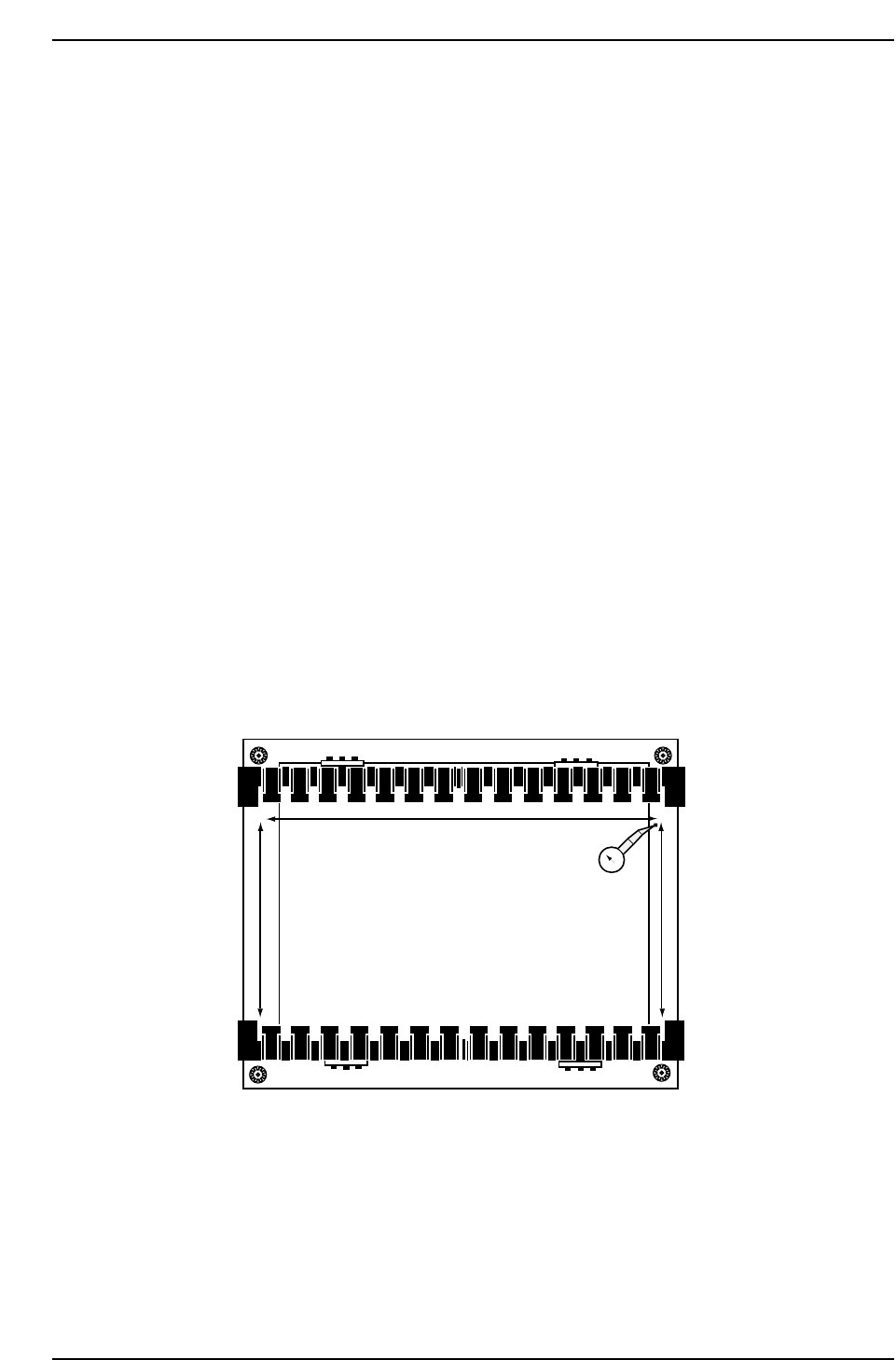
3. Attach a dial gauge to the Fiducial camera bracket and attach the needle
to point A (refer to diagram below).
4. Using A as the reference point, set the dial gauge to zero and inch in the
Y-direction to take the needle to point B.
CP7T31018
0
A
B
C
D
XY-Table
Chapter 1 1.5 Replacing the Z-Motor
Edition 2.0 1-21 CP-7-series Level 3 Tutorial
5. Loosen the lock nut at corner B and use an allen wrench to adjust the
height of the table until the dial reads 0. Move the dial back to point A
and re-check.
Note: The reference point should always be zero.
6. Now inch in the X-direction to move the dial to point C. Adjust to zero
using the lock nut jig and allen wrench. Repeat for C to D.
7. Finally re-check and ensure that the tolerance for whole table is no more
than 0.2 mm.
1.5.4 Main Clamper Parallelism
Once the table top leveling has been performed, it is necessary to perform the main
clamper parallelism adjustment.
Procedure:
1. Use an allen wrench to loosen all claws on both the fixed and adjustable
rails. Loosen the top claws only.
Note: It is impossible to inch the XY-table when the clamper is open
2. Disconnect the air supply and move the adjustable rail back
approximately 50 mm.
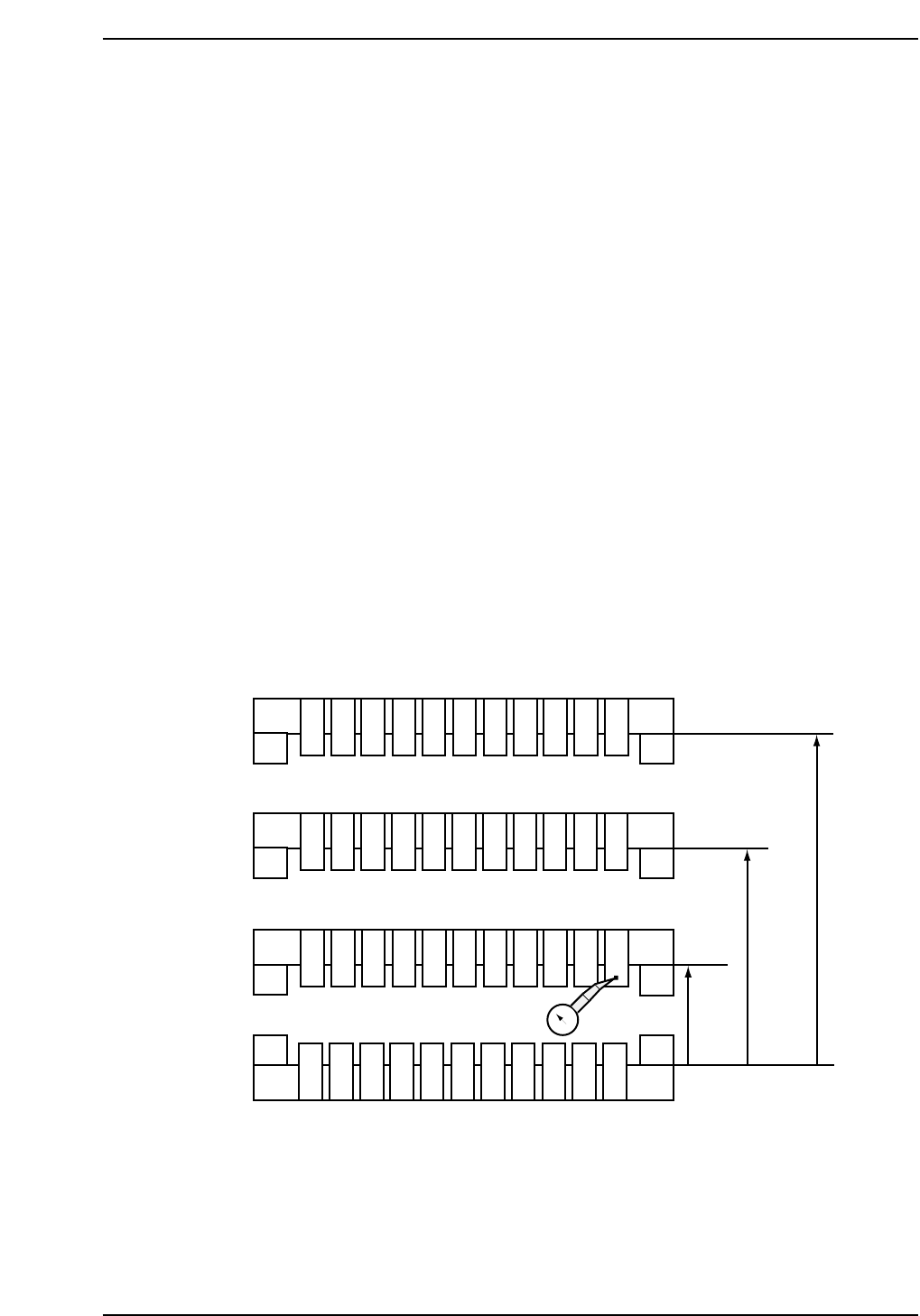
3. Set the dial gauge to zero at point zero as shown in the diagram below.
4. Inch the table in the X-direction and measure the deflection on the dial
gauge at points 2 and 3. Then measure points 10, 11 and 12 with respect
to point 1.
Note: Adjust at ZØ to ensure that there is no interference between the opened claws and the
cutter plate.
101112
123
456
789
50 mm
180 mm
250 mm
0
CP7T31019