00190725-01.pdf - 第13页
1.4. 3 Sub menu s f or HS -180 P la cemen t St ation s The display of the submenus is dependent - similarly t o the main m enu - on the opt ions activated. For details on these submenus → r efer to chap. 5 "Descript…
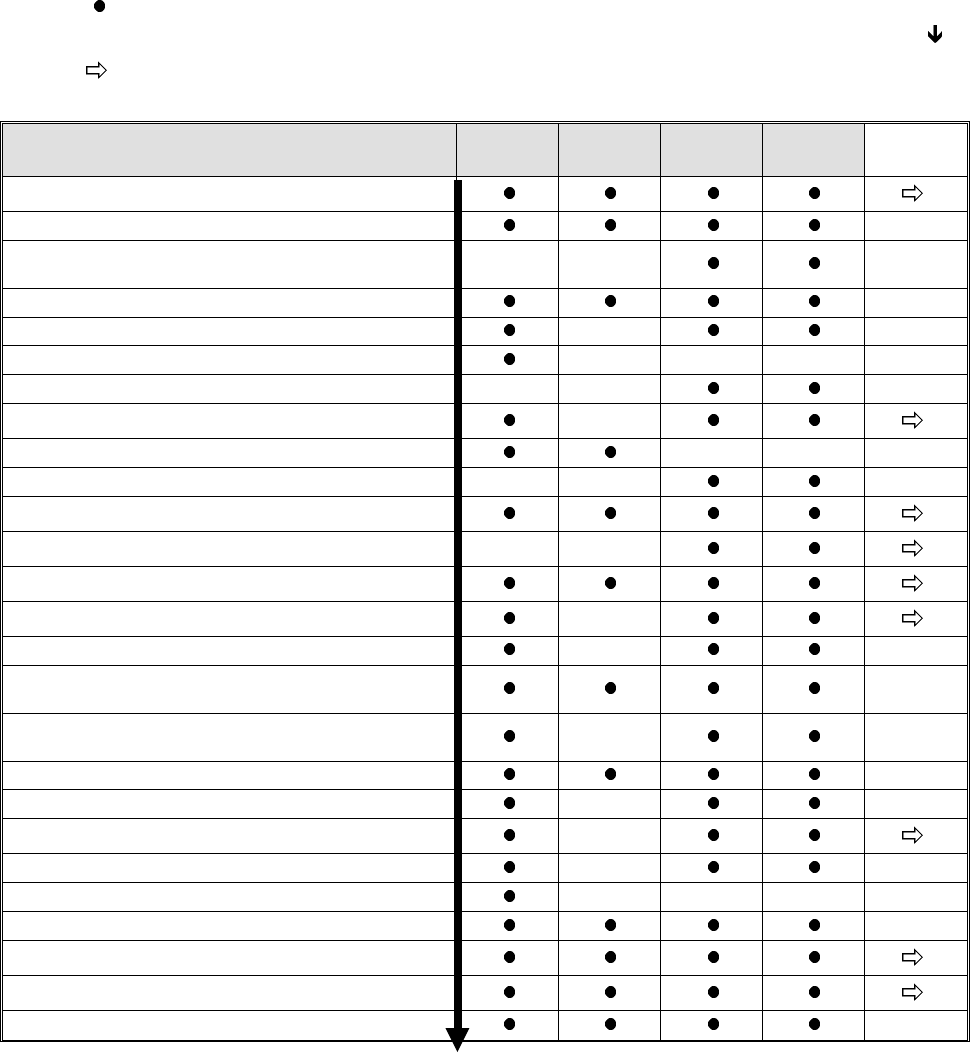
Legend: = displayed / executable main menu option of the respective machine type.
Execution of the menu options is performed in the sequence displayed on the screen (see )!
= when this menu option is selected, a submenu is displayed as shown for the respective machine
types in figures 1.3 to 1.11.
1)
These measuring routines can be called up either individually or in a block by selecting "EXECUTE NEXT
4 POINTS". In this connection, please take note of the text on page 1-5!
2)
Prior
to the performance of "Glass mapping" (adhesive station II and HS-180 placement station), "DETERMINE
CALIBRATION FACTORS OF HEAD CAMERA" and "DETERMINE CAMERA OFFSET" are to be carried
out in the specified sequence.
3)
Prior
to the execution of the "NOZZLE MENU" the option "DETERMINE ANGLE CORRECTION OF D-AXIS"
has to be carried out.
Functions for machine type: Placem.st
HS-180
Adh.st.II
HS-180
MS-102
MS-128
MS-132
Submenu
EDIT MENU
CHECK AXIS ADJUSTMENT
DETERMINE MAX. AND MIN. Z-AXIS
TRAVEL RANGES
----- -----
MEASURE MACHINE ZERO POSITION
DETERMINE ECCENTRICITY OF NOZZLE
-----
DETERMINE HEAD HEIGHT
----- ----- -----
REGISTER PLACEMENT LEVEL Z AXIS
----- -----
TRACK MEASURING MENU
-----
DETERMINE PCB EDGE FIXED TABLE
----- -----
DETERMINE SENSOR MOVABLE TABLESIDE
-----
MAPPING MENU (Glass /Steel Mapping)
2)
ADHESIVE MENU
----- -----
AXES INITIALIZING MENU
NOZZLE MENU
-----
EXECUTE NEXT 4 POINTS
-----
DETERMINE CALIBRATION FACTORS OF
HEAD CAMERA
1)
2)
DETERMINE ANGLE CORRECTION OF
D-AXIS
1)
3)
-----
DETERMINE CAMERA OFFSET
1) 2)
DETERMINE JAW OFFSET
1)
-----
COMPONENT CAMERA MENU
-----
DETERMINE COPLANARITY COORDINATES
-----
MEASURE ANY HOLE (REPEATEDLY)
----- ----- -----
CONVEYOR BELT WIDTH ADJUSTMENT
AXES MOVEMENT MENU
I/O MENU
STORING
Fig. 1.2 Main Menu of the Various Machine Types (Maximum Configuration)
1 Overview of the Program User’s Manual AutoCal Program
1.4 Program Run and Operation Software Version 114.xxx
1 - 6
1.4.3 Submenus for HS-180 Placement Stations
The display of the submenus is dependent - similarly to the main menu - on the options activated. For details
on these submenus → refer to chap. 5 "Description of the Menu Options for HS-180 Placement Stations".
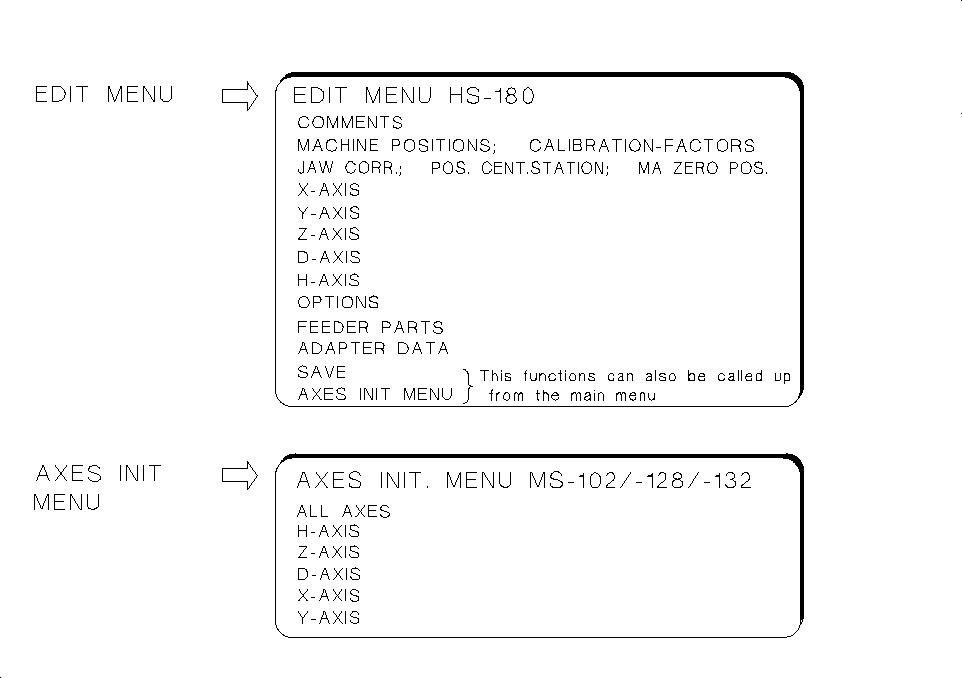
These submenus are designed for
checking and correcting MA-data.
• The
EDIT MENU
allows you to enter the data that cannot be determined automatically (e.g. zero point cor-
rection values of the axes) directly into the MA-data and to initialize the axes directly from the Edit Menu.
• Upon starting the AutoCal program: If you have to respond to the first query "Z AXIS IN UPPER POSI-
TION?" with NO, the main menu is displayed from which the EDIT MENU can be selected enabling you
to check / edit the correction values of the axis and to initialize the axes.
• Under "Options" you can review the activation of a given option, yet no changes can be made.
• Under "ADAPTER DATA" you can (with the
Nozzle changer
activated) obtain a display of the X, Y and Z-
pick-up positions of the nozzles, the adapter lengths and the Z-position following the pick-up of the adapters.
• Within the measuring sequence of the routine check, call up the EDIT MENU to check, for instance,
the "min. / max. X and Y-travel paths" and to correct them, if required, in accordance with the measu-
ring sequence description.
• From the EDIT MENU it is also possible to call up the AXES INIT MENU (see submenu) to ensure, for instance,
the troublefree performance of the axes reference run prior to the selection of the first measuring routine.
• The
AXES INITIALIZING MENU
enables you to initialize either individual or all axes.
Fig. 1.3 Submenus of HS-180 Placement Station
User’s Manual AutoCal Program 1 Overview of the Program
Software Version 114.xxx 1.4 Program Run and Operation
1 - 7
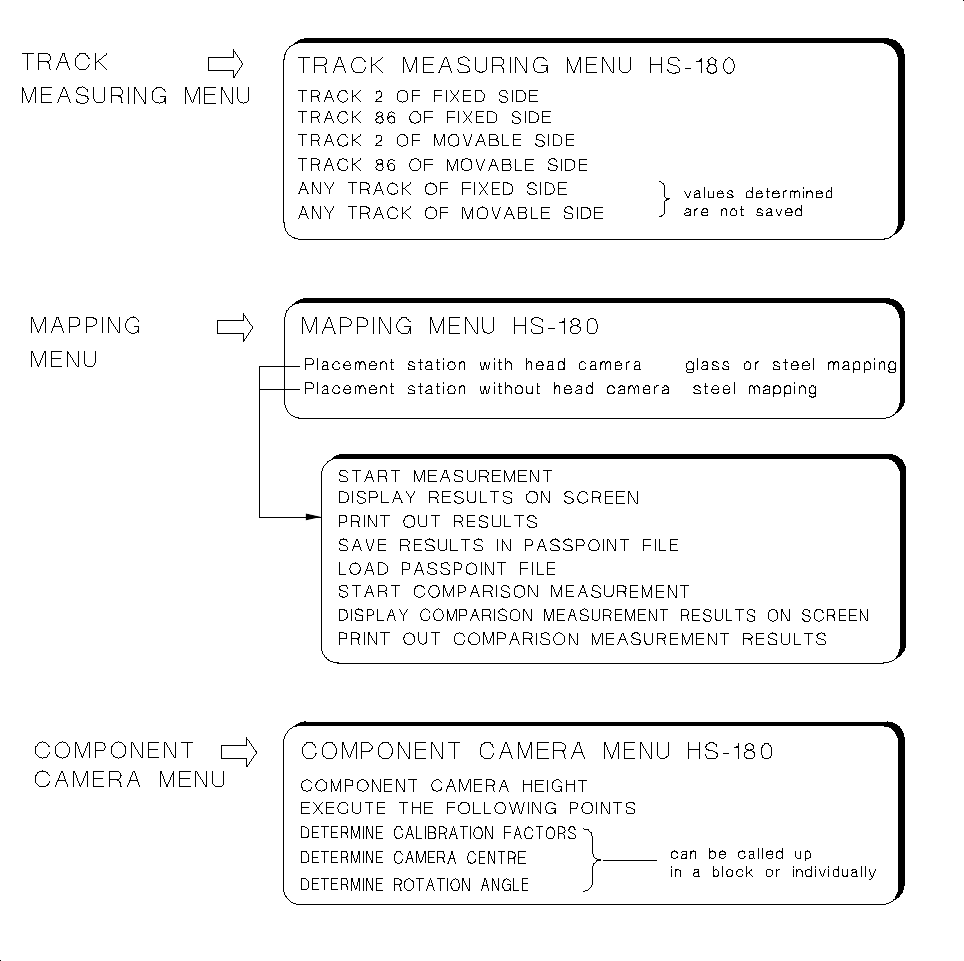
These submenus are designed to determine MA-Data and the gantry offset
• In the
TRACK MEASURING MENU
the X,Y and Z-values of the tracks of the fixed and movable table si-
des are determined.
• The
MAPPING MENU
for HS-180 placement stations offers different measuring sequences, depending
on the options available: If a head camera (PCB camera) is activated, you can select between "Glass
mapping" or "Steel mapping". If not, only the measuring sequence for "steel mapping" is available. The re-
spective mapping plate must be available (see "Testing Aids", chap. 3).
— A precondition for "Glass mapping" is the calibration of the head camera (see Fig. 1.2).
• The
COMPONENT CAMERA MENU
allows you to call up a number of measuring routines either blockwi-
se or individually. In this connection, pay attention to the information contained in section 1.4.2.
Fig. 1.4 Submenus of HS-180 Placement Station
1 Overview of the Program User’s Manual AutoCal Program
1.4 Program Run and Operation Software Version 114.xxx
1 - 8