00190725-01.pdf - 第8页
1.2 Inf or mat ion Ab ou t the Progr am 1.2. 1 Disk ettes The AutoCal program vers ion 114.xxx is provided on 2 different set s of diskettes. • 5 DD-diskettes • 5 DD-diskettes and 1 HD-disk ette The set of DD-diskettes i…
1 Overview of the Program
This documentation is based on the current release of the AutoCal program version
114.000
!
1.1 Field of Application and User Training
➤ Exact machine data are a precondition for optimal placement results.
This menu-controlled AutoCal Program (Automatic Calibration Program) V 114.xxx permits you to check
and determine most of the machine data of the following machine types:
• HS-180 placement station,
• HS-station adhesive station II,
• MS-machines MS-102, 128 and MS-132 (with
or
without automatic width adjustment)
In the following those machines are identified that are not supported by the AutoCal program:
— As before, adhesive station I is not supported by the AutoCal program
— From AutoCal version 112.000 onwards, the automatic MS-72 and MS-90 machines are no longer supported.
— MS-132 with fixed
conveyor width:
As before, the AutoCal program cannot be used on MS-132 machines with the conveyor width set to a fi-
xed value (up to and including batch identification no. 5).
Reason: These machines are not fitted with a Bero for width adjustment. However, in various measuring
routines the AutoCal program checks the conveyor width by approaching the Bero for width adjustment.
➤ Adequate training is prerequisite for the application of the program !
Such training is conducted in any case by Siemens AG, i.e. the SMD Service, Commissioning or SMD-
Training Center of Siemens AG (see chap. 2 "Safety").
User’s Manual AutoCal Program 1 Overview of the Program
Software Version 114.xxx 1.1 Field of Application and User Training
1 - 1
1.2 Information About the Program
1.2.1 Diskettes
The AutoCal program version 114.xxx is provided on 2 different sets of diskettes.
• 5 DD-diskettes
• 5 DD-diskettes and 1 HD-diskette
The set of DD-diskettes is required for machines equipped with a computer with DD-disk drive.
Any further information on the sets of diskettes such as contents or diskette handling is contained in chapter
4.
1.2.2 Installation / Start of the Program
Depending on the system installed and storage space available, the AutoCal program can be installed on the
hard disk or be started from diskette. All related information is contained in chap. 3.
1.2.3 Selection of the National Language
The default language of the screen displays is
German
.
By activating the appropriate language module (see chapter 12 "Workarounds") the screen displays will be
output in any one of the following languages:
● English ● French ● Italian ● Spanish
1.2.4 Abbreviations Used (Screen and Documentation)
MA-Data Machine Data
MA-zero point machine zero point
WPC Waffle-Pack Changer
PCB printed circuit board
PCB width width of printed circuit board
PCB camera camera of printed circuit board
PCB transport transport of the printed circuit board
LC line computer
1 Overview of the Program User’s Manual AutoCal Program
1.2 Information About the Program Software Version 114.xxx
1 - 2
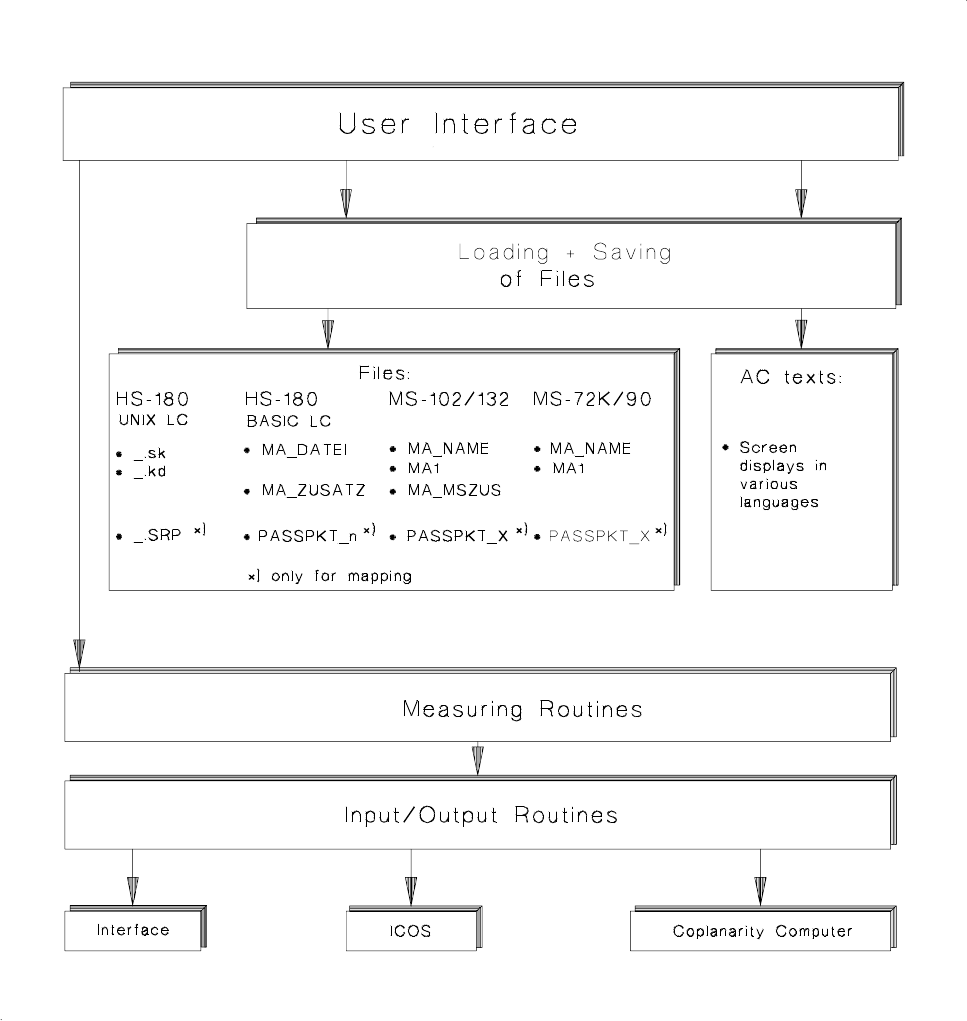
1.3 Program Architecture
Fig. 1.1 Program Architecture of AutoCal Program Version 114.xxx
User’s Manual AutoCal Program 1 Overview of the Program
Software Version 114.xxx 1.3 Program Architecture
1 - 3