00190725-01.pdf - 第9页
1.3 Pro gram Arch ite ctur e F ig. 1. 1 Pro gra m A rchi tectu re of Auto Cal Prog ram Ve rsion 11 4.xx x Us er’ s Ma nual Auto Cal Prog ram 1 Over v iew of th e Pr o gra m Sof tw are Ver si on 11 4. x xx 1.3 Program Arc…
1.2 Information About the Program
1.2.1 Diskettes
The AutoCal program version 114.xxx is provided on 2 different sets of diskettes.
• 5 DD-diskettes
• 5 DD-diskettes and 1 HD-diskette
The set of DD-diskettes is required for machines equipped with a computer with DD-disk drive.
Any further information on the sets of diskettes such as contents or diskette handling is contained in chapter
4.
1.2.2 Installation / Start of the Program
Depending on the system installed and storage space available, the AutoCal program can be installed on the
hard disk or be started from diskette. All related information is contained in chap. 3.
1.2.3 Selection of the National Language
The default language of the screen displays is
German
.
By activating the appropriate language module (see chapter 12 "Workarounds") the screen displays will be
output in any one of the following languages:
● English ● French ● Italian ● Spanish
1.2.4 Abbreviations Used (Screen and Documentation)
MA-Data Machine Data
MA-zero point machine zero point
WPC Waffle-Pack Changer
PCB printed circuit board
PCB width width of printed circuit board
PCB camera camera of printed circuit board
PCB transport transport of the printed circuit board
LC line computer
1 Overview of the Program User’s Manual AutoCal Program
1.2 Information About the Program Software Version 114.xxx
1 - 2
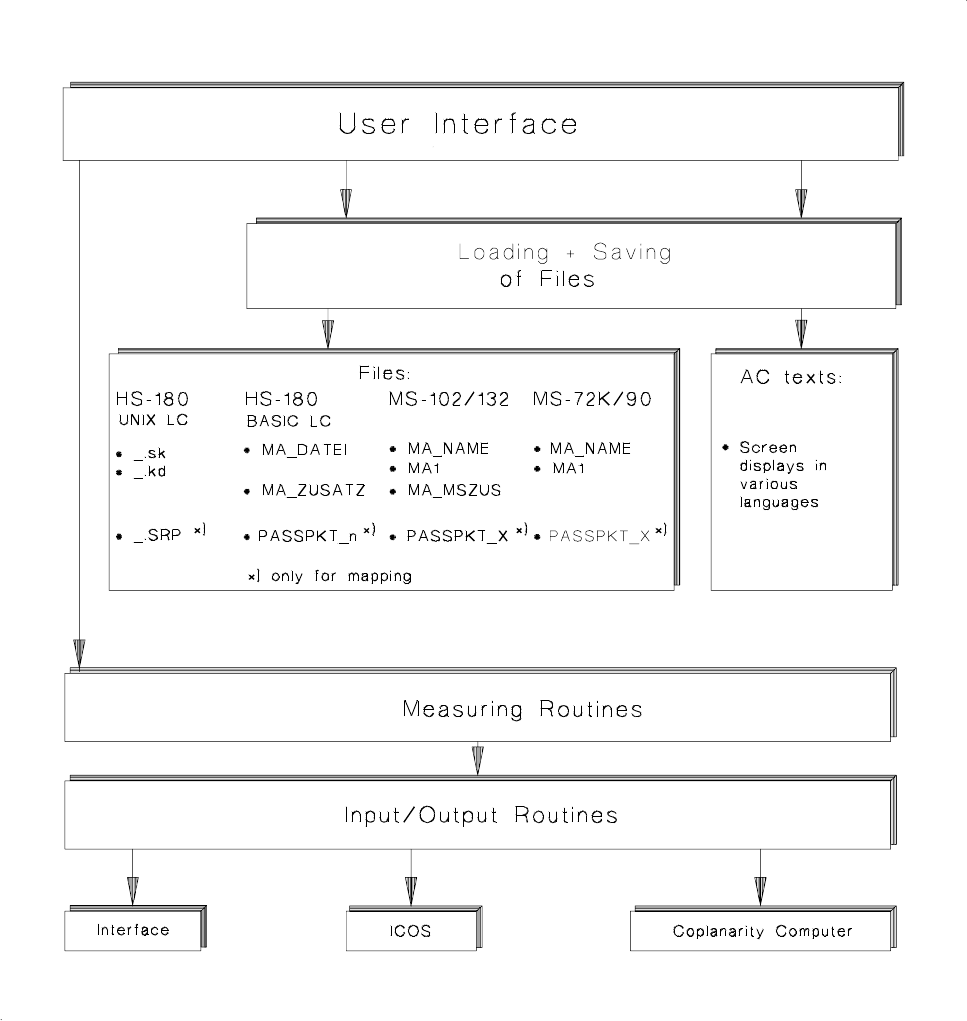
1.3 Program Architecture
Fig. 1.1 Program Architecture of AutoCal Program Version 114.xxx
User’s Manual AutoCal Program 1 Overview of the Program
Software Version 114.xxx 1.3 Program Architecture
1 - 3
1.4 Program Run and Operation
•
The AutoCal program offers the following possibilities:
➤ To perform a
complete routine test
of your machine thereby determining most of the machine data.
To this end, all measuring routines are executed in the specified sequence.
The time to be expended including mapping is approx. 5 hours for HS-180 placement stations and MS-
1xx; approx. 3 hours for the Adhesive Station II.
➤ To check and correct only individual machine data by means of
individual checks
(e.g. if errors have
occurred or following troubleshooting activities). When so doing, it is absolutely necessary to observe
the
interdependence
of machine data / calibrations in order to obtain valid MA-Data. All related infor-
mation is contained in chap. 6.
•
With some measuring routines the computer performs a plausibility check of the measured values follo-
wing the completion of the determination of the values and any errors are displayed on the screen. For a
very small number of values the operator assesses the measuring results according to the data contained
in the run description of the measuring routine.
•
Where a printer is connected, certain measuring results - except for the mapping results - are automat-
ically printed out. In the Mapping menu separate menu options are offered for the printout.
NOTE:
The MA-Data of the HS-placement station and adhesive station II as well as those of the MS-1xx machi-
ne must be correct within closely defined limits already before the calibration.
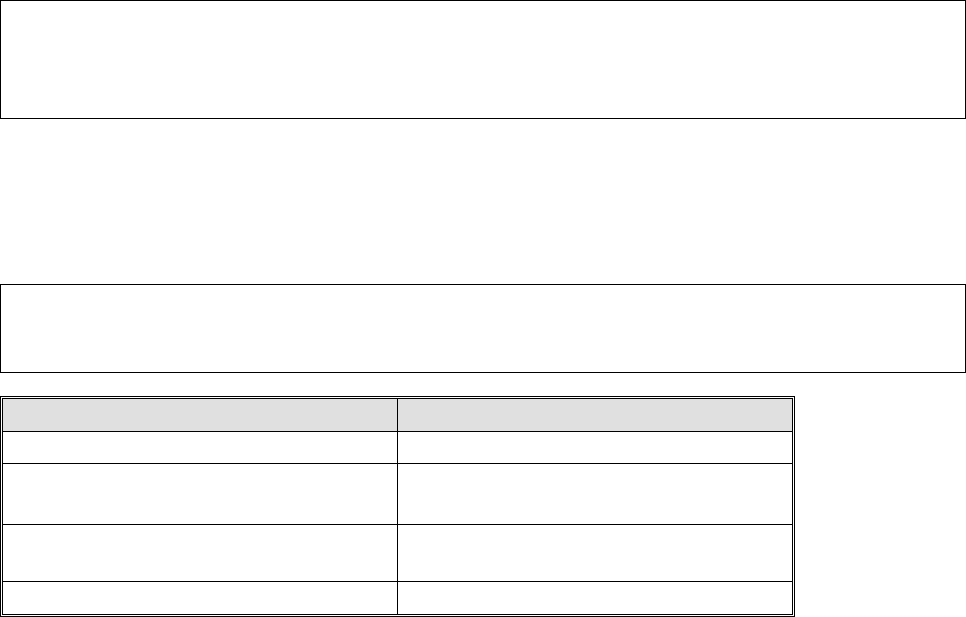
1.4.1 Overview of the File Versions and the Machine Selection Menu
The table below shows the allocation of the line computer software versions to the MA-file versions that can
be selected from the Machine Selection menu.
NOTE
In the case of line computer software versions
<
10
2
.xxx it is recommended to get an UPDATE!
Line Computer Software Version MA-File Version
LRB.1XX.xxx V2.01
LRB.206.xxx
LRB.207.xxx
V2.03
LRB.208.xxx
LRB.209.xxx
V2.08
LRB.230.xxx V2.09
•
After the AutoCal program has been installed on the hard disk or started from diskette, as described in
chapter 4, first the following machine selection menu appears on HS-placement stations, adhesive stati-
ons II or MS-machines upon the start of the AutoCal program.
1 Overview of the Program User’s Manual AutoCal Program
1.4 Program Run and Operation Software Version 114.xxx
1 - 4