00190725-01.pdf - 第40页
Fi g. 4.1 Flo wc har t: Ex ampl e of St a rti ng t he Aut oCa l Pr o gra m 11 4.xx x f rom Dis kette 4 P reparatory Wor k to be Per formed Before ( up to and including) the Start of the Calibration Procedure Us er’s M an…
4.2.6 Station Computer: Starting the AutoCal Program From the Hard Disk
➤ All starting prerequisites must be met (see section
4.2.5
" HS-180 Checklist:....").
• Switch the machine OFF.
• Switch the machine back ON. The control unit remains "
OFF"
for the time being!
• Insert the work diskette (containing the MA-Data of the line) into the disk drive of the station computer.
The diskette’s write-protection tab must be deactivated.
• Now switch the control unit
ON.
After a short while the "ABORT" key (function key) is displayed on the
screen. Press this function key within 8 seconds.
( 1 second corresponds to 1 asterisk, shown in the lower right corner of the screen)
• Start the AutoCal program from the hard disk by selecting menu option "
Auto Calibration Program
".
• From this stage onwards, proceed as described in chapter
7
.
4.2.7 Station Computer: Starting the AutoCal Program From the Diskette
➤ All prerequisites for starting the program must be met (see section
4.2.5
" HS-180 Checklist:....").
• Start the program from the diskette (
menu-controlled
procedure) as shown in the
Flow chart, Fig. 4.1
.
• After AutoCal has been started from a wrong diskette, the error message "FILE NOT FOUND" appears on
the screen.
• The diskette can now be changed and replaced with the other installation diskette. After pressing function
key "AGAIN" the system searches for the program module again. This procedure is repeated until the pro-
gram module has been found (function key "END" = program exit).
• Now carry out the Routine Checks of the HS machine as described in chapter 7.
User’s Manual AutoCal Program 4 Preparatory Work to be Performed Before (up to and including) the Start of the Calibration Procedure
Software Version 114.xxx 4.2 Preparatory Work on the HS-180 Placement Station
4 - 5
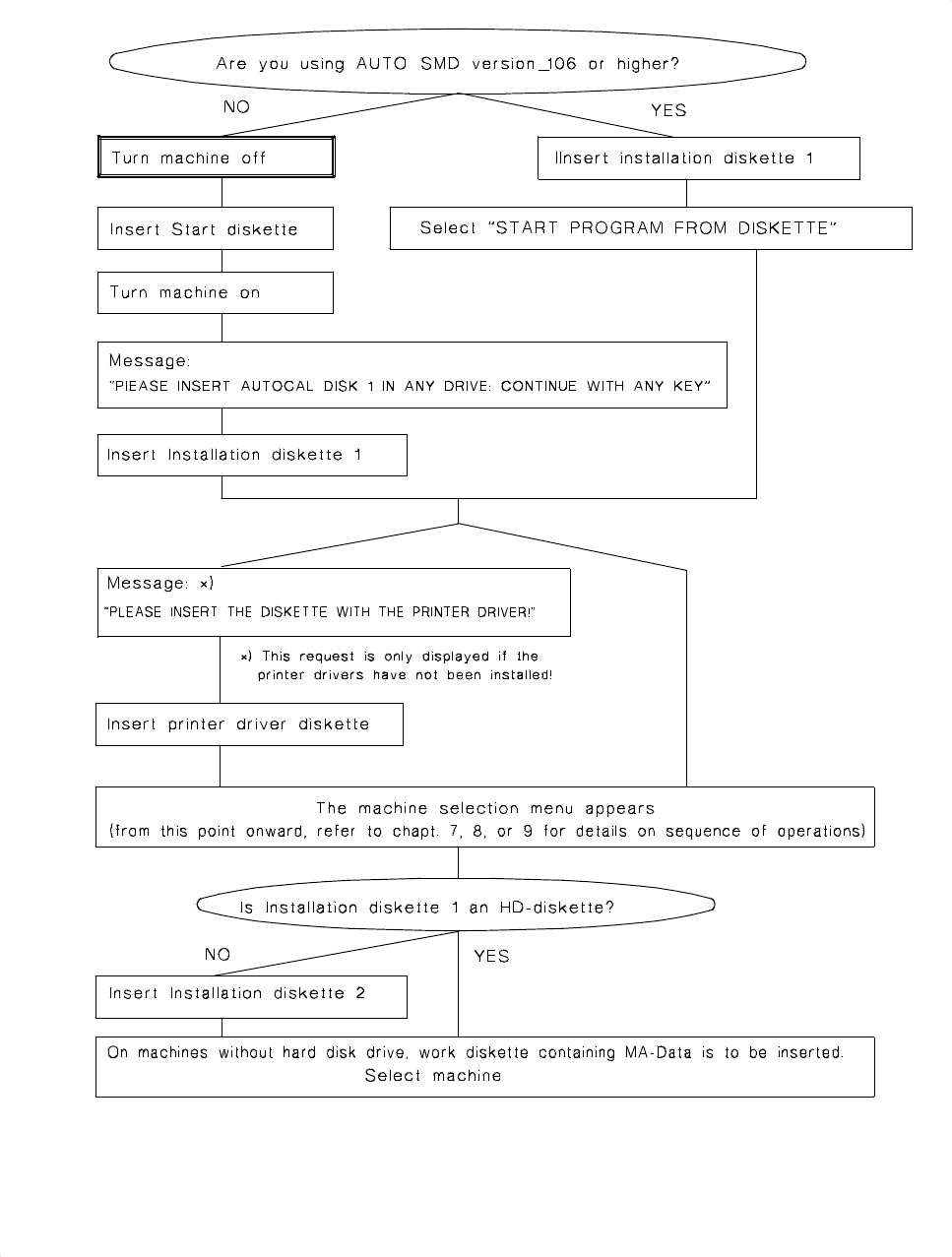
Fig. 4.1 Flowchart: Example of Starting the AutoCal Program 114.xxx from Diskette
4 Preparatory Work to be Performed Before (up to and including) the Start of the Calibration Procedure User’s Manual AutoCal Program
4.2 Preparatory Work on the HS-180 Placement Station Software Version 114.xxx
4 - 6

4.3 Pre-Calibration Work on HS-180 Adhesive Station II
4.3.1 Checking of MA Data Before Copying them to the Work Diskette
• Check the machine data
before
copying them, as described in section 4.2.1.
• A blank,
HP-formatted 3.5" work diskette
with deactivated write protection tab must be available for
copying the MA-data for the
BASIC
line computer.
4.3.2 BASIC Line Computer: Copying Files to the Work Diskette
NOTE
This description applies from LBR 10
2
.xxx (2.01) version onwards. If you still work with a line computer
software
<
102.xxx you should order an
update !
➤ The PASSPKT file is only required if in the course of mapping you wish to load the old mapping data for
comparison measurements.
• Copy the MA-data of the line to the work diskette as described in section
4.2.2
"BASIC Line Compu-
ter:.....".
4.3.3 Station Computer: Installing the AutoCal Program onto the Hard Disk
• Proceed as described in section
4.2.4
(HS-180).
4.3.4 Station Computer: Starting the AutoCal Program From the Hard Disk
➤ Ensure that the prerequisites for program start are all met (see section
4.2.5
"HS-180 Checklist:........." ).
• Start the program from the hard disk as described in section
4.2.6
.
• Thereafter carry out the Routine Check of Adhesive Station II as described in chapter 8.
4.3.5 Station Computer: Starting the AutoCal Program from Diskette
➤ All prerequisites for the program start must be met (see section
4.2.5
"HS-180 Checklist:.....").
• Start the program from diskette as described in section
4.2.7
(menu-controlled procedure).
• Subsequently conduct a complete routine check of Adhesive Station II as described in chapter
8
.
User’s Manual AutoCal Program 4 Preparatory Work to be Performed Before (up to and including) the Start of the Calibration Procedure
Software Version 114.xxx 4.3 Pre-Calibration Work on HS-180 Adhesive Station II
4 - 7