00190725-01.pdf - 第24页
Moreover, the "NOZZLE ENDUR. RUN" function allows you to c heck the nozzle pick-up and returning operations. • AXES MOVE MENT MENU : These functions allow you t o check the movement / positioning of individual …
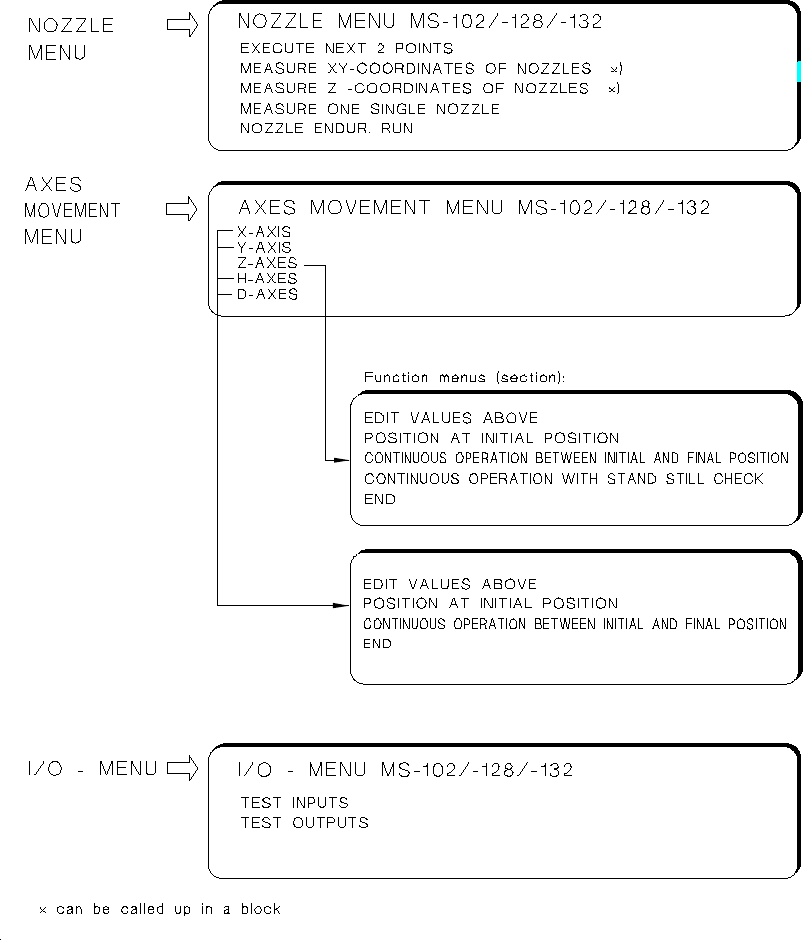
These submenus are designed for the determination of MA-Data, adjustment of axes or testing inputs
and outputs:
•
NOZZLE MENU
: Serves to determine all X,Y and Z-nozzle positions either for all X-Y or all Z-positions wit-
hin a given measuring sequence, or selectively by selecting only individual nozzles.
Fig. 1.11 Submenus MS-102/-128/-132
User’s Manual AutoCal Program 1 Overview of the Program
Software Version 114.xxx 1.4 Program Run and Operation
1 - 17

Moreover, the "NOZZLE ENDUR. RUN" function allows you to check the nozzle pick-up and returning
operations.
•
AXES MOVEMENT MENU
: These functions allow you to check the movement / positioning of individual
axes in the event of a malfunction and to perform the axis adjustment, if required.
For the Z-axis the continuous run function including standstill control and the force values are offered on
the functions menu in addition (for details see chap. 5 "Description of the Menu Options").
NOTE:
For the adjustment of an axis the documentation pertaining to the adjustment of axes is required in additi-
on (adjustment instructions of the machine).
•
I/O MENU:
This menu permits you to set the desired outputs by selecting "TEST OUTPUTS", to toggle
the outputs by selecting "ENDURANCE RUN" and to read the updated inputs in each case off the screen
when so doing. Selecting the "TEST INPUTS" causes all signal state changes of the inputs to be dis-
played successively on the screen. Further information about the I/O MENU is contained in chap. 5.
WARNING
∆
!
∆
!
Any concurrent setting of competing outputs may result in damage to the machine!
N o (!) verification by the software is carried out !
1 Overview of the Program User’s Manual AutoCal Program
1.4 Program Run and Operation Software Version 114.xxx
1 - 18

2 Safety
2.1 Safety Instructions for Using the Program
The items listed in the following primarily apply to the HS-180 Placement Station and the Adhesive Station II,
as well as the MS-102/128 and MS-132 machines.
DANGER
∆
!
∆
!
∆
!
DANGER OF ACCIDENT! / DANGER OF PLACEMENT HEAD CRASH AS A RESULT OF IMPROPER
HANDLING !
Carefully read all items listed in the following and be sure to observe all instructions.
•
Improper use of the AutoCal program results in a danger of accident and damage to the machine.
•
All work to be performed with the AutoCal program, in particular any modification of MA-data, may therefo-
re only be carried out by specially trained and authorized personnel, or by Siemens AG service
technicians.
All training courses on the use of this program are provided in any case by Siemens AG, namely either
the SMD Service, Commissioning or the Siemens AG SMD Training Center.
•
Make sure that only authorized persons have access to the program!
•
No activities may be performed on the machine without proper knowledge of the corresponding section of
these "AutoCal Program Operating Instructions".
•
It is mandatory that all DANGER, WARNING and CAUTION notes contained in this description be observed.
•
The safety instructions contained in the User’s Manual of the machine apply in addition.
•
Special safety regulations apply in connection with the coplanarity laser module, which are contained
— in the "Coplanarity Laser Module" Operating Instructions for MS machines and
— in the "Coplanarity Laser Module" Retrofit Instructions for HS machines.
•
The keyswitch and the protective covers have a protective function when working with the AutoCal program.
Therefore, the keyswitch must remain locked at all times when working with the program.
•
Width adjustment and elevating table movements may only be carried out with the protective covers closed.
•
Observe the specified sequence of operations.
User’s Manual AutoCal Program 2 Safety
SoftwareVersion 114.xxx 2.1 Safety Instructions for Using the Program
2 - 1