00190725-01.pdf - 第41页
4.3 Pre- Cali brat ion W ork on H S-1 80 Ad hesive Stat io n II 4.3. 1 Che cking of MA Data Befor e Co pying t hem t o th e Wo rk Disk ette • Check the m achine data before copying them, as described in section 4.2.1. • …
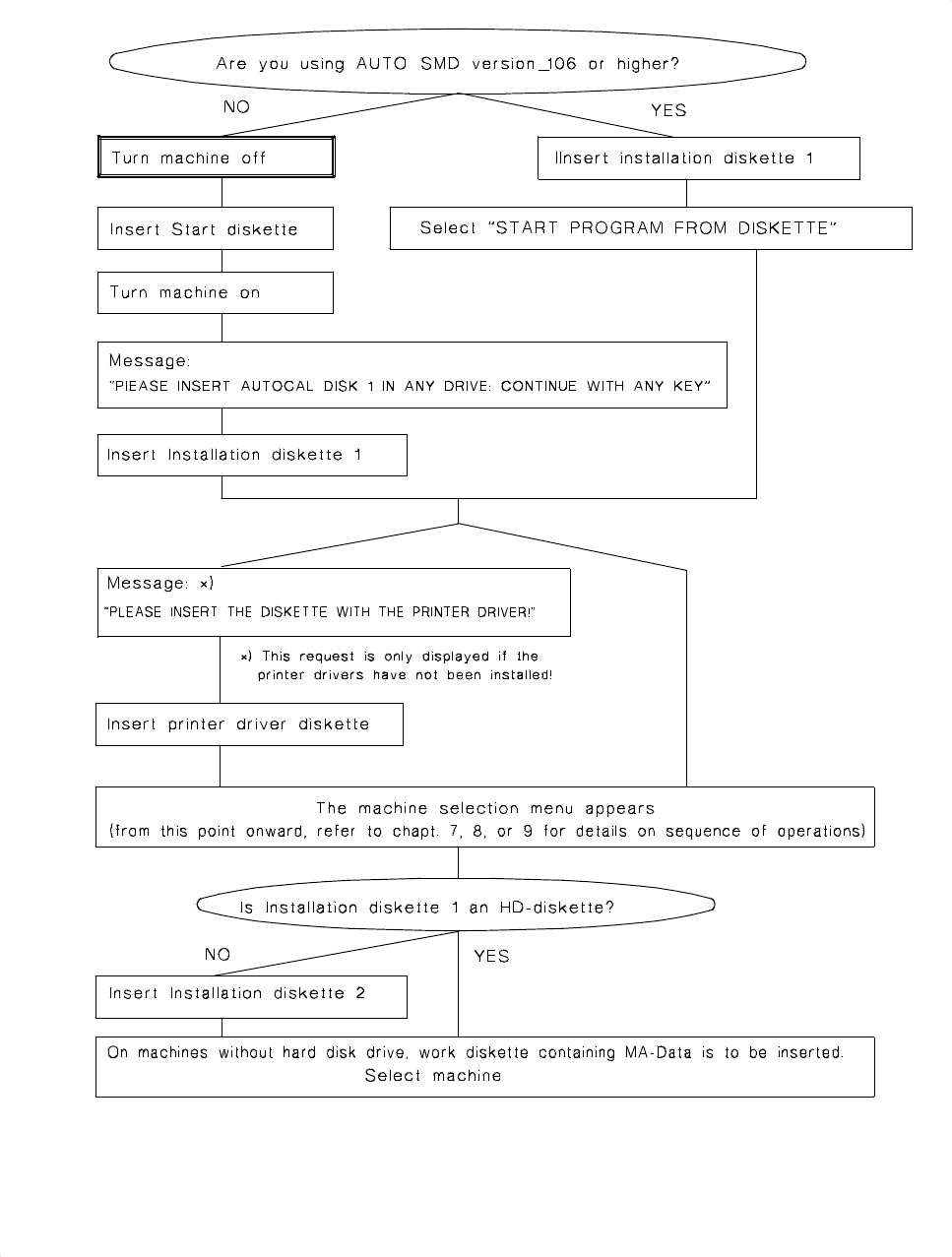
Fig. 4.1 Flowchart: Example of Starting the AutoCal Program 114.xxx from Diskette
4 Preparatory Work to be Performed Before (up to and including) the Start of the Calibration Procedure User’s Manual AutoCal Program
4.2 Preparatory Work on the HS-180 Placement Station Software Version 114.xxx
4 - 6

4.3 Pre-Calibration Work on HS-180 Adhesive Station II
4.3.1 Checking of MA Data Before Copying them to the Work Diskette
• Check the machine data
before
copying them, as described in section 4.2.1.
• A blank,
HP-formatted 3.5" work diskette
with deactivated write protection tab must be available for
copying the MA-data for the
BASIC
line computer.
4.3.2 BASIC Line Computer: Copying Files to the Work Diskette
NOTE
This description applies from LBR 10
2
.xxx (2.01) version onwards. If you still work with a line computer
software
<
102.xxx you should order an
update !
➤ The PASSPKT file is only required if in the course of mapping you wish to load the old mapping data for
comparison measurements.
• Copy the MA-data of the line to the work diskette as described in section
4.2.2
"BASIC Line Compu-
ter:.....".
4.3.3 Station Computer: Installing the AutoCal Program onto the Hard Disk
• Proceed as described in section
4.2.4
(HS-180).
4.3.4 Station Computer: Starting the AutoCal Program From the Hard Disk
➤ Ensure that the prerequisites for program start are all met (see section
4.2.5
"HS-180 Checklist:........." ).
• Start the program from the hard disk as described in section
4.2.6
.
• Thereafter carry out the Routine Check of Adhesive Station II as described in chapter 8.
4.3.5 Station Computer: Starting the AutoCal Program from Diskette
➤ All prerequisites for the program start must be met (see section
4.2.5
"HS-180 Checklist:.....").
• Start the program from diskette as described in section
4.2.7
(menu-controlled procedure).
• Subsequently conduct a complete routine check of Adhesive Station II as described in chapter
8
.
User’s Manual AutoCal Program 4 Preparatory Work to be Performed Before (up to and including) the Start of the Calibration Procedure
Software Version 114.xxx 4.3 Pre-Calibration Work on HS-180 Adhesive Station II
4 - 7

4.4 Pre-Calibration Work on MS-102, 128, 132
4.4.1 Installing the AutoCal Program onto the Hard Disk
NOTE
On the 300 computer with an
LIF-formatted 10MB or 20MB
hard disk the AutoCal program cannot be in-
stalled onto the hard disk but must be started from the AutoCal diskette (see following section).
• To install the program onto the hard disk, proceed as described in section
4.2.4
.
• Subsequently check whether all prerequisites are met (see section
4.4.2)
and start the program.
4.4.2 MS-1xx Checklist: Ensuring that all Prerequisites for Program Start are Met.
As a basic principle, the prerequisites described in Section 4.2.5 " HS-180 Checklist:.......") apply .
Furthermore, the following must be ensured:
1.
The MA_MSZUS file must be available on the hard disk for initial calibration (coplanarity module/optical
position recognition - adhesive station).
2.
The conveyor system of the waffle-pack changer must be installed in the outer position (see CAUTION).
CAUTION ⇒ TRAVERSING RANGE FOR PCB TRANSPORT
∆
!
The conveyor system of the waffle-pack changer must be
relocated
to the
outer position
and the
positi-
on of the limit switch
for maximum PCB conveyor width adjusted accordingly!
Before starting the AutoCal program the waffle-pack changer must be switched OFF and subsequently
switched ON again in order to prevent any
initialization
from occurring.
Please proceed as described in the MS-102/132 User’s Manual.
4.4.3 Starting the AutoCal Program From the Hard Disk
➤ All prerequisites for the program start must be met (see section
4.4.2
"MS-1xx Checklist:...." ).
• Start the AutoCal program from the hard disk as described in section
4.2.6
.
• From this stage onwards, proceed as outlined in the description of the measuring procedure, chapter
9.
4.4.4 Starting the AutoCal Program From Diskette
➤ All prerequisites for the program start must be met (see section
4.4.2
" MS-1xx Checklist:...." ).
• The program is started from the diskette as described in Section
4.2.7 (menu-controlled
).
• Conduct a complete Routine Check on the MS machine as described in chapter
9
.
4 Preparatory Work to be Performed Before (up to and including) the Start of the Calibration Procedure User’s Manual AutoCal Program
4.4 Pre-Calibration Work on MS-102, 128, 132 Software Version 114.xxx
4 - 8