EUKYX-199-2100_G5S2_Instruction_Vol2_E.pdf - 第104页
EUKYX 1-54 199-2100 [ 4] Spe ed DC LR SET All Set ting The " All Set tin g" windo w appears. Enter the ra te of spee d reduction. The spee d reductions of each opera tion are set at on ce. The ra te of spee d r…
EUKYX
1-53199-2100
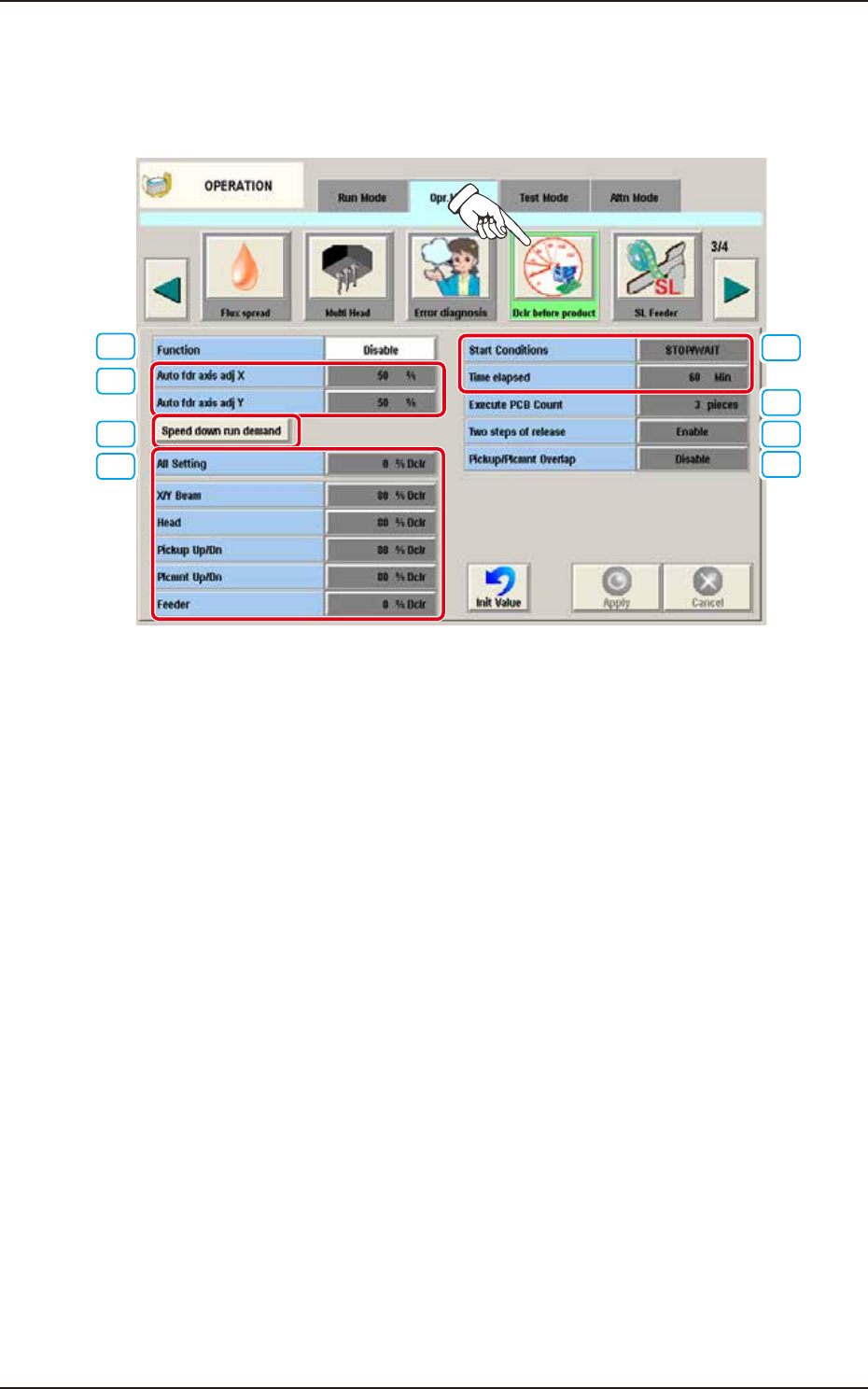
4.2.14 Dclr before product
This is the function to suppress the speed until the component pickup becomes stable during the
automatic operation right after the Setup. When the [Dclr before product] button is pressed on the
"Opr. Mode" tab sheet, the following window appears.
[1]
[2]
[3]
[4]
[5]
[6]
[7]
[8]
F2A42C
[1] Function
Disable
Select this when Dclr before product is not used.
Enable
Select this when Dclr before product is used.
[2] Auto fdr axis adj X, Auto fdr axis adj Y
Set the feedback amount for Pickup Auto Adjust.
[3] Speed down run demand button
Perform the Dclr before automatic operation.
4.2 "Opr.Mode" Tab Sheet

EUKYX
1-54199-2100
[4] Speed DCLR SET
All Setting
The "All Setting" window appears. Enter the rate of speed reduction.
The speed reductions of each operation are set at once. The rate of
speed reduction are reflected to all the Speed DCLR SET.
X/Y Beam
The "X/Y Beam" window appears. Enter the rate of speed reduction
of X/Y Beam.
Head
The "Head" window appears. Enter the rate of speed reduction
of Head.
Pickup Up/Dn
The "Pickup Up/Dn" window appears. Enter the rate of speed
reduction of Pickup Up/Dn.
Plcmnt Up/Dn
The "Plcmnt Up/Dn" window appears. Enter the rate of speed
reduction of Plcmnt Up/Dn.
Feeder
The "Feeder" window appears. Enter the rate of speed
reduction of Feeder.
[5] Start Conditions when machine stopped for long hours
Set the Start Conditions of the Dclr before product when the machine stopped for long hours.
►
Start Conditions
STOP
Performs Dclr before product when the machine continued to stop.
STOP/WAIT
Performs Dclr before product when the machine continued to stop/wait.
Time elapsed
The interval between the machine stopping and performing Dclr before product is specified by the
hour.
[6] Execute PCB Count
Set the number of PCB to perform Dclr before product.
[7] Two steps of release
Select “Enable” or “Disable” for the function to halve the Speed DCLR SET
when the half of [6] Execute PCB Count set value completed the production.
Disable
Select this when Two Steps of release is not used.
Enable
Select this when Two Steps of release is used.
[8] Pickup/Plcmnt Overlap
Select “Enable” or “Disable” for the function to perform Pickup/Plcmnt Overlap during Dclr before
product is performed.
Disable
Select this when Pickup/Plcmnt Overlap is not used.
Enable
Select this when Pickup/Plcmnt Overlap is used.
4.2 "Opr.Mode" Tab Sheet
EUKYX
1-55199-2100
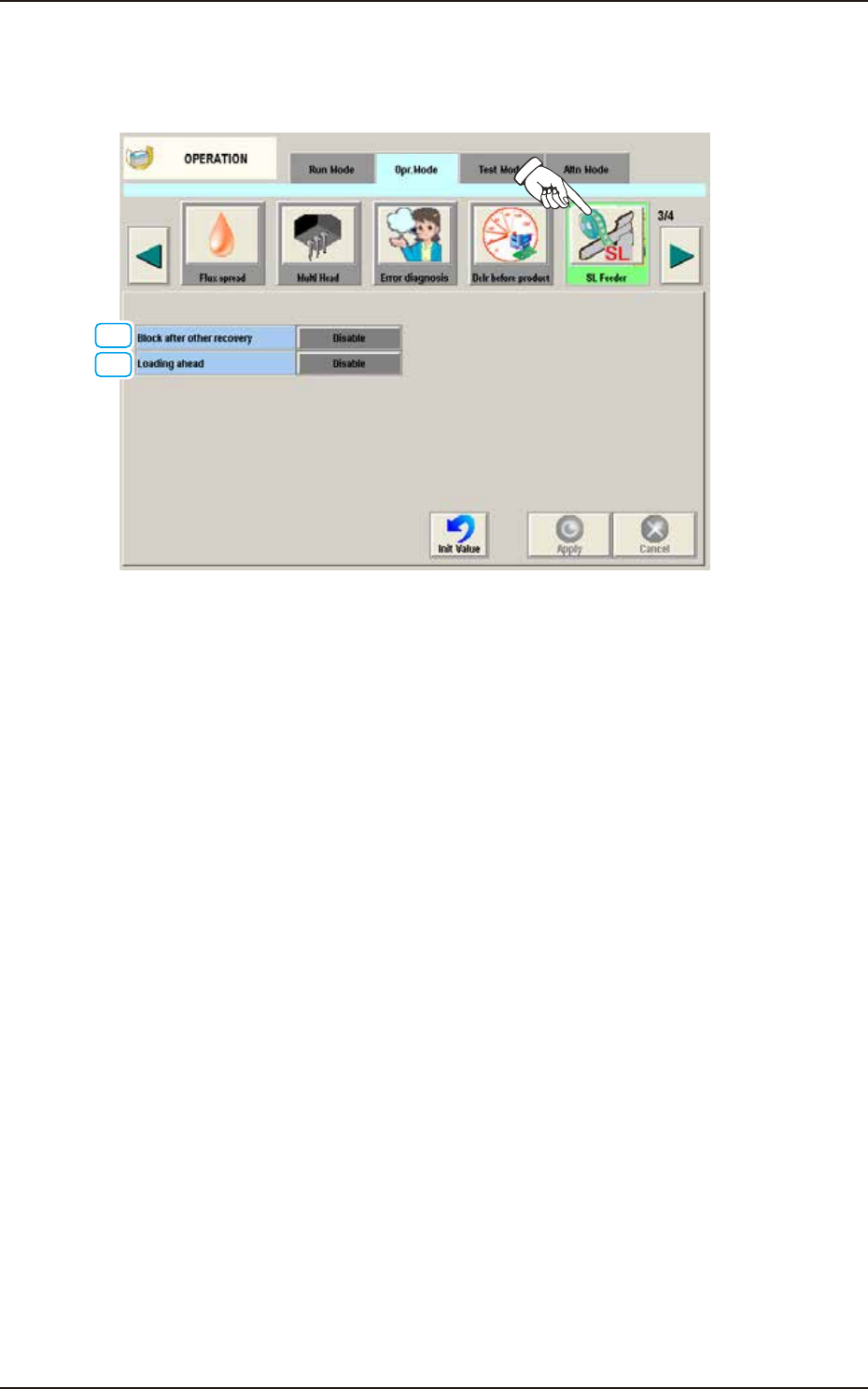
4.2.15 SL Feeder
When the [SL Feeder] button is pressed on the "Opr. Mode" tab sheet, the following window
appears.
[1]
[2]
F2A42D
[1] Block after other recovery
Select "Enable" or "Disable" for the function to mount the components loaded from SL feeder later
on.
Disable
Select this when Block after other recovery is not used.
Enable
Select this when Block after other recovery is used.
[2] Loading ahead
Select "Enable" or "Disable" for the function to reduce the waiting time by loading the SL feeder in
advance.
Disable
Select this when Loading ahead is not used.
Enable
Select this when Loading ahead is used.
4.2 "Opr.Mode" Tab Sheet