EUKYX-199-2100_G5S2_Instruction_Vol2_E.pdf - 第64页
EUKYX 1-14 199-2100 3. "Comp.Reload" Window [ 1 3 ] [F dr . Loc.Chk. ] but ton Pressi ng thi s but ton disp la ys the “FDR.L OC.CHEC K “ window . Thi s wi ndow can support t he operator to set a feeder to the m…
EUKYX
1-13199-2100
3. "Comp.Reload" Window
[10] Total
The total of the "Current Component Remained (Cmp Rem)" and "Splicing Component
Balance (Spl Comp Bal)" is displayed.
[11] Local/Line Change Button
Each pressing of this button toggles between the local window and the line window.
[12] Alternate
In this section, “Enable” or “Disable” is set for the “Alternate” function in the feeder where the
feeder “Alternate” function has been setup.
Source Feeder
to be Alternated
Alternated Feeder
F2A13
: Feeder where the feeder “Alternate” function has been setup
: Feeder where the components are being picked up
: Feeder where the feeder “Alternate” function has been disabled
EUKYX
1-14199-2100
3. "Comp.Reload" Window
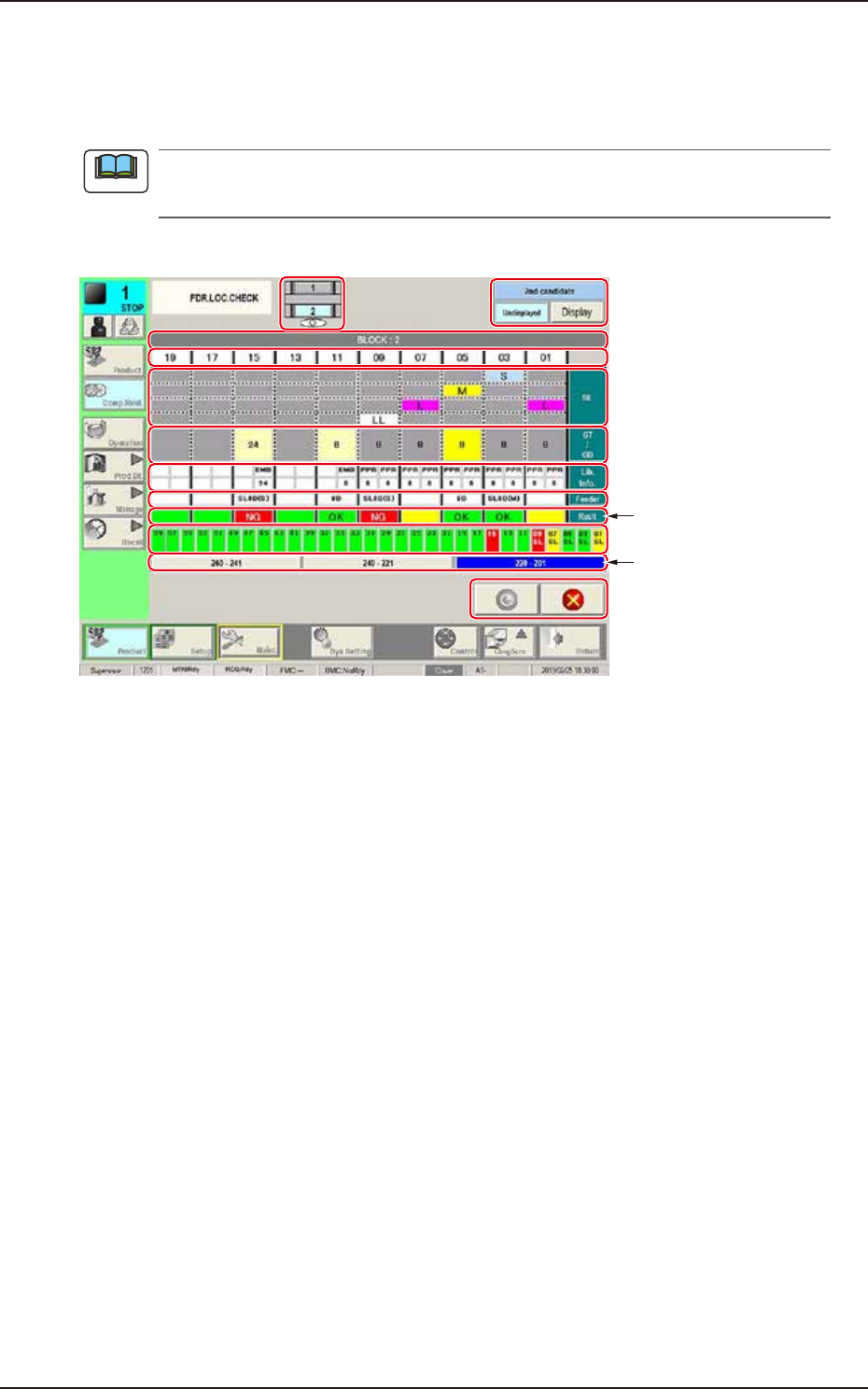
[13] [Fdr.Loc.Chk.] button
Pressing this button displays the “FDR.LOC.CHECK“ window.
This window can support the operator to set a feeder to the machine. It also prevents the incorrect
setting of SL feeder.
The “FDR.LOC.CHECK“ window can be displayed by pressing the [Setup] button > [Prgm Chg.]
button > [Fdr.Loc.Chk] button.
(1) (11)
(2)
(3)
(4)
(5)
(6)
(7)
(9)
(12)
(8)
(10)
F2A49
(1) Active
Displays either front or rear of mounter is active.
(2) BLOCK No.
Displays the block No. that is supporting SL feeder setting.
The color of cell shows either the feeder cart is set or not.
Set: Green
Not set: Gray
(3) Slot No.
Displays the slot No. that is supporting SL feeder setting.
It displays the same slot No. of label on the equipment.
(4) Feeder type
Displays the feeder type used for production. The feeder type is displayed for SL, GT, or GD feeder
only.
(5) Tape width
Displays the tape width specified in component library.
Note
EUKYX
1-15199-2100
3. "Comp.Reload" Window
(6) Lib.Info.
Displays the "Tape type" and "Tape pitch" specified in component library data. The abbreviation of
tape type is in the upper cell. The tape pitch is in the lower cell.
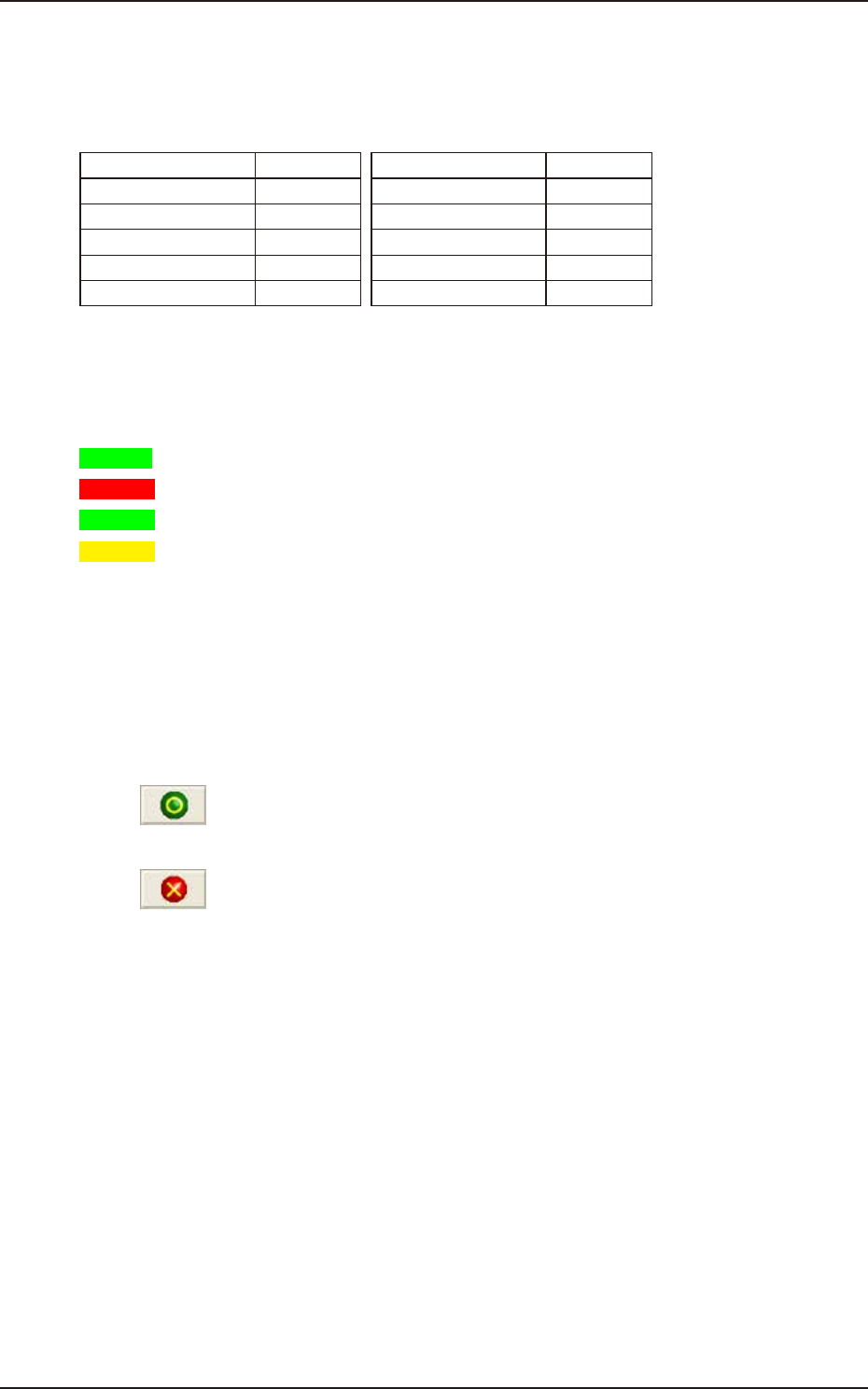
• Abbreviation of tape type
Tape type Abbr. Tape type Abbr.
Paper PPR Emboss EMB
Adhesive ADH MS MS
Bulk BK Pack PK
Bulk2 BK2 Vibratory Stick VST
Label Feeder LBL Stack Stick SST
(7) Feeder
Displays the feeder set to the machine.
(8) Result
Checks if the feeder specified for production meets feeder set to the machine.
OK : Feeder specified for production meets feeder set to the machine.
NG : Feeder specified for production does not meet feeder set to machine.
: Lane is not specified for production.
: Lane is specified for production but feeder is not set.
(9) Status of all feeders
Displays the feeder setting status on all slots of the active side block of machine. The color
definition of the cell is the same as (8). The "SL" is displayed under the slot No. for SL feeder.
(10) Lane No. button
Pressing the button changes the display information.
(11) “2nd candidate“ [Display/Undisplayed] button
Used when SL feeders for C and D versions are used simultaneously.
(12) [
(Apply)] button
Pressing this button saves the changed settings.
[
(Close)] button
Pressing this button closes the “FDR.LOC.CHECK“ window and returns to the previous window.