EUKYX-199-2100_G5S2_Instruction_Vol2_E.pdf - 第160页
EUKYX 2-47 199-2100 3.6 CMPNT PL (F0 1 _08) Component Library Comment Shown are the comments that w ere entered in the component l ibrary data. (F0 1 _09) Carrier Type, Dir [ d eg], and Width [mm] Shown are the va lues s…
EUKYX
2-46199-2100
3.6 CMPNT PL
(F01_03)
C : Set control commands in the text boxes.
If a control command other than the following ones is used, the step becomes invalid.
- (Hyphen) : This command handles the steps as those for the placement feeder location data.
E : This command shows the end of the placement feeder location data. The step
where "E" is set is valid.
S : This command invalidates the steps specified as placement feeder location data.
X : This command invalidates the steps specified as placement feeder location data
and shows the end of the data.
(F01_04)
Comment
Set a comment for each Fdr No.Up to 32 characters. Alphanumeric characters and symbols can be
used.
(a) The performance of the machine is not affected by these commands. In other words,
it has nothing to do with or without these comments.
(b) It is recommended to set helpful information on components related to the feeder Nos.
(Fdr No.).
(F01_05)
Feeder Fixed
Select "Enable" or "Disable" to determine whether or not the feeder positions should be fixed in
place. When "Enable" is selected, the feeder Nos. (Fdr No.) and the component ID are not affected
by any insert and delete operations of a component.
Disable : The feeder position is not fixed.
Enable : The feeder position is fixed.
(F01_06)
Feeder Alternate
Select "Enable" or "Disable" to determine whether or not the feeder alternate function should be
used.
Disable : The feeder alternate function is not used.
Enable : The feeder alternate function is used.
(F01_07)
Fdr No.
When "Enable" is selected for the feeder alternate function, set the destination feeder No. (Fdr No.)
of the feeder that will work in place of the feeder where a component pickup error has occurred in
succession.
Notice
Note

EUKYX
2-47199-2100
3.6 CMPNT PL
(F01_08)
Component Library Comment
Shown are the comments that were entered in the component library data.
(F01_09)
Carrier Type, Dir [deg], and Width [mm]
Shown are the values specified in the component library data.
(F01_10)
Fd. Pitch [mm]
Shown are the feed pitches specified in the component library data.
(F 01_11)
Used Parts
Shown is the number of components to be used for one unit PCB.
(F01_12)
Nozzle Type
Shown is the number of components to be used for one unit PCB.
EUKYX
2-48199-2100
3.7 Placement
3.7 Placement
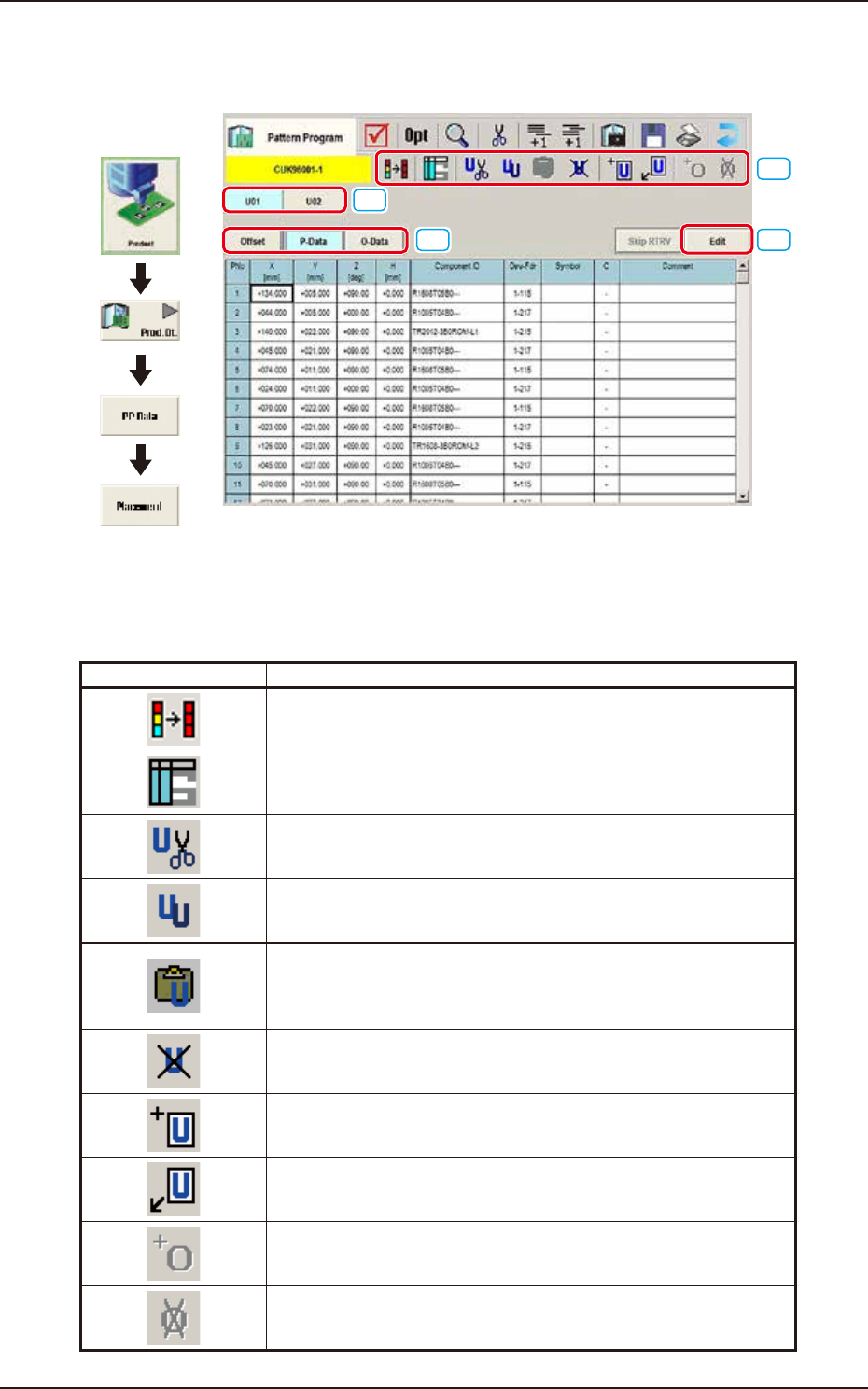
(G01) Placement Data
[1]
[2]
[3]
[4]
Graphic
Development
F2B43
[1] Tool Bar
The operation commands that can be executed in the "Placement" window, are collectively
displayed as icons.
Icons Description
The first row contents in the selected area are copied to the rest of
rows in the selected area.
The "Symbol Data" window appears.
The selected unit is copied and deleted.
The currently displayed U-data is cut out.
The selected unit is copied.
The currently displayed U-data is copied.
The copied unit is inserted.
The U-data (the selected unit is copied and deleted, or the selected
unit is copied) is pasted.
The selected unit is deleted.
The currently displayed U-data is deleted.
New unit is added at the end.
New U-data is added to the end of the U-data.
New unit is inserted before the selected unit.
New U-data is inserted before the currently selected U-data.
The O-data is added to the selected unit.
The O-data is added to the currently selected U-data.
The O-data in the selected unit is deleted.
The O-data in the currently selected U-data is deleted.