EUKYX-199-2100_G5S2_Instruction_Vol2_E.pdf - 第161页
EUKYX 2-48 199-2100 3.7 Placement 3. 7 Placement (G0 1 ) Placement Data [1] [2] [3] [4] Graphic Development F2B43 [ 1 ] T ool Bar The operation com mands tha t can be ex ecuted in the "Pl acement" win dow , are…

EUKYX
2-47199-2100
3.6 CMPNT PL
(F01_08)
Component Library Comment
Shown are the comments that were entered in the component library data.
(F01_09)
Carrier Type, Dir [deg], and Width [mm]
Shown are the values specified in the component library data.
(F01_10)
Fd. Pitch [mm]
Shown are the feed pitches specified in the component library data.
(F 01_11)
Used Parts
Shown is the number of components to be used for one unit PCB.
(F01_12)
Nozzle Type
Shown is the number of components to be used for one unit PCB.
EUKYX
2-48199-2100
3.7 Placement
3.7 Placement
(G01) Placement Data
[1]
[2]
[3]
[4]
Graphic
Development
F2B43
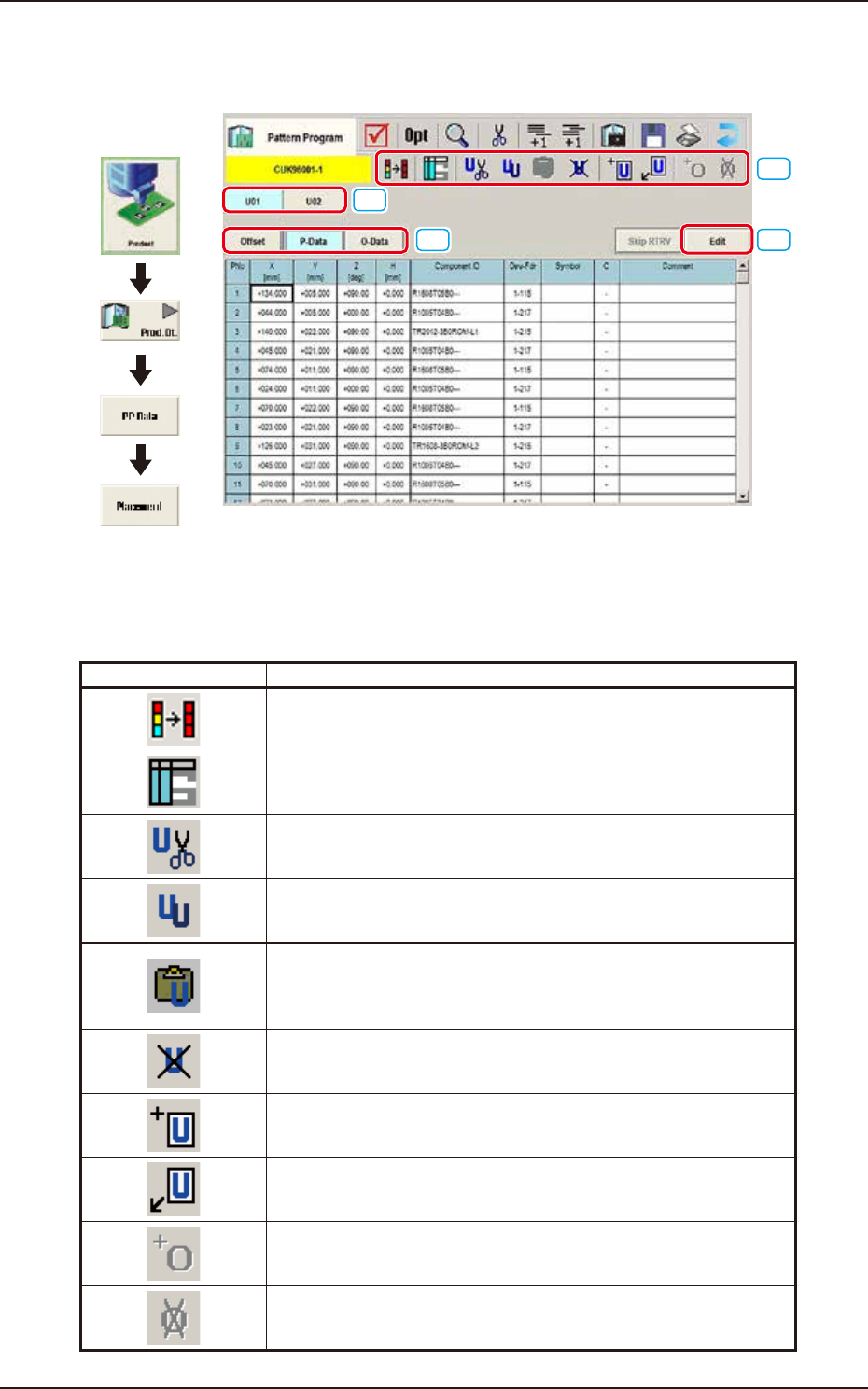
[1] Tool Bar
The operation commands that can be executed in the "Placement" window, are collectively
displayed as icons.
Icons Description
The first row contents in the selected area are copied to the rest of
rows in the selected area.
The "Symbol Data" window appears.
The selected unit is copied and deleted.
The currently displayed U-data is cut out.
The selected unit is copied.
The currently displayed U-data is copied.
The copied unit is inserted.
The U-data (the selected unit is copied and deleted, or the selected
unit is copied) is pasted.
The selected unit is deleted.
The currently displayed U-data is deleted.
New unit is added at the end.
New U-data is added to the end of the U-data.
New unit is inserted before the selected unit.
New U-data is inserted before the currently selected U-data.
The O-data is added to the selected unit.
The O-data is added to the currently selected U-data.
The O-data in the selected unit is deleted.
The O-data in the currently selected U-data is deleted.
EUKYX
2-49199-2100
3.7 Placement
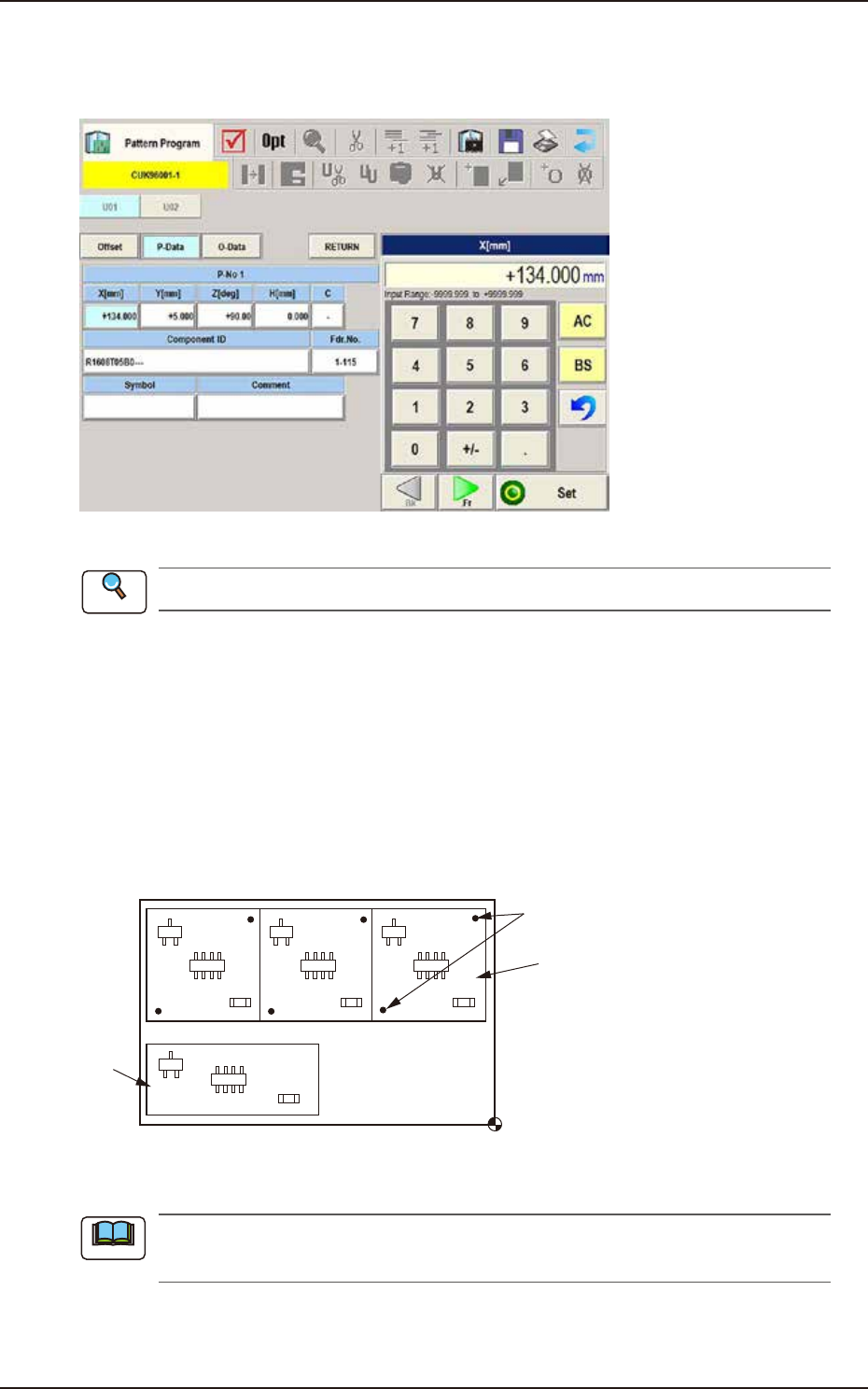
[2] [Edit] Button
When this button is pressed, the P-Data or O-Data is edited. When the data to be edited is selected
and the [Edit] button is pressed, the "Data Setting" window appears.
F2B44
Refer to “(G03) P-Data” or “(G04) O-Data” for each item to be set.
[3] Placement Data Group Select Button
Using this button, the placement data group is selected.
(G01_01)
Un
Select one of the following tabs (placement data groups) in one pattern program.
U01 : First Placement Data Group
U02 : Second Placement Data Group
↓
Un : Up to 99 placement data groups can be specified.
U02
U01
Placement Coordinate
Reference
Fiducial Marks
F2B45
(a) Use “U01” in normal cases.
(b) The operation and feeder location data are used commonly.
[4] Placement Data Select Button
Using this button, the placement data is selected.
Reference
Note