EUKYX-199-2100_G5S2_Instruction_Vol2_E.pdf - 第87页
EUKYX 1-37 199-2100 ► High-speed fle xible Head Detec t the component drop by mon itori ng the vacuu m flow ra te from the head when moun tin g. Select “Disab le“ , “Enable (Auto)“ , “Enable (Notice) “ , or “Enabl e ( St…
EUKYX
1-36199-2100
4.2 "Opr.Mode" Tab Sheet
[3] “Comp Drop detection function” Group Box
The setting value varies depending on the head type.
►
High-speed flexible Head
Monitor the component pickup status when mounting.
Detect the component drop or vertical component.
Select “Disable“, “Enable (Auto)“, “Pass“, “1 Time“, or “Just Before“.
Disable
When this button is selected, the Comp Drop detection function is not used.
Enable (Auto)
When this button is selected, the Comp Drop detection function is used.
The pickup status is checked only when the picked component passes over the sensor position
when mounting.
Pass
When this button is selected, the Comp Drop detection function is used.
The pickup status is checked only when the picked component passes over the sensor position
when mounting.
1 Time
When this button is selected, the Comp Drop detection function is used.
The pickup status is checked at least 1 time when mounting.
Just Before
When this button is selected, the Comp Drop detection function is used.
The pickup status is checked by passing the picked component over the sensor position just before
mounting the component.
(a) The component drop is detected only with a high-speed nozzle.
Additionally, The component drop is not detected depending on the component shape or
material.
(b) The component drop setting on the component library has priority.
Note
EUKYX
1-37199-2100
►
High-speed flexible Head
Detect the component drop by monitoring the vacuum flow rate from the head when mounting.
Select “Disable“, “Enable (Auto)“, “Enable (Notice)“, or “Enable (Stop)“.
Disable
When this button is selected, the Comp Drop detection function is not used.
Enable (Auto)
When this button is selected, the Comp Drop detection function is used.
No information is reported when the vacuum flow rate from the head is abnormal value when
mounting a component normally.
Enable (Notice)
When this button is selected, the Comp Drop detection function is used.
The information is reported on the machine information when the vacuum flow rate from the head
is abnormal value when mounting a component normally.
Enable (Stop)
When this button is selected, the Comp Drop detection function is used.
The information is reported on the machine information and the operation is stopped when the
vacuum flow rate from the head is abnormal value when mounting a component normally.
(a) The component drop is not detected for the component that the vacuum flow rate from
the head is abnormal value when mounting the component normally.
(b) The component drop is not detected for the nozzle that the vacuum flow rate from the
head is not abnormal value when a component is dropping.
[4] Surplus Comp detection function
When picking up 2 or more components set as “Square“ in the Component Library, this
function detects them as the recognition error.
Disable
When selected, Surplus Comp detection function is not used.
Enable
When selected, Surplus Comp detection function is used.
[5] [ ]/[ ] Page change buttons
Changes the page of “Comp Handling“ window.
[6] Remaining comp on Nzl check after plcmnt
Setting the button which is displayed under each nozzle in the Head 1 or 2, to “OFF”, cancels the
nozzle check before the component pick-up operation for each nozzle.
ON : The nozzle check before pick-up operation is to be performed.
OFF : The nozzle check before pick-up operation is not to be performed.
Setting it to “OFF” for the nozzles with larger diameter, prevents a malfunction such as a
machine stop in such case that solder debris, etc., attached to the nozzle, is judged as a
component taken back by the nozzle.
Note
Note
4.2 "Opr.Mode" Tab Sheet
EUKYX
1-38199-2100
4.2.5 Speed
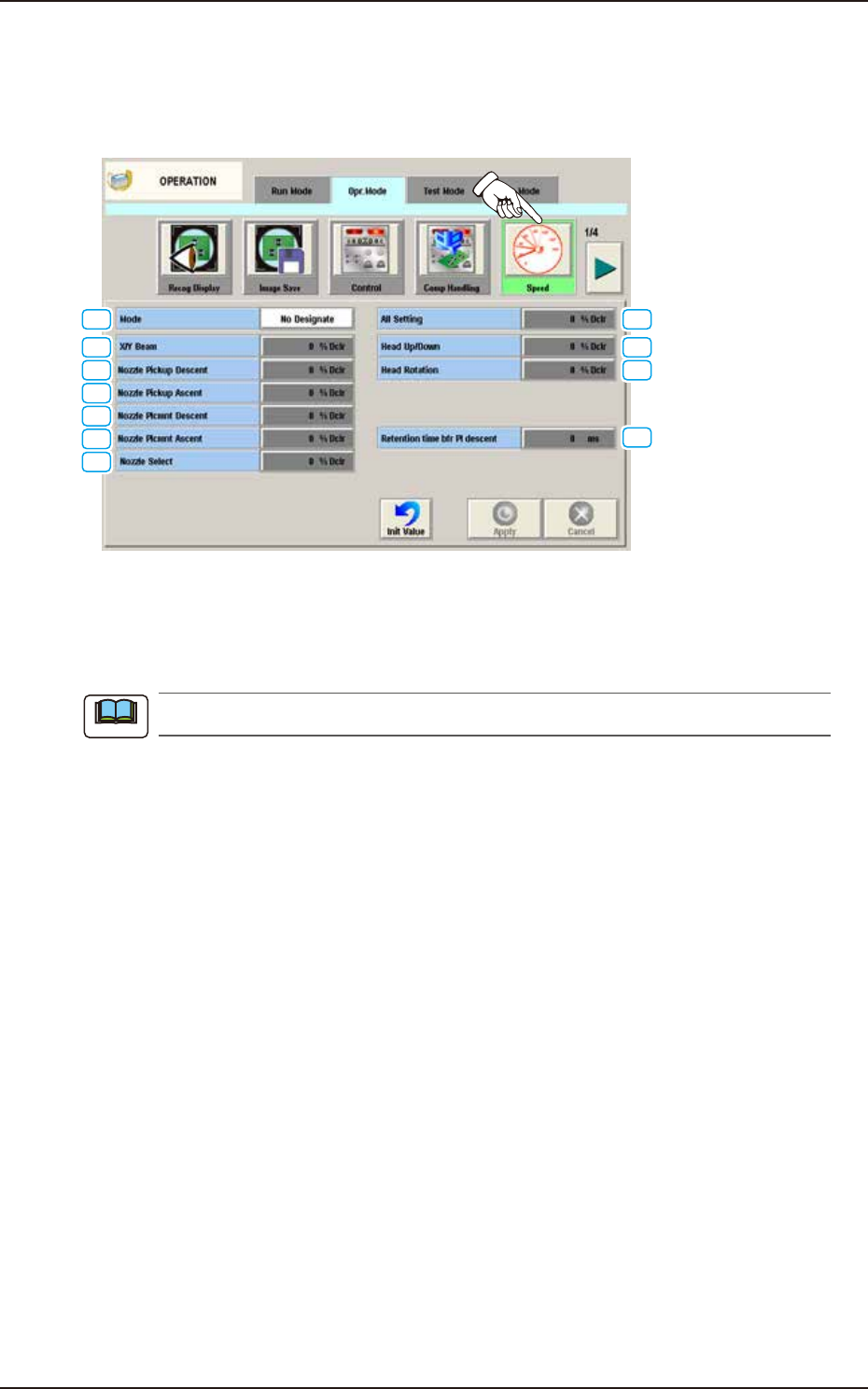
The following window appears by pressing the [Speed] button on the “Opr. Mode“ tab sheet.
Whether or not the speed upper limit is set, is selected for the operation speed in each unit, which
has been designated in the component library data (speed reduction rate to the maximum speed).
[1]
[3]
[4]
[2]
[9]
[10]
[5]
[6]
[7]
[8]
[11]
F2A31A
[1] Mode
The following buttons can be selected to determine whether or not the running speed reduction
mode should be used.
When "Not Save" is selected, the other items cannot be set.
No Designate
When selected, this button disables you to designate the reduction of the running speed.
Designate
When selected, this button enables you to designate the reduction of the running speed.
In this case, as the following buttons become available, set the rate of each speed reduction.
[2] All Setting
When this button is pressed, the [All Setting] window opens. In this window, set the speed
reduction rate in the data entry field. The set speed reduction rate is reflected on all other settings.
[3] X/Y Beam
When this button is pressed, the “X/Y Beam” entry window is displayed. In this window, set the
speed reduction rate for the X/Y beam in the data entry field.
[4] Nozzle Pickup Descent
When this button is pressed, the “Nozzle Pick-Up Descent” edit window opens.
Set the rate of speed reduction in the data entry field for the descending movement of the nozzle
(nozzle movement to pick up a component from the feeder).
Note
4.2 "Opr.Mode" Tab Sheet