EUKYX-199-2100_G5S2_Instruction_Vol2_E.pdf - 第79页
EUKYX 1-29 199-2100 4.2 .3 Control When the [ Control] button is pressed on t he "Opr . M ode" t ab sheet, the foll owing w indow s appear . [1] [3] [2] [4] [5] [7] [6] [8] F2A28A 4.2 "Opr.Mode" T ab …

EUKYX
1-28199-2100
4.2 "Opr.Mode" Tab Sheet
[2] Object
Select one of the following options as a recognized object to be saved.
Comp and PEC Recog : Both images captured through component and PEC recognition
operations are regarded as object images to be saved.
Comp Recog : Only the image captured through a component recognition
operation is regarded as an object image to be saved.
PEC Recog : Only the image captured through a PEC recognition operation is
regarded as an object image to be saved.
[3] Comp designation
In this section box, whether or not the component to be saved is designated, is selected.
No Designate : The component to be saved is not designated.
Feeder No. : The component to be saved is designated using the feeder No.
Component ID : The component to be saved is designated using the component ID.
[4] Feeder No.
When it is selected, enter the feeder No. to be designated.
[5] Component ID
When "Component ID" is selected in the "Comp designation" text box, enter the component ID to
be designated.
[6] Beam designation
When the image only of the specified beam is to be saved, select "Designate" in this text box.
[7] Beam
When "Designate" is selected in the "Beam designation" text box, select 1 or 2.
[8] Nozzle designation
When saving the image of the specified nozzle only, select "Designate" in this text box.
[9] Nozzle
When “Designate” is selected in the “Nozzle designation” text box, enter the No. of the nozzle to
be designated.
[10] Nozzle ID designation
When saving the image of the specified nozzle ID only, select “Designate” in this text box.
[11] Nozzle ID
When “Designate” is selected for the “Nozzle ID designation”, enter the nozzle ID to be designated.
EUKYX
1-29199-2100
4.2.3 Control
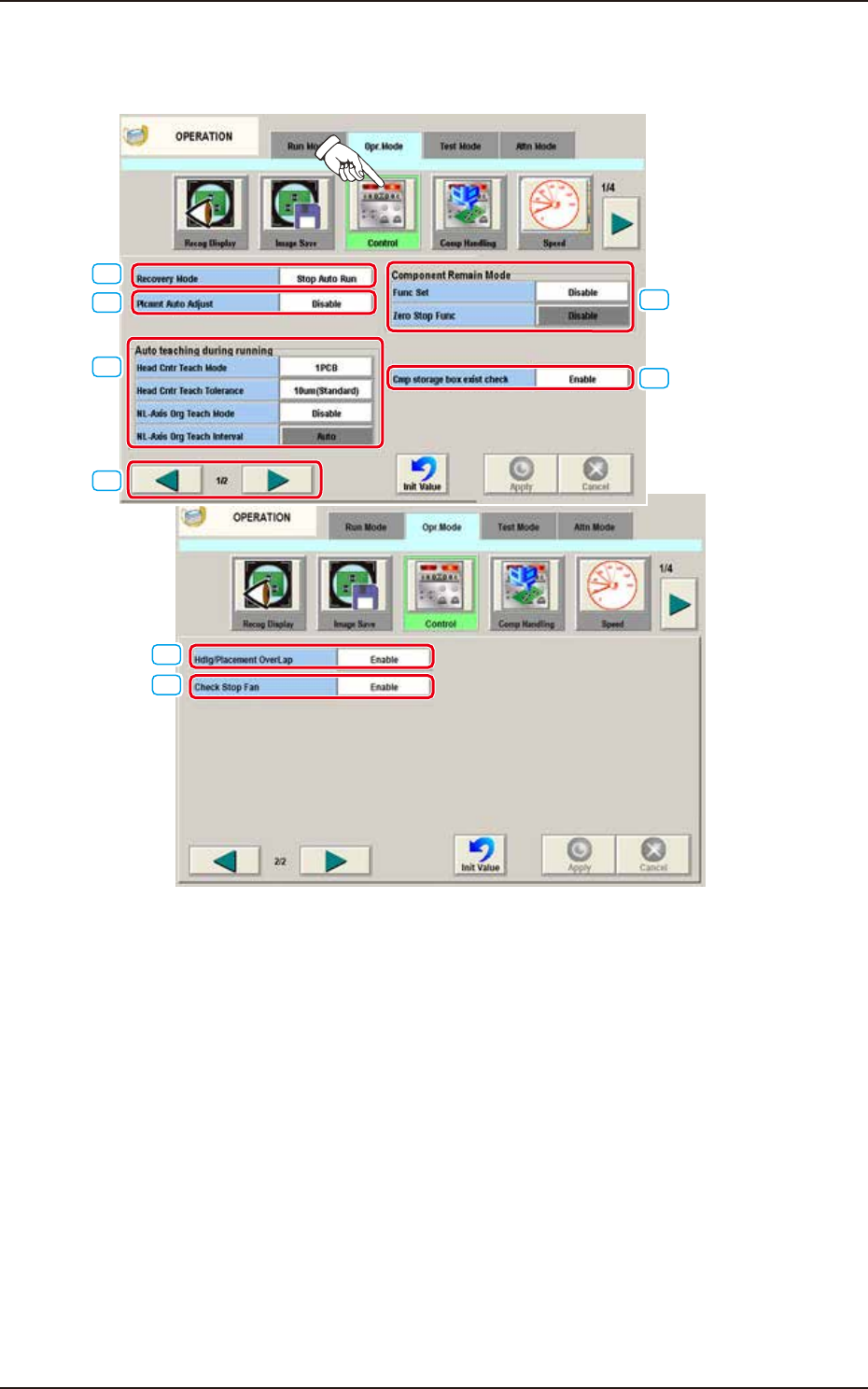
When the [Control] button is pressed on the "Opr. Mode" tab sheet, the following windows appear.
[1]
[3]
[2]
[4]
[5]
[7]
[6]
[8]
F2A28A
4.2 "Opr.Mode" Tab Sheet

EUKYX
1-30199-2100
[1] Recovery Mode
For the Recovery Mode, select "Immediately Stop (Priority of Reload)", "Recovery Mode" or "All
Recovery Mode".
Recovery Mode
When the component shortage has been detected:
Treatment when a
pick-up error has been
detected
Treatment "Alternate" has been setup.
Stop Auto Run When the component shortage
is detected, the machine is
stopped immediately.
When the component shortage
is detected, the alternative
operation is started up.
When the component
shortage is detected, the
machine is stopped
immediately.
Aft Other Plcmnt When the component shortage
is detected, the machine is
not stopped immediately. In
turn, the machine information
is issued, prompting the
operator to replenish the
components. Then, after
placing the components other
than the missing ones, the
machine is stopped without
discharging the PCB.
When the component shortage
is detected, the alternative
operation is not started up
immediately, but after the PP
final step.
When the pick-up error is
detected, the components
for the next cycle are used
to recover the operation.
Batch Recovery When the component shortage
is detected, the alternative
operation is started up.
When the component shortage
is detected, the alternative
operation is started up.
After the pick-up error is
detected, the operation is
continues using the spare
nozzles set up for the
following cycles. When
there is no spare nozzle,
recovery operation is
performed lastly using the
components for the
following cycles for
recover y.
4.2 "Opr.Mode" Tab Sheet