X3_X4_Series machine.pdf - 第229页
User manual SIPLAC E X-Series 4 Setting up and commissioning Software Version SR.601.xx 11/2005 US Edition 4.4 Sett ing up the placement machine 229 4.4.12.2 Axis unit X3, X4 (gan try 1 and gantr y 4) - Conn ecting the p…
4 Setting up and commissioning User manual SIPLACE X-Series
4.4 Setting up the placement machine Software Version SR.601.xx 11/2005 US Edition
228
4.4.12 Installing the axis unit on X3 and X4
4.4.12.1 Axis unit X3, X4 (gantry 1 and gantry 4) - Electrical connection points
4
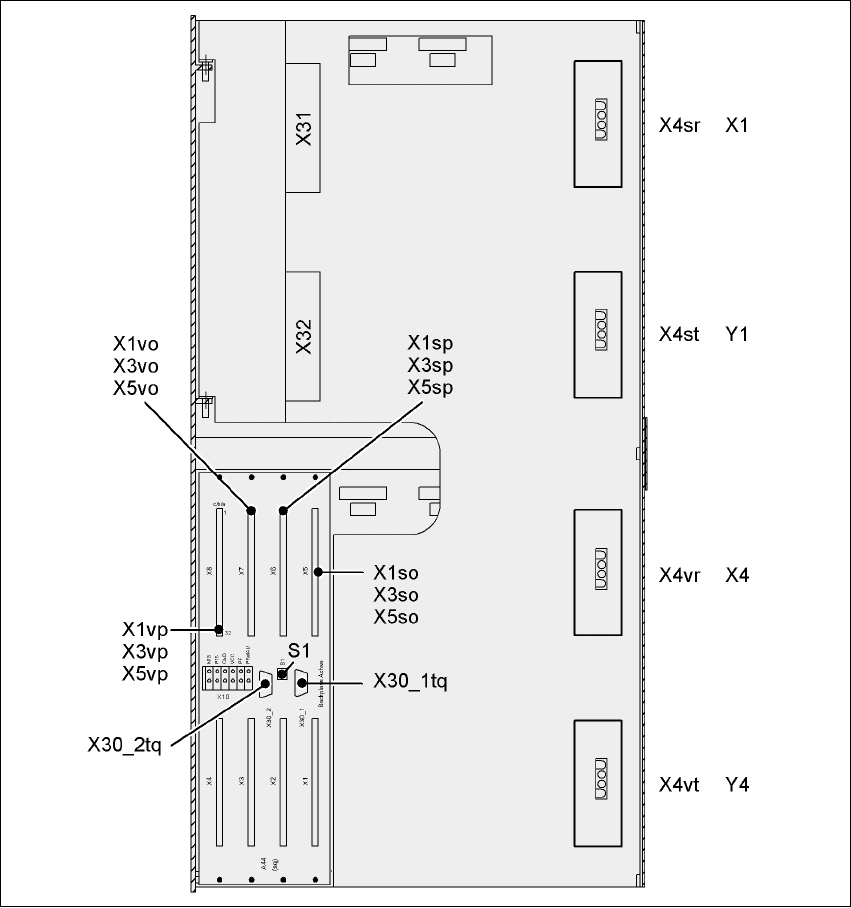
Fig. 4.4 - 22 Axis unit X3, X4 (gantry 1 and gantry 4), rear panel - Connecting the plugs

User manual SIPLACE X-Series 4 Setting up and commissioning
Software Version SR.601.xx 11/2005 US Edition 4.4 Setting up the placement machine
229
4.4.12.2 Axis unit X3, X4 (gantry 1 and gantry 4) - Connecting the plugs
Æ Connect the power cable as shown in the following diagram:
4
4
Æ Check the switch settings for S1
1: OFF
2: OFF
Axis unit
Gantry 1 and gantry 4
Plug
Connecting cable NOTE
Plug Cable
X31
X31 03009762
03009763
03009764
03009765
03009766 W1-W5
Secure connector with clips
X32
X32 03009822
03009823
03009824
03009825
03009827
Secure connector with clips
X4sr X4sr 03009760 Snap connector into place
X4st X4st 03009761 Snap connector into place
X4vr X4vr 03009820 Snap connector into place
X4vt X4vt 03009821 Snap connector into place
X1so
X3so
X5so
X1so
X3so
X5so
03009771
03009772
03009773
Insert as far as the stop
X1sp
X3sp
X5sp
X1sp
X3sp
X5sp
03009774
03009775
03009776
Insert as far as the stop
X1vo
X3vo
X5vo
X1vo
X3vo
X5vo
03009831
03009832
03009833
Insert as far as the stop
X1vp
X3vp
X5vp
X1vp
X3vp
X5vp
03009834
03009835
03009836
Insert as far as the stop
X30_1tq
X30_2tq
X30_1tq
X30_2tq
03010051
03010051
Screw tightly

4 Setting up and commissioning User manual SIPLACE X-Series
4.4 Setting up the placement machine Software Version SR.601.xx 11/2005 US Edition
230
4.4.12.3 Fitting the X3, X4 axis unit (gantry 1 and gantry 4)
Æ Carefully lift the axis unit onto the rail in the extension kit.
Æ Make sure that you do not squash any cables.
Æ Push the axis unit into the extension kit as far as the stop.
Æ Secure the axis unit with the fillister head screw.
Æ Insert the cover.
Æ Fix the grounding cable to the doors (item 2 in Fig. 4.4 - 16, page 217),
as shown in Fig. 4.4 - 18
on page 221.
Æ Lock the doors.
4.4.12.4 Fitting the side plates
Æ Fix the grounding cable to each side plate (item 5 in Fig. 4.4 - 16, page 217),
as shown in Fig. 4.4 - 18
page 221.
Æ Fix the side plate to the machine frame with 6 fillister head screws.
4.4.13 Fitting the main fault indicator
Æ Connect the main fault indicator cables to the cables on the basic machine.
Æ Insert the main fault indicator lamp into the hole (item 2 in Fig. 4.4 - 23) until the tube of the
lamp projects sufficiently into the terminal beneath.
Æ Tighten the hexagon socket head screw beneath the hole (item 3 in Fig.4.4 - 23).