1OM-1050-002.pdf - 第117页
• • • • • Intentional Component Replenishment during Automatic Operation (1) Press the [STOP] button on the front operation panel to stop the machine temporarily . (2 ) Press the [ALL] button (entitled "ZERO") …
1.4 Temporary Stop and Restart of Automatic Opera-
tion
1.4.1 Replenishment of Components and P.C.B.’s
There will be two cases of component replenishment during automatic
operation - Component Replenishment with Machine in Short of Com-
ponents and Intentional Component Replenishment.
Correct countermeasures are also required when the machine is short
of P.C.B.’s.
••
••
• Component Shortage Mode
When a component shortage error occurs during automatic opera-
tion, an error alarm is issued and the machine stops.
In this case, follow the steps below to replenish components and re-
start the automatic operation.
(1) Press the [RESET] button to cancel the error alarm.
(2) Open the feeder work area safety door and detach the tape feeder.
(3) Install the tape feeder loaded with components.
Refer to the instruction manual of the tape feeders for attach-
ment and detachment of the tape feeders.
CAUTION
The tape feeders should be seated securely. Other-
wise, they may collide with the feeder installation er-
ror detection sensors or pick-up errors will occur.
(4) After the replacement of the tape feeder, close the feeder work area
safety door and press the [READY] button on the pertinent side.
Confirm that the "AUTO OPN." window is active on the touch screen
and press the [START] button. The automatic operation re-starts.
1.4 Temporary Stop and Restart of Automatic Operation
0110-003 3- 13 AFO01EOPP
••
••
• Intentional Component Replenishment during Automatic
Operation
(1) Press the [STOP] button on the front operation panel to stop the
machine temporarily.
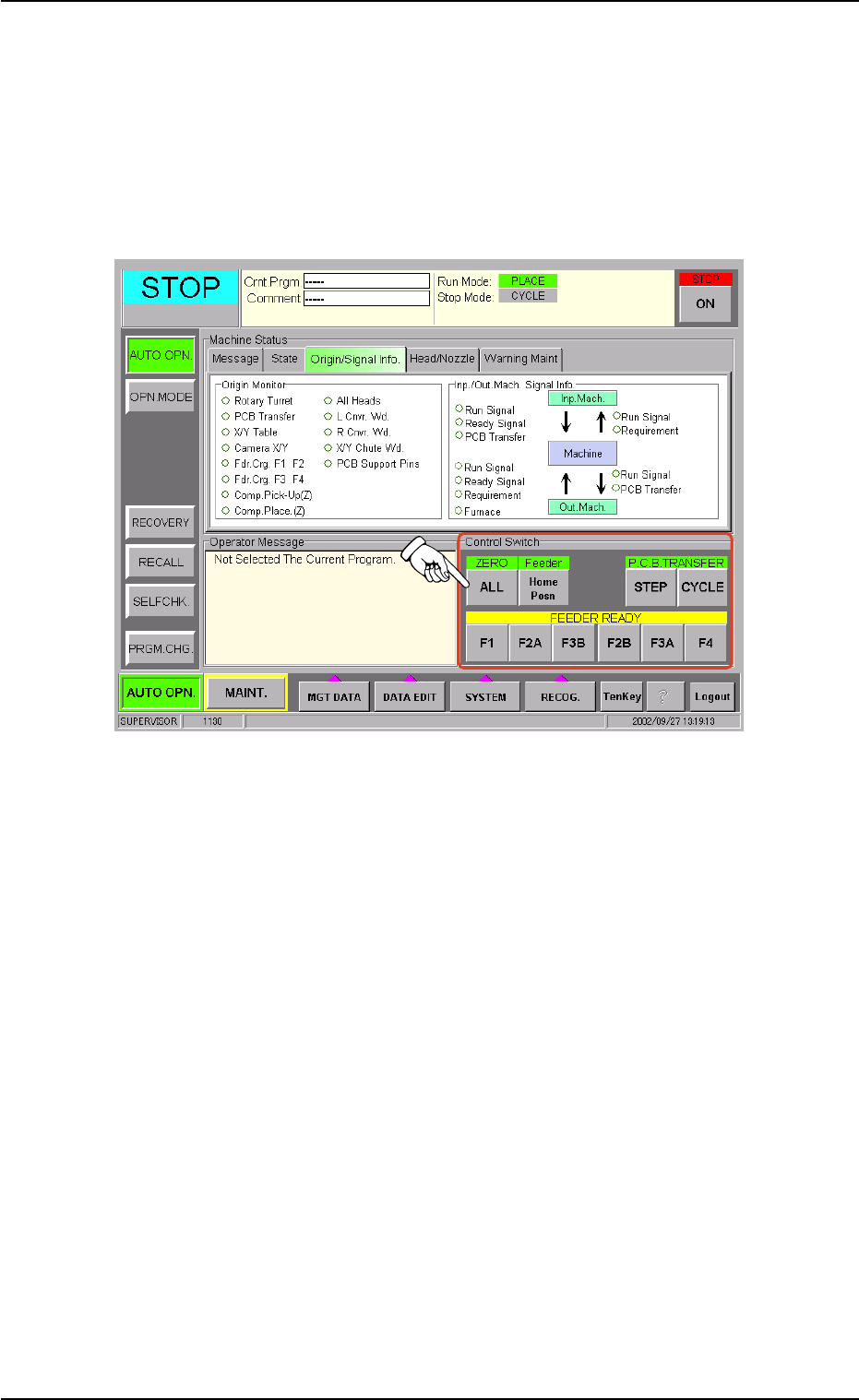
(2) Press the [ALL] button (entitled "ZERO") in the "Control Switch" group
box of the "AUTO OPN." window (submenu) to zero the devices.
Fig. 1C22
(3) Open the feeder work area safety door and detach the tape feeder
in component shortage.
(4) Load the tape feeder with new components and install it on the feeder
carriage.
(5) Press one of the buttons (entitled "FEEDER READY") related to the
pertinent tape feeder in the "Control Switch" group box in the "AUTO
OPN." submenu window.
(6) Close the feeder work area safety door and press the [READY] and
[START] buttons. The automatic operation re-starts.
0210-005 3-14 AFO01EOPP
1.4 Temporary Stop and Restart of Automatic Operation

••
••
• Countermeasures against Shortage of P.C.B.’s
When the machine gets short of P.C.B.’s during automatic operation,
the input machine issues an error alarm or the machine stops auto-
matically.
When the input machine has issued an error alarm, follow the step
below.
(1) Replenish the input machine with P.C.B.’s and re-start the auto-
matic operation.
When the machine has stopped automatically, it indicates the fol-
lowing.
(1) The input machine has stopped automatically in a normal condition.
In normal cases, it means that the production is completed.
0110-003 3- 15
AFO01EOPP
1.4 Temporary Stop and Restart of Automatic Operation