1OM-1050-002.pdf - 第78页
*5 Floppy Disk Drive The device data, the pattern program data, etc., can be saved on a floppy disk. The data on the floppy disk can also be loaded onto the machine. CAUTION • Do not use the floppy disk drive for any fun…
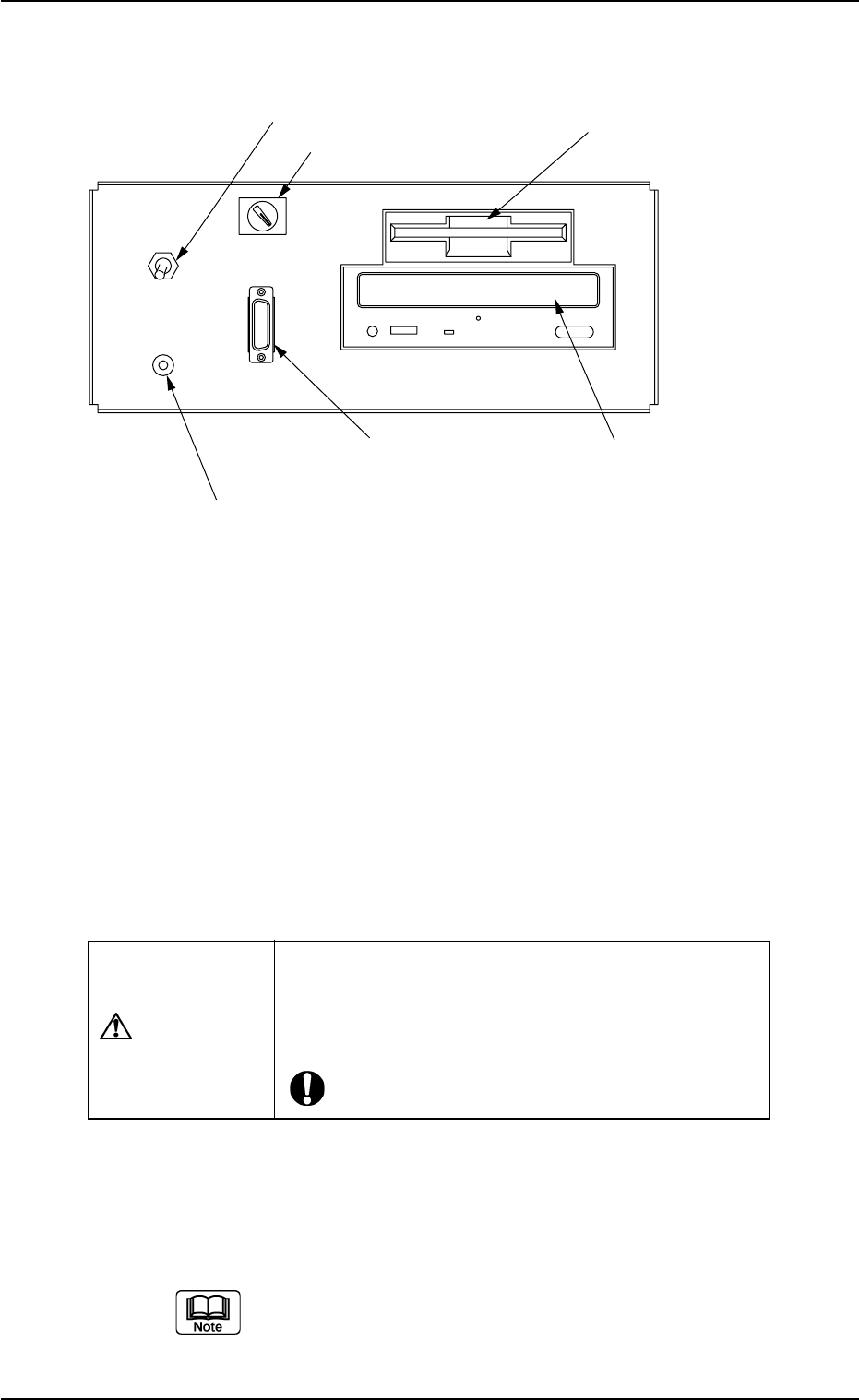
2.3.5 Front Service Panel
Fig. 1A16
*1 Working Lamp Switch
This switch is used to turn on or off the working spot lamp.
*2 Ground Terminal for Wrist Band
This terminal is used to clear a ground through the wrist band.
*3 Selector Switch
This switch is used to select either the operation panel "OFF" of the
main machine or the secondary operation panel "ON" for mainte-
nance.
CAUTION
Keep the selector switch "OFF" during automatic op-
eration.
When the switch is turned "ON", the power will be
cut off.
*4 Connector for Secondary Operation Panel
This connector is used to connect the secondary operation panel
for maintenance.
This connector is provided only for a service personnel.
ON OFF
LIGHT
FDD
CD-ROMD
OPE-TAB
*3 Selector Switch
*1 Working Lamp
Switch
*2 Ground Terminal
for Wrist Band
*5 Floppy Disk Drive
*4 Connector for Secondary
Operation Panel
*6 CD-ROM Drive
0207-004 1-20 AFO01EOPP
2.3 Operational Measures
*5 Floppy Disk Drive
The device data, the pattern program data, etc., can be saved on a
floppy disk.
The data on the floppy disk can also be loaded onto the machine.
CAUTION
• Do not use the floppy disk drive for any func-
tions other than the specified ones.
Otherwise, the machine may break down because
the program may be corrupted due to computer vi-
ruses or worms or may be changed in the hard disk
of the machine.
• Do not press the eject button of the disk drive
when the access lamp is ON. Otherwise, the data
may be corrupted, causing the machine to break
down.
*6 CD-ROM Drive
This is a device that can only read information from CD-ROM disk.
This is used to upgrade the system program.
CAUTION
• Do not use any CDs other than the provided
ones.
Otherwise, the machine may break down because
the program may be corrupted due to computer vi-
ruses or worms or may be changed in the hard disk
of the machine.
• Do not remove the inserted CD from the
drive while the lamp is "ON". Otherwise, the
data may be corrupted, causing the machine to
break down.
2.3 Operational Measures
0207-004 1-21 AFO01EOPP
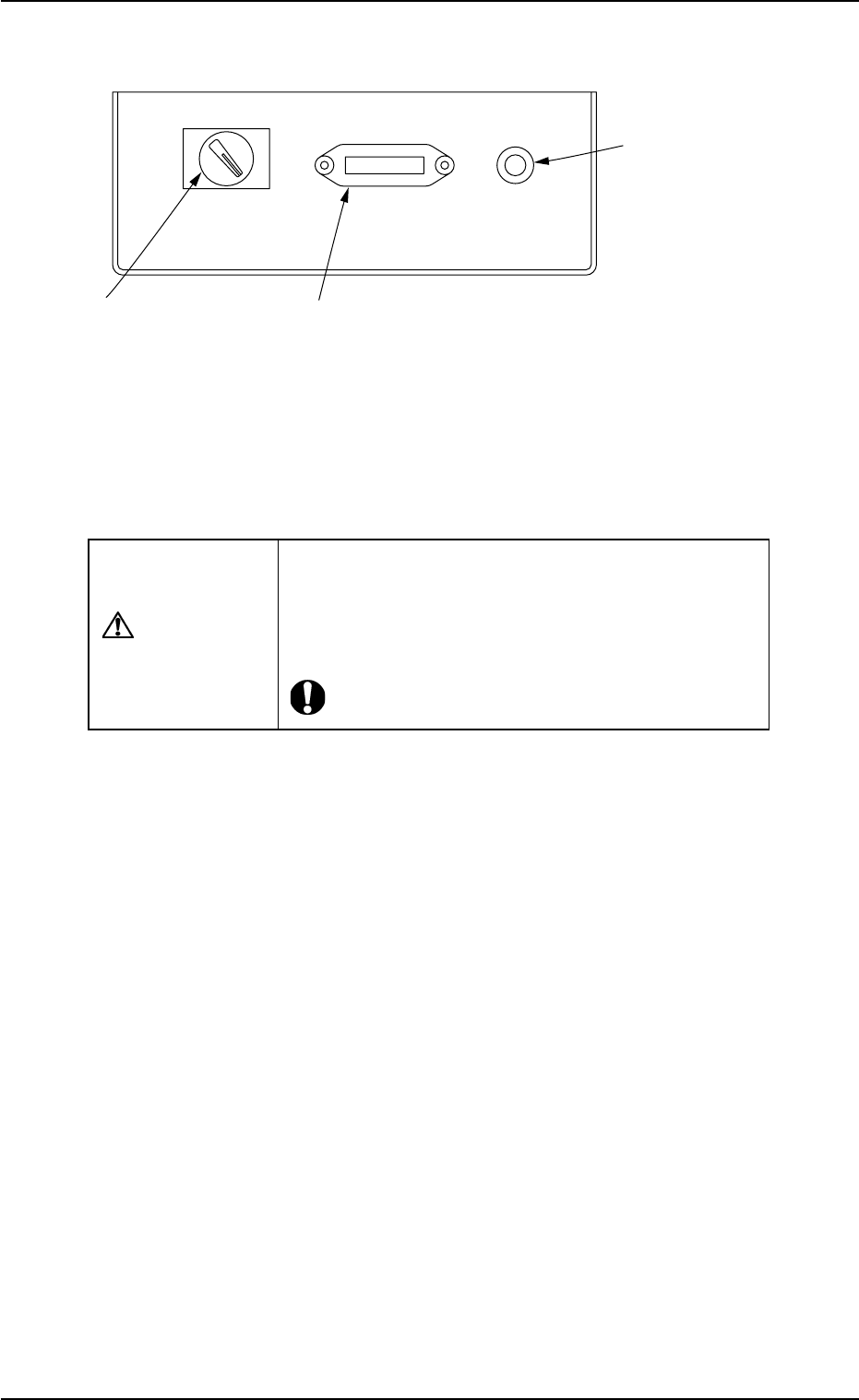
2.3.6 Rear Service Panel
Fig. 1A17
*1 Selector Switch
This switch is used to select either the operation panel of the main
machine or the secondary operation panel for maintenance.
CAUTION
Keep the selector switch "OFF" during automatic op-
eration.
When the switch is turned "ON", the power will be
cut off.
*2 Connector for Secondary Operation Panel
This connector is used to connect the secondary operation panel
for maintenance.
*3 Ground Terminal for Wrist Band
The wrist band must be connected to this terminal for grounding.
ON OFF OPE-TAB
*1 Selector Switch
*2 Connector for Secondary
Operation Panel
*3 Ground Terminal
*3 for Wrist Band
0207-002 1-21-1 AFO01EOPP
2.3 Operational Measures