1OM-1050-002.pdf - 第99页
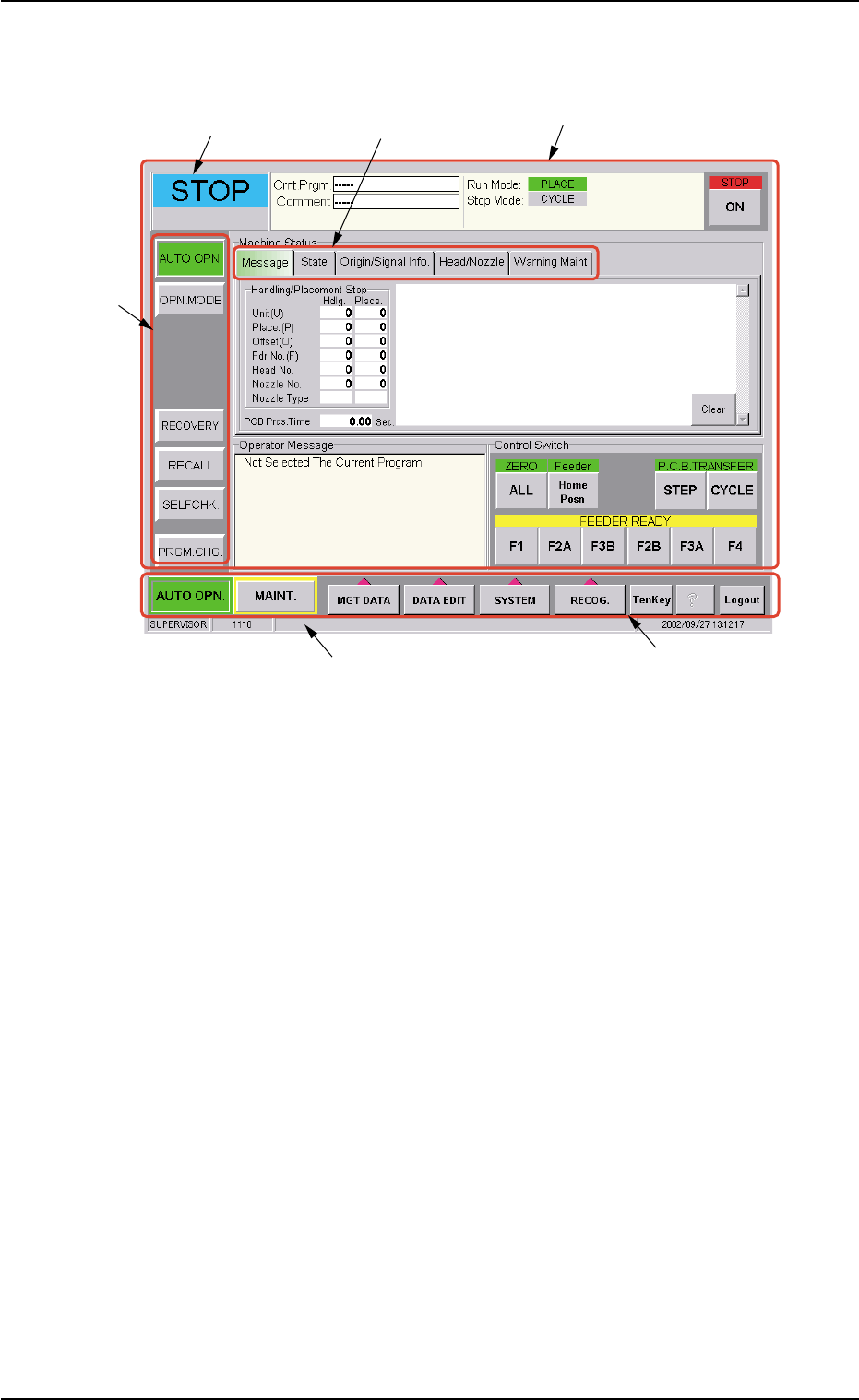
2 . 2 Structure of Operation Windows Fig. 1B4 Main Menu Bar and "AUTO OPN." Window • • • • • Window Composition *1 Main Menu Bar The main menu bar has five buttons ([AUTO OPN.], [MAINT .], [MGT DA T A], [DA T A…

This machine is provided with a password function which pre-
vents various types of data groups from being deleted by mis-
take and keeps unauthorized user (third party) from operating
the machine.
The following three kinds of passwords are available and each
gives individually approved user’s access to the computer sys-
tem of the machine.
Refer to "Section 5 System Setting" in "Volume 3: Program-
ming and Machine Data" for details.
[SUPERVISOR] : Access can be gained by only the person
identified as "Supervisor".
[OPERATOR #1] : Access can be gained by only the person
identified as "Operator #1". For example, the
person identified as "Operator #1" is given
a permission to all machine operations in-
cluding data editing.
[OPERATOR #2] : Access can be gained by only the person
identified as "Operator #2". For example, the
person identified as "Operator #2" is limited
to only the operations related to the auto-
matic operation.
(3) Enter the password.
"*****" appears in the "Password Entry" dialog box.
(4) Press the [Set] button.
The "AUTO OPN." window opens on the touch screen. It is provided
with a main menu bar.
See Fig. 1B4 in "2.2 Structure of Operation Windows" for the dis-
played main menu bar and the "AUTO OPN." window.
When no password is set, press the [SUPERVISOR], the [OP-
ERATOR #1], or the [OPERATOR #2] button according to the
given authority. The "AUTO OPN." window opens.
0102-002 2 - 5
AFO01EOPP
2.1 Getting Started
2.2 Structure of Operation Windows
Fig. 1B4 Main Menu Bar and "AUTO OPN." Window
••
••
• Window Composition
*1 Main Menu Bar
The main menu bar has five buttons ([AUTO OPN.], [MAINT.], [MGT
DATA], [DATA EDIT], and [SYSTEM] buttons) as main menus, one
button ([RECOG.] button) for selection of a recognized image pat-
tern to be displayed, and three operation buttons ([TenKey], [?], and
[Logout] buttons).
Refer to "Section 4" in "Volume 2: Operation (Supervisor)" for the
main menu bar.
*2 Submenu Bar
The submenu bar has the buttons to select the submenus. When
each button on the submenu bar is selected, the corresponding
operation window opens.
When a button on the main menu bar is pressed, the corresponding
submenu bar appears.
Refer to "Section 4" in "Volume 2: Operation (Supervisor)" for the
submenu bar.
2.2 Structure of Operation Windows
*5 Current Mode
*4 Operation Window
(Menus for Automatic Operation)
*6 Supplementary Explanation
*1 Main Menu Bar
*3 Tab
*2 Sub Menu Bar
0210-004 2 - 6 AFO01EOPP

*3 Tabs
When a window is composed of several sheets, all sheets are pro-
vided with extensions called "Tab" and laid on top of each other so
that the tab of each is visible.
Refer to "Section 4" in "Volume: Operation (Supervisor)" for the tabs.
*4 Operation Window
This window is provided with main menus related to the automatic
operation of the machine.
All operations required for automatic operation are included in this
window.
When the [MAINT.] button on the main menu bar is pressed, the
"MAINT." window opens.
Refer to "Section 5" in "Volume 2: Operation (Supervisor)" for the
composition of the "AUTO OPN." window and "Section 6" in "Vol-
ume 2: Operation (Supervisor)" for the composition of the "MAINT."
window.
*5 Current Mode
The current machine status is indicated at real time.
"RUN" : This indicates that the machine is running.
"PAUSE" : This indicates that the machine is stopped temporarily.
"WAIT" : This indicates that the machine is in the standby mode.
"STOP" : This indicates that the machine is stopped.
"TEACH" : The machine is performing a teaching operation.
"MOVE" : The machine is being activated (zeroing and manual op-
erations, etc.).
"TEST" : The machine is performing a device test in the "DVC.
TEST" window (submenu).
*6 Supplementary Explanation
Indicated are the "LOGIN" type, the window No., and the current
date & time.
2.2 Structure of Operation Windows
0110-003 2 - 7 AFO01EOPP