1OM-1050-002.pdf - 第69页
*8 [EMERGENCY STOP] Switch • This button is used to stop the machine immediately in an emergency . • When this button is pressed, the power is turned off and the machine stops immediately . When the power is turned off, …
*6 [LOCK] Lamp
• While the lamp is ON, it indicates that the selected operation is locked.
• When the operation panel is operated from the unavailable side, the [LOCK]
lamp flickers.
To cancel the flickering of the lamp, press the [PNL CHANGE] button and
follow the steps to set the operation-lock mode again.
*7 [OPERATION] Switch
• The selection key must be inserted to change over the [OPERATION] switch
to "RUN" or "SETUP".
The [OPERATION] switch must be set to the "RUN" side for automatic
operation.
The switch can be changed over to "RUN" or "SETUP" only when
the machine is in the "STOP" mode.
• When the switch is changed to the "SETUP" side, the machine is set as
follows.
(a) The red, yellow, and green lamps of the light tower will illuminate (initial
setting of the machine upon shipment).
(b) The following operations are prohibited regardless of the front safety
door condition (opened/closed).
Automatic Operation, P.C.B. Transfer (Cycle) Operation, Zeroing Op-
eration, Device Test, Unit Adjustment, and Teaching Operation
(c) Operations automatically become available on the front operation panel
(operations locked).
No operations are accepted on the rear operation panel.
CAUTION
• When the [OPERATION] switch is set to the
"SETUP" side, the interlock function of the front
safety door is deactivated and it may cause critical
injury to the operator.
• Do not operate the machine with the [OPERATION]
switch in the "SETUP" mode except for the setup
operations.
• Do not keep the selection key inserted unless nec-
essary. The key shall be stored by the person in
charge.
• When the selection key is turned forcibly, the switch
may be damaged.
0307-005 1-14
AFO01EOPP
2.3 Operational Measures

*8 [EMERGENCY STOP] Switch
• This button is used to stop the machine immediately in an emergency.
• When this button is pressed, the power is turned off and the machine stops
immediately.
When the power is turned off, the LED of the [POWER ON] button on the
operation panel illuminates in red.
*9 Keyboard
Fig. 1A12
This keyboard can be used to enter alphanumeric characters in edit
windows for pattern programs and component data.
To enter numerals in one of the windows that belong to "AUTO
OPN." or "MAINT.", the edit window on the screen can be used.
2.3 Operational Measures
0307-005 1-15 AFO01EOPP
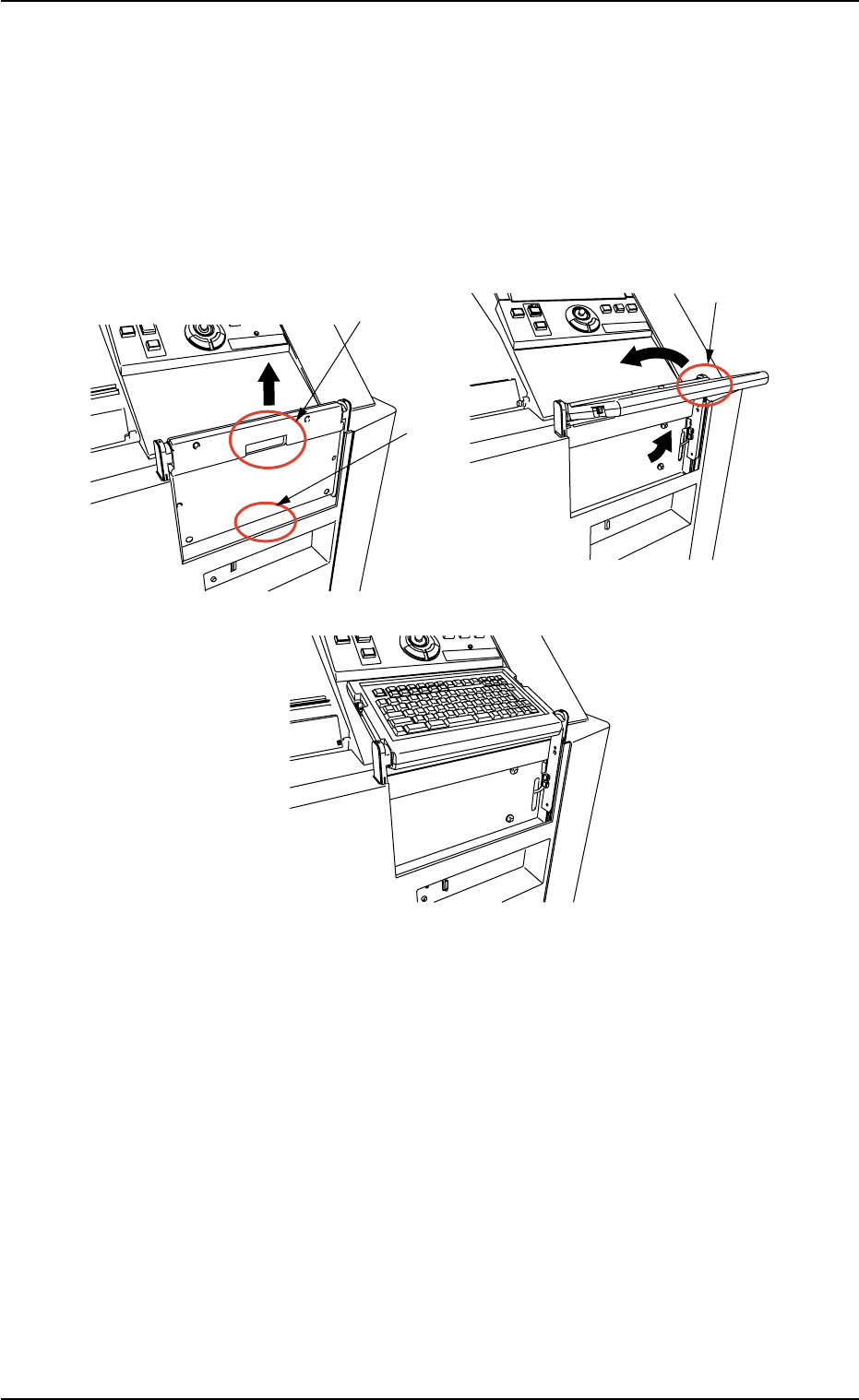
How to set up and store the keyboard
• Setup Procedure
(1) Hold the A-marked area and lift it up until it clicks.
(2) Hold the B-marked area and turn it in the C-marked arrow direction.
Fig. 1A12-1
A
B
B
C
2.3 Operational Measures
0307-001 1-15-1 AFO01EOPP