00195193-02 SG D4 FSE en (1).pdf - 第281页
Modular conveyor Checking the limit switch position Conveyor Settings Student Guide SIPLACE D4 (FSE) EN 09/2006 Modular conveyor 265 1 1.3.4 Checking the limit switch position X Check the minimum and maximum width and en…

Modular conveyor
Conveyor Settings Move fixed conveyor side for ’conveyor - excess width’
Student Guide SIPLACE D4 (FSE)
Modular conveyor EN 09/2006
264
11.3.3 Move fixed conveyor side for ’conveyor - excess width’
The standard positions of the fixed conveyor sides are preset.
X Select
Option and configuration
from the SITEST conveyor menu and then click on
Conveyor excess width,
to set the conveyor mode "excess width".
X The fixed conveyor side of conveyor 2 (right side fixed (track 1 left side fix)) remain at its position
X The ’fixed conveyor of track 1(right side fixed (track 2 left side fix)) is moved 34mm outside. This
allow the wider boards. The flexible conveyor side on lane 2 (lane 1 left fixed) can now be set to
accommodate boards which are wider than 216 mm (242 mm).
NOTE:
This operating mode is possible for D machines with single or dual conveyors.
ATTENTION:
After the conversion process, you need to measure/calibrate the board
reference corner and the conveyor sides and then save this information in the
machine data.
Modular conveyor
Checking the limit switch position Conveyor Settings
Student Guide SIPLACE D4 (FSE)
EN 09/2006 Modular conveyor
265
11.3.4 Checking the limit switch position
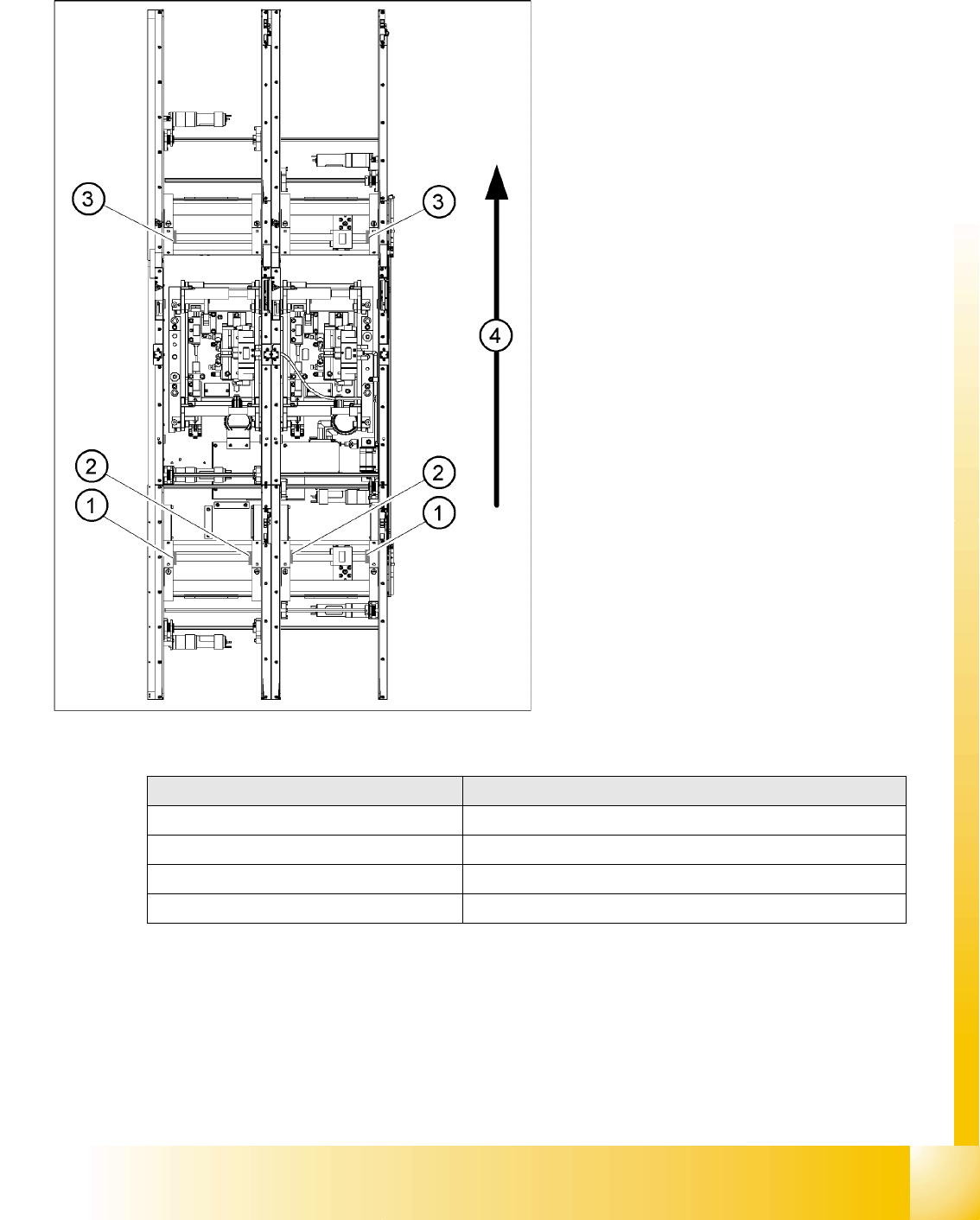
X Check the minimum and maximum width and ensure that the conveyor sides are parallel.
Legend:
1. Limit switch on the input conveyor - fitted
below the conveyor side
2. Limit switch on the input conveyor - fitted
below the conveyor side
3. Limit switch for the width adjustment unit
4. Transport direction
Limit switches on the input conveyor:
There are 5 limit switches below the conveyor
sides near the input conveyor. The limit switch
is designed to prevent the conveyor sides
hitting one another or the conveyor frame.
Limit switches on the output conveyor:
There are 2 limit switches for the driver near
the output conveyor. They serve to protect the
traveling range and initialize (right side) the
driver for the width adjustment.
Setup Value
Minimum width: 49.7 mm
Maximum width of single conveyor 508.5 mm
Maximum width of dual conveyor 216.5 mm (standard)
Maximum width of dual conveyor 242.5 mm (standard)
Adjustments
Modular conveyor
Conveyor Settings Width adjustment unit (Driver)
Student Guide SIPLACE D4 (FSE)
Modular conveyor EN 09/2006
266
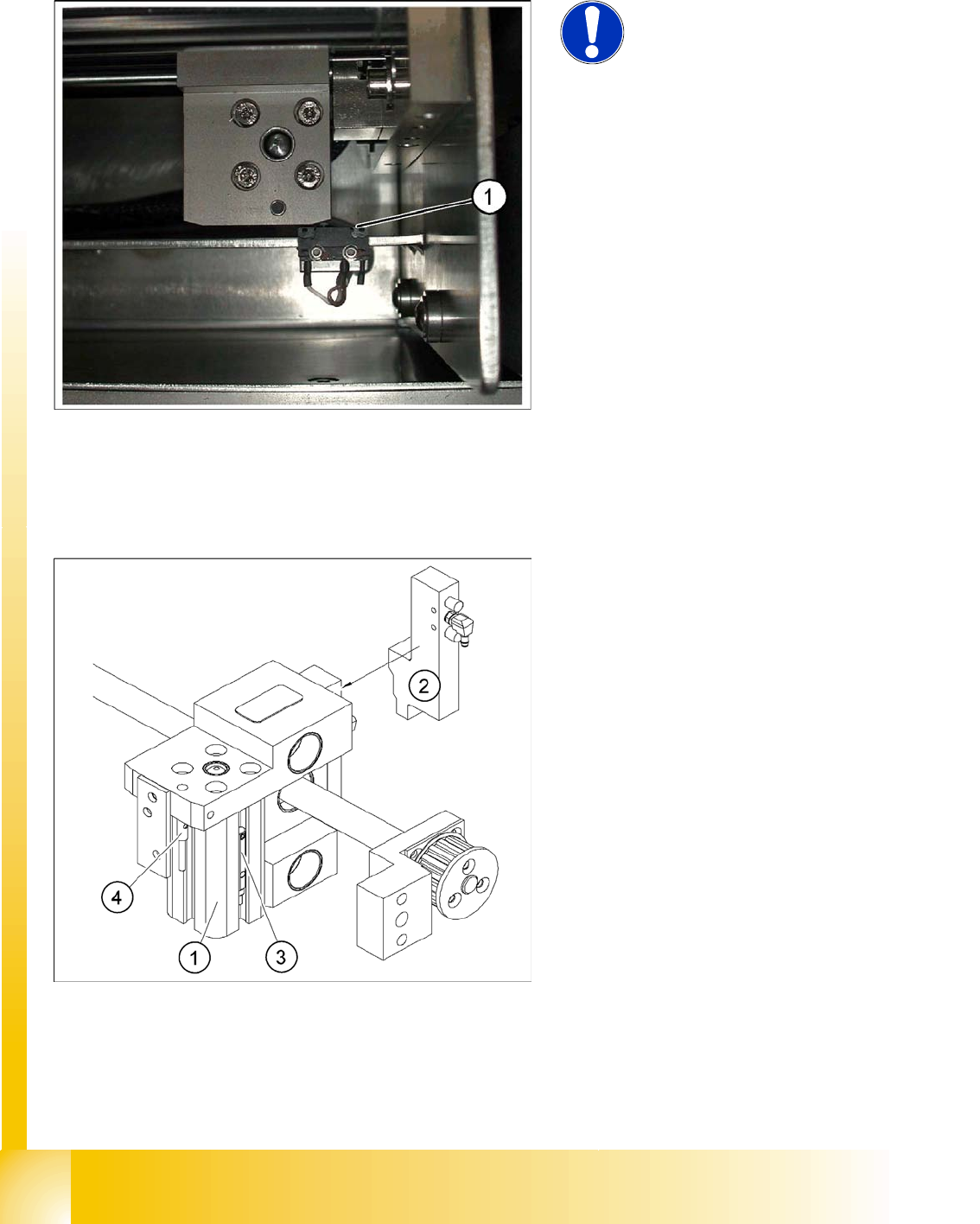
11.3.4.1 Adjusting the limit switch for initialize the driver
11.3.5 Width adjustment unit (Driver)
11.3.5.1 Setting the BERO on the driver
X When installing the proximity switch (4) , make sure that the proximity switch is level with the
adjustment unit housing.
X The switching point is set via the actuator on the conveyor side
X Move the driver under the conveyor side, then loosen the actuator using the screw.
NOTE:
This setting is only required after
replacing the switch or other error
functions in the width adjustment
reference run.
X Move the driver for the width adjustment by
hand (via the toothed belt) to the conveyor
side.
X Loosen the two screws on the limit switch (1).
X Move the limit switch in the slot towards the
driver and make sure, that the limit switch is
safely switched on.
X Check the switching state of the
corresponding LED (H11 for conveyor 201)
(H41 for conveyor 301) in the conveyor control
software.
X Fit the limit switch in this position.
X Calibrate the conveyor width via the SITEST
program.
Legend:
1. Pneumatic cylinder
2. Solenoid valve
3. Proximity switch for pneumatic cylinder (for
"locking pin up" recognition)
4. Proximity switch for adjustment unit(for
conveyor side recognition)
X The proximity switch (3) serves as a signal for
controlling the pneumatic valve of the
adjustment unit. Once the switching point
"conveyor side present" has been reached,
the conveyor side is connected via the
pneumatic valve.