00195193-02 SG D4 FSE en (1).pdf - 第38页
Operational Safety ESD guidelines Handling ESD modules S tudent Guide SIPLACE D4 (FSE) Operational Safety EN 09/2006 38 2.5 ESD guidelines 2.5.1 Handling ESD modules Do not touch electron ic modules unless it is absolute…
Operational Safety
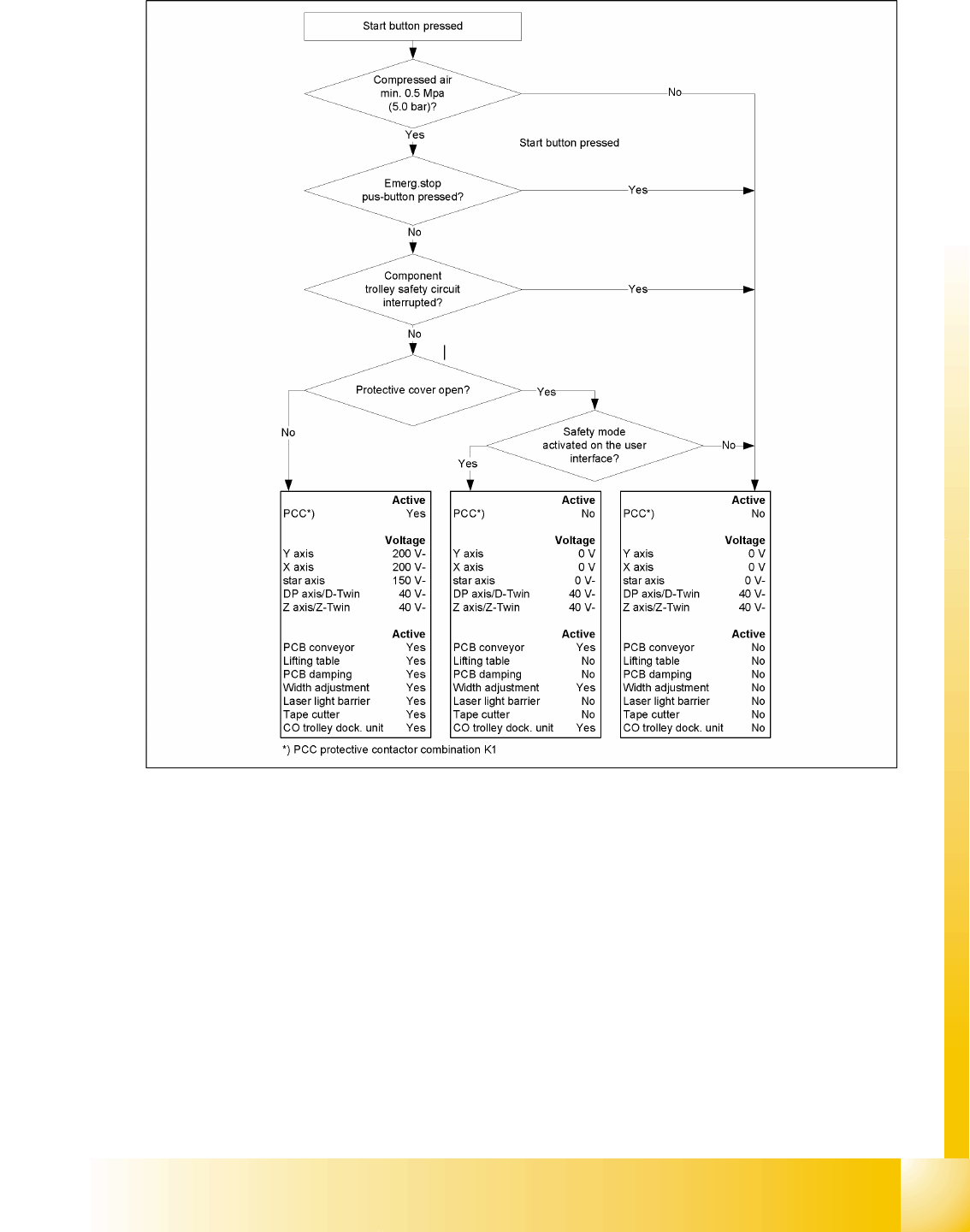
Safety and Signaling Circuit Safety equipment
Student Guide SIPLACE D4 (FSE)
EN 09/2006 Operational Safety
37
2.4.3.2 Safety circuits
2.4 - 4: Safety circuits

Operational Safety
ESD guidelines Handling ESD modules
Student Guide SIPLACE D4 (FSE)
Operational Safety EN 09/2006
38
2.5 ESD guidelines
2.5.1 Handling ESD modules
Do not touch electronic modules unless it is absolutely essential to do so in order to carry out other work.
If it is necessary, make sure that you do not touch the pins or printed conductors when you pick up flat
modules.
Do not touch components unless
you are constantly earthed by an ESD wrist strap or
you are wearing ESD shoes or ESD shoe earthing strips on an ESD floor.
Always discharge yourself before you touch an electronic module. To do this, simply touch a conductive
and earthed object immediately before you touch the module (such as unpainted parts of a switch
cabinet, a water pipe, etc.).
Do not allow modules with chargeable and highly insulating materials to touch one another, e.g. plastic
films, insulating table surfaces or items of clothing made from synthetic fibers.
Always place the modules on a conductive surface (table with an ESD coating, conductive ESD foam,
ESD bag or container).
Do not bring modules near visual display units, monitors or televisions. Keep them at least 10 cm away
from the screen.
2.5.2 Measurements and modifications to ESD modules
Measurements of the assemblies may only be taken if
The measuring device has been grounded (e.g. via protective conductor) or
The measuring head of the potential-free measuring device has been briefly discharged before
measurement (e.g. touching blank metal control unit housing).
X Always use an earthed soldering iron if you carry out any soldering work.
2.5.3 Dispatching ESD modules
X Always store modules and components in conductive packaging (e.g. metallized plastic bags or
metal sleeves) and dispatch them in conductive packaging.
If the packaging is not conductive, place the modules in a conductive envelope before packaging. Use
conductive expanded rubber, ESD bags, domestic aluminum foil or paper, for example. NEVER use
plastic bags or film.
X If the module has integral batteries, ensure that the conductive packaging does not touch or short-
circuit the battery terminals and, if necessary, first cover the terminals with insulating tape or
material.
Overview
General
Student Guide SIPLACE D4 (FSE)
EN 09/2006 Overview
39
3Overview
3.1 General
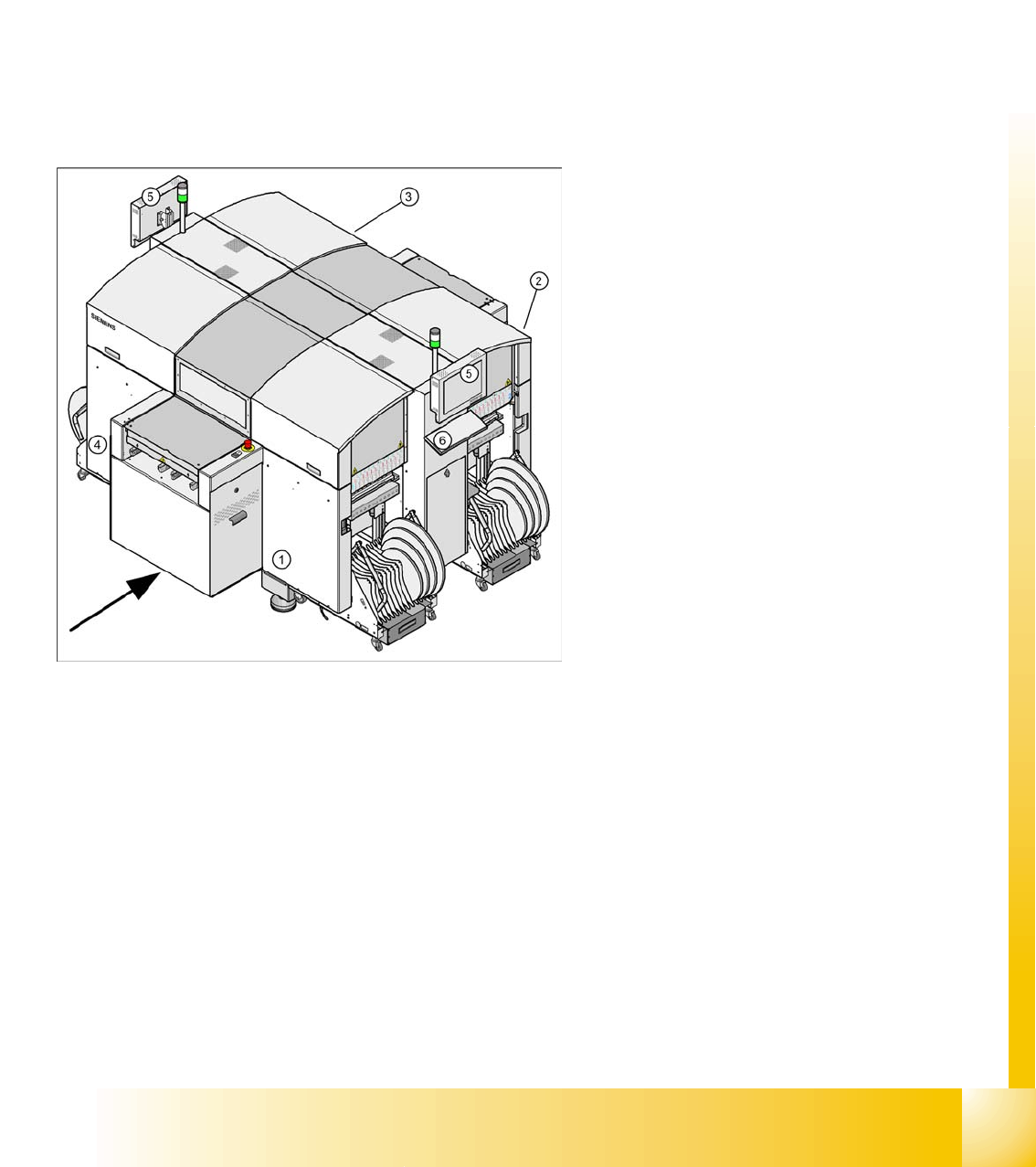
The high-speed SIPLACE D4 placement machine combines high placement performance with accuracy
and flexibility. The machines use the Collect&Place placement method.
The SIPLACE D4 placement machine is equipped with four gantries, for fast and accurate positioning
along the X and Y axes.
Each gantry has a 12-segment C&P head (C&P12). Each placement area is served by two gantries:
Placement area 1 Gantries 1 and 4
Placement area 2 Gantries 2 and 3
The components are optically centered with the help of a digital Vision module. Two different CO
cameras are available for the placement heads: a standard camera and a high-resolution CO camera.
A five-segment PCB conveyor, consisting of input conveyor, processing conveyor 1, intermediate
conveyor, processing conveyor 2 and output conveyor, transports the components to the processing
positions. PCB transport can be performed with a single or flexible dual conveyor (with stationary side
either on the left or right). A PCB camera is used to optically center the boards.
Legend:
1. Sector 1
2. Sector 2
3. Sector 3
4. Sector 4
5. Monitor (on both sides)
6. Keyboard (on both sides)